Miro February 2026 Updates: MCP, AI Slides & More
Miro
¿No sabes por dónde empezar con la IA?Evalúa preparación, riesgos y prioridades en menos de una hora.
➔ Descarga nuestro paquete gratuito de preparación para IA
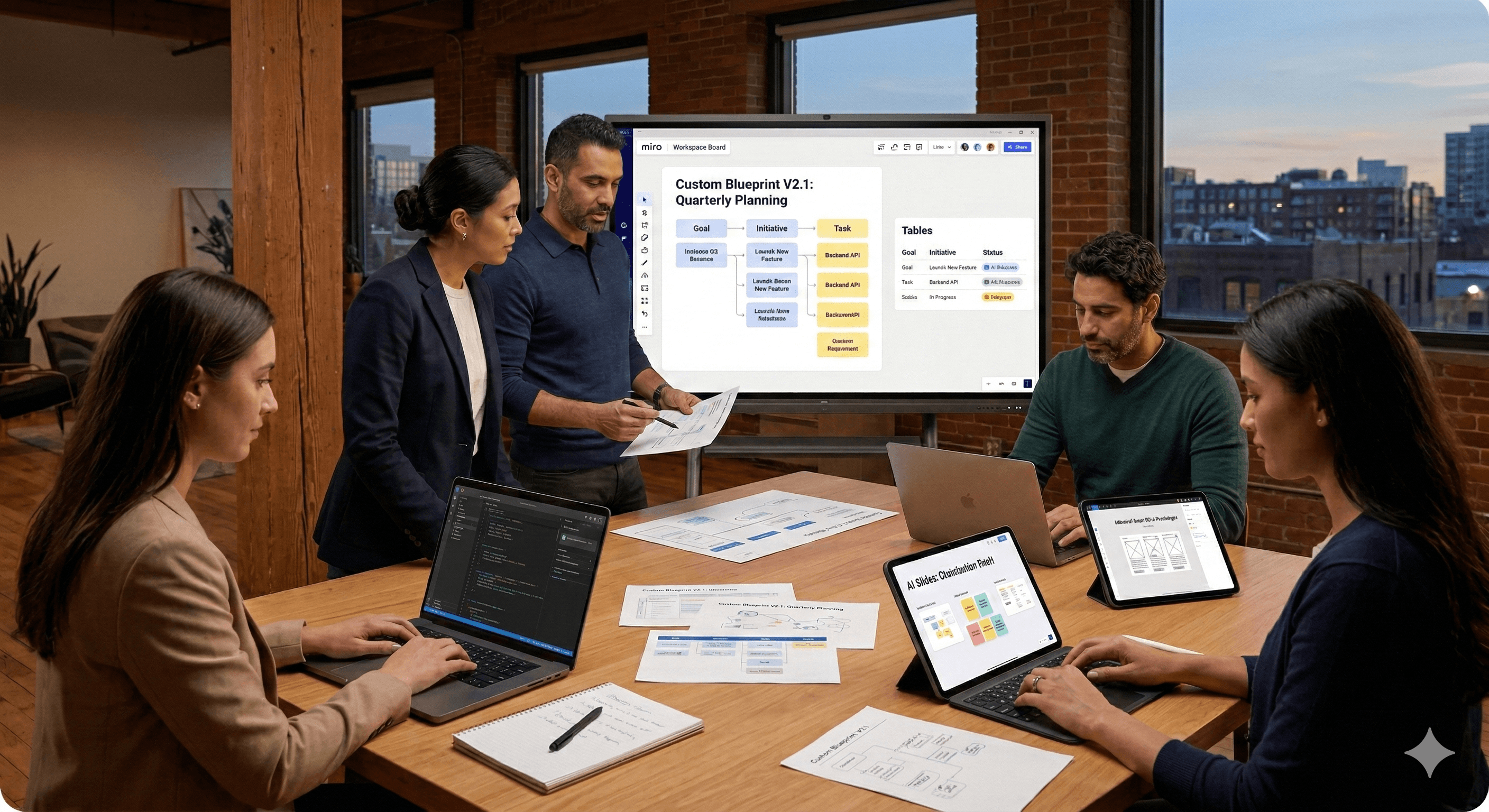
Miro’s February 2026 updates help teams collaborate and execute faster with less context loss. New features include an MCP server (Beta) that connects Miro boards to AI coding tools, Custom Blueprints for reusing workflows, AI Slides for automatic slide creation, improved prototype handoff to Figma, and stronger Tables to connect goals and tasks.
Between a plan and a shipped product, context often disappears. Notes get rewritten, decisions get buried in chats, and the work your team already aligned on doesn’t always make it into execution.
Miro’s February 2026 updates are designed to close that gap. This month’s release introduces the MCP server (Beta) to connect Miro boards with AI coding tools, Custom Blueprints to reuse your best workflows, AI Slides to turn rough ideas into polished presentations, smoother prototype handoff to Figma, and smarter Tables that show how goals connect to tasks.
What’s new in Miro (February 2026)
1) Connect Miro to AI coding tools with MCP (Beta)
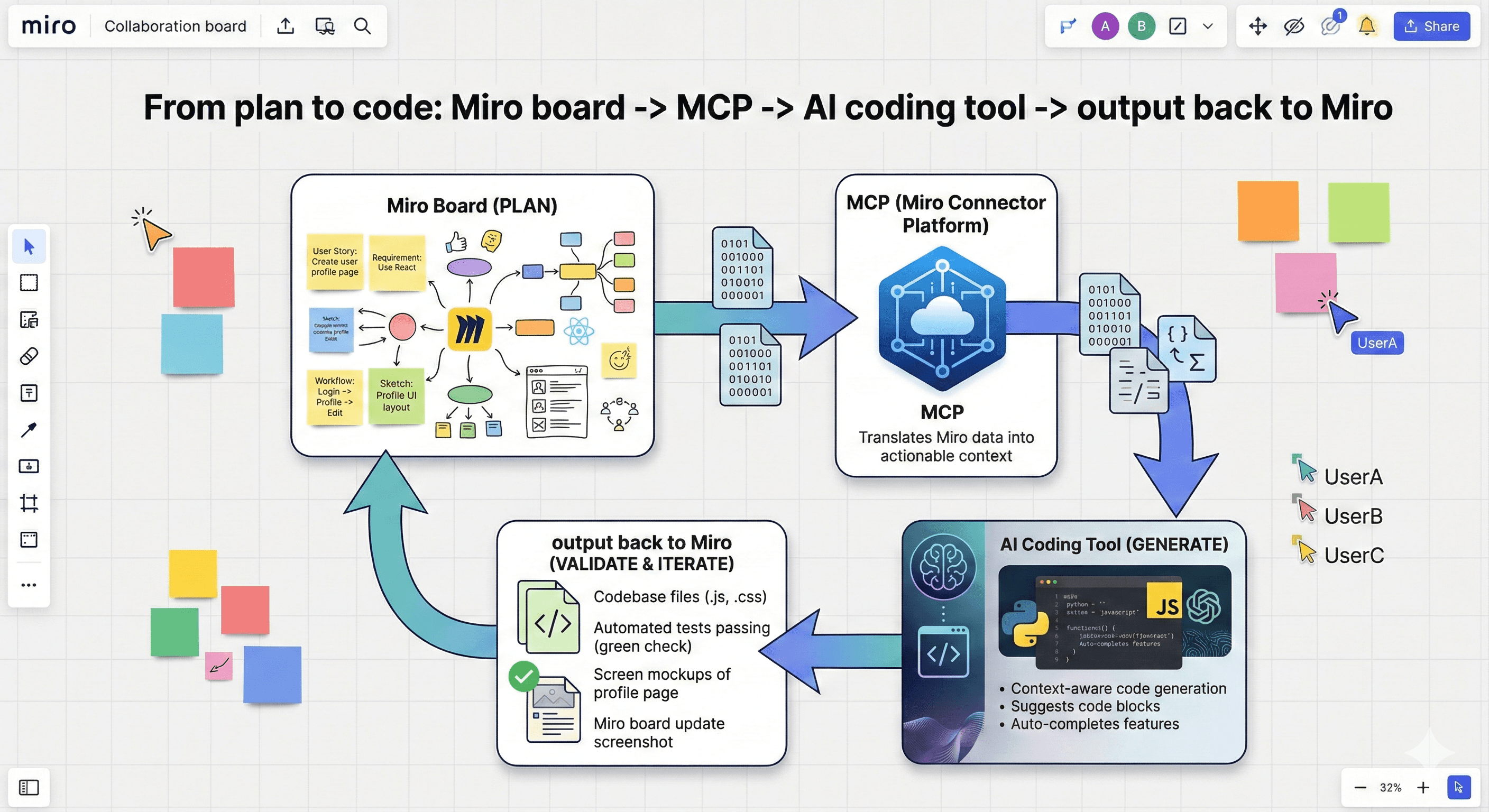
Miro’s MCP server (Beta) brings visual context into the tools engineers use to build.
In practice, that means your:
product specs
technical documentation
architecture diagrams
…can be referenced by AI coding environments so the generated output reflects how your system is actually designed.
Who it’s for: product and engineering teams who want fewer handoff misunderstandings and faster alignment between planning and delivery.
Where it fits: run discovery and technical planning in Miro, then use MCP to make that shared context usable inside AI coding tools.
2) Reuse your best workflows with Custom Blueprints
Templates are useful, but they can become fragmented fast: everyone edits their own copy and “the standard” disappears.
Custom Blueprints solve that by letting teams create reusable, organisation-ready workflows that reflect how you plan and execute in the real world.
Best use case: standardising a planning ritual (quarterly planning, discovery, retros, portfolio review) while still allowing teams to customise the parts that matter.
3) Turn rough ideas into polished Miro Slides with AI
If your workshop outputs are good but your stakeholder update takes hours, AI Slides is built for you.
AI Slides helps transform raw board content into a coherent deck, so you can:
share decisions quickly
keep story and structure consistent
avoid rebuilding the same presentation patterns every month
Tip: treat AI Slides as your first draft. Your team still supplies the judgement, nuance and narrative.
4) Copy prototypes from Miro to Figma
This update makes it easier to hand off work from early exploration to high-fidelity design.
You can copy Miro Prototypes as SVGs and paste directly into Figma with structure and layout intact—reducing the rebuild step and speeding up design transitions.
5) Tables updates: See how work connects, from goals to tasks
Miro Tables are becoming more powerful for planning and execution, especially when you need to show hierarchy.
Use Tables to connect:
goals → initiatives → tasks
owners → deadlines → status
dependencies and sequencing
This is ideal for teams who want the clarity of structured tracking without leaving the planning space.
6) Smarter AI workflows: Sidekicks and Flows can read the web
AI is most useful when it helps you structure information—not when it generates more content you have to clean up.
Miro’s AI workflows (including Sidekicks and Flows) can now incorporate web context, helping teams speed up research, synthesis and drafting.
7) New in Miroverse: Flows templates to jumpstart your next project
If your team is still building workflows from scratch every time, Flows templates are a shortcut.
They’re designed to guide repeatable steps like:
turning workshop inputs into structured plans
creating a prioritised backlog
drafting a stakeholder-ready update
Practical steps: how to adopt these updates without overwhelm
Step 1: Choose one workflow where context is consistently lost
Common examples:
discovery → engineering handoff
workshop outputs → delivery plan
strategy → quarterly goals
Step 2: Match the feature to the problem
Losing context between planning and build? Start with MCP (Beta).
Repeating the same planning process every quarter? Use Custom Blueprints.
Spending hours on slide decks? Start with AI Slides.
Rebuilding wireframes in Figma? Use the prototype handoff.
Plans scattered across tools? Use Tables hierarchy to connect goals and tasks.
Step 3: Set lightweight governance
If you want adoption at scale:
define a naming convention for boards and blueprints
decide where “final decisions” live (board section + change log)
assign owners for shared blueprints
schedule a monthly review to improve the blueprint, rather than letting it drift
What this means for teams in 2026
Miro is pushing towards a single “innovation workspace” where planning, AI-assisted structuring, and execution handoffs are connected.
For many organisations, the biggest gain will come from reducing duplication: fewer rewrites, fewer re-explanations, and fewer lost decisions.
How Generation Digital can help
If you want to use these updates to improve real delivery outcomes (not just add features), Generation Digital can help you:
design repeatable workflows using Custom Blueprints
pilot MCP safely for product and engineering teams
standardise planning and reporting with Tables
integrate Miro with execution tools like Asana and knowledge systems like Notion
Summary
Miro’s February 2026 updates introduce practical improvements for faster execution: MCP (Beta) for AI coding context, Custom Blueprints for reusable workflows, AI Slides for rapid decks, improved Figma handoff, and smarter Tables for goals-to-tasks visibility.
Next steps: Explore what’s new in Miro, then choose one workflow to improve this month. If you’d like help building an end-to-end planning system with the right guardrails, speak to Generation Digital.
FAQs
What is MCP in Miro?
MCP is Miro’s Model Context Protocol server (Beta) that connects Miro boards to AI coding tools, so developers can work with richer product and technical context.
How do AI Slides work?
AI Slides turns rough board content into a structured slide deck, saving time on formatting and helping teams share consistent updates.
Can I customise templates with Custom Blueprints?
Yes. Custom Blueprints let you create reusable workflows and standard templates that reflect how your team actually works, while still allowing controlled customisation.
What does the Figma export do?
It helps you copy Miro Prototypes as SVGs and paste them into Figma with layout and structure intact, reducing rebuild work.
What is Tables hierarchy in Miro?
It’s the ability to organise tables so you can see relationships from higher-level goals down to initiatives and tasks, improving visibility and accountability.
Recibe noticias y consejos sobre IA cada semana en tu bandeja de entrada
Al suscribirte, das tu consentimiento para que Generation Digital almacene y procese tus datos de acuerdo con nuestra política de privacidad. Puedes leer la política completa en gend.co/privacy.



Generación
Digital

Oficina en Reino Unido
Generation Digital Ltd
33 Queen St,
Londres
EC4R 1AP
Reino Unido
Oficina en Canadá
Generation Digital Americas Inc
181 Bay St., Suite 1800
Toronto, ON, M5J 2T9
Canadá
Oficina en EE. UU.
Generation Digital Américas Inc
77 Sands St,
Brooklyn, NY 11201,
Estados Unidos
Oficina de la UE
Software Generación Digital
Edificio Elgee
Dundalk
A91 X2R3
Irlanda
Oficina en Medio Oriente
6994 Alsharq 3890,
An Narjis,
Riad 13343,
Arabia Saudita






Número de la empresa: 256 9431 77 | Derechos de autor 2026 | Términos y Condiciones | Política de Privacidad