Modelos RAG: Aumenta la Precisión de la IA Empresarial en 2026
Géminis
Perplejidad
OpenAI
Claude
ChatGPT
¿No sabes por dónde empezar con la IA?Evalúa preparación, riesgos y prioridades en menos de una hora.
➔ Descarga nuestro paquete gratuito de preparación para IA
Por qué RAG importa en 2026
RAG ha pasado de ser un prototipo prometedor a un patrón empresarial confiable. En 2026, la precisión no es solo un objetivo de calidad; es un requisito de cumplimiento. Al basar cada respuesta en documentos citados, RAG hace que los resultados sean auditables para revisión interna y reguladores externos. También acorta el ciclo de actualización: cuando cambian políticas, especificaciones de productos o precios, actualizas el índice en lugar de reentrenar un modelo, por lo que los equipos responden al cambio en horas, no meses. Igualmente importante, RAG puede ser rentable. Modelos más pequeños y bien gestionados emparejados con una fuerte recuperación superan rutinariamente a los modelos pesados que funcionan solo con memoria para preguntas y respuestas empresariales. Y dado que el contenido reside dentro de índices controlados, puedes aplicar reglas de acceso, redactar campos sensibles y mantener los datos dentro de tu región elegida, incorporando la privacidad en el diseño de las operaciones diarias.
Cómo funciona RAG (visión moderna)
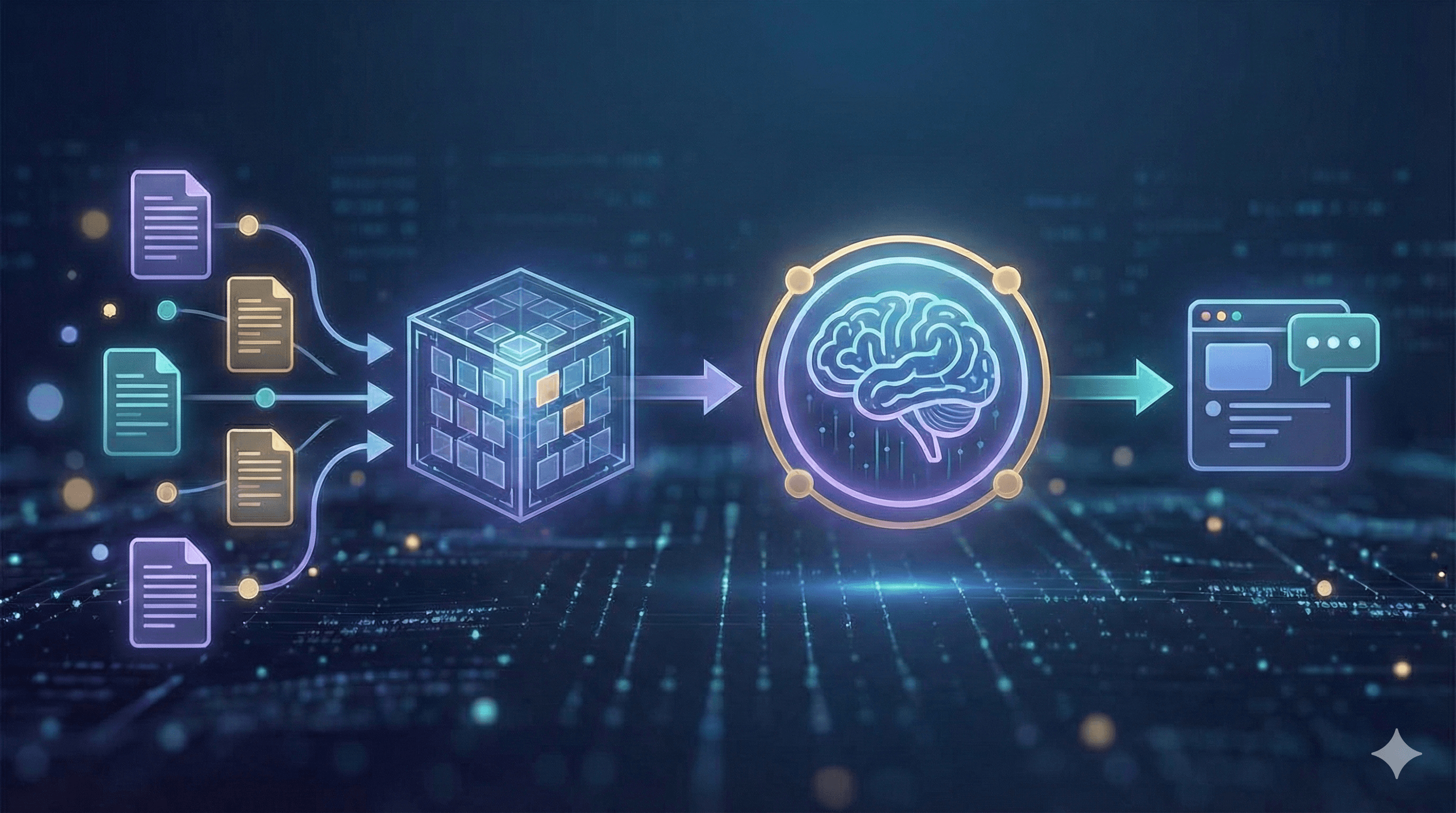
Un sistema RAG moderno comienza con la ingesta: registras las fuentes que importan — políticas, wikis, tickets, PDFs y datos estructurados — y las limpias, duplicas y etiquetas con metadatos útiles como propietario, fecha y región. Luego viene el fraccionamiento y la incorporación. En lugar de cortar el texto arbitrariamente, preservas encabezados y secciones para que cada fragmento tenga suficiente contexto para ser significativo, luego almacenas las incorporaciones en un índice vectorial seguro junto con campos de palabras clave para coincidencias exactas.
Al momento de la consulta, el asistente recupera un pequeño conjunto de pasajes prometedores usando búsqueda híbrida que combina vectores semánticos con filtros clásicos de palabras clave (para SKUs, acrónimos y fechas). Un re-rankeador ligero puede reordenar esos candidatos para que solo los cinco o seis más relevantes pasen. El sistema entonces augmente el mensaje con esos pasajes, instrucciones y límites (por ejemplo: responder con concisión, citar fuentes y rechazar si falta evidencia). Un LLM gobernado genera la respuesta y devuelve las citas y enlaces profundos para que los usuarios puedan inspeccionar los originales. Finalmente, evalúas y monitoreas continuamente: rastreando lealtad, latencia y costo con pruebas automatizadas, y revisando muestras manualmente para mantener alta la calidad.
Beneficios clave
Las empresas adoptan RAG por cuatro razones. Primero, las respuestas son precisas y actuales porque se basan en los documentos más recientes en lugar de la memoria obsoleta de un modelo. Segundo, el mantenimiento disminuye: actualizas un índice, no un modelo, lo cual es ideal para políticas y datos de productos cambiantes rápidamente. Tercero, RAG ofrece proveniencia verificable — las citas permiten que empleados y clientes verifiquen afirmaciones con un clic. Y cuarto, obtienes privacidad configurable a través del acceso basado en roles, redacción y registros de auditoría, manteniendo el conocimiento sensible dentro de tu entorno.
Patrones de Arquitectura
Comienza con el RAG clásico — la búsqueda vectorial devuelve los pasajes principales que llevas al modelo. Es rápido y establece una línea base medible. La mayoría de las empresas rápidamente pasan al RAG híbrido, combinando vectores con filtros de palabras clave y facetas de metadatos para manejar cosas como números de piezas y fechas efectivas. Cuando la calidad debe ser maximizada, introduce un pipeline re-rankeado: recupera ampliamente (por ejemplo, k≈50) y deja que un codificador transversal promueva los mejores cinco al mensaje.
Para preguntas complejas, la recuperación multi-hop o agente planifica un breve viaje de búsqueda — leyendo una política, siguiendo una excepción, luego abriendo el formulario relevante. Finalmente, RAG estructurado mezcla texto no estructurado con tablas y JSON, permitiendo que el asistente llame a herramientas o SQL para datos en lugar de parafrasear números de la prosa.
Pasos prácticos
1) Preparación de datos
Comienza con un registro de fuentes para saber qué sitios de SharePoint, Drives, espacios de Confluence, colas de tickets y bases de datos de productos alimentarán al asistente. Preserva encabezados, listas y tablas durante la conversión, elimina plantillas y firmas, y divide el contenido en secciones de 200 a 600 tokens que heredan sus encabezados originales. Adjunta metadatos como propietario, producto, región (UK/EU), fecha efectiva y etiqueta de seguridad. Para datos personales, minimiza o redacta antes de indexar y registra la base legal para el procesamiento.
2) Recuperación y solicitud
Usa búsqueda híbrida (BM25 más vectores) y aplica filtros como región:UK o estado:actual. Mantén el sistema de solicitud explícito: “Responde solo desde el contexto proporcionado; incluye citas; si falta evidencia, di 'No encontrado'.” Limita el contexto a un puñado de pasajes de alta calidad en lugar de docenas de pasajes ruidosos y verás disminuir tanto la latencia como las alucinaciones.
3) Evaluación y monitoreo
Reúne un conjunto de preguntas representativas con respuestas y referencias de verdad fundamentales, luego rastrea fidelidad, precisión/recuerdo de contexto, relevancia de la respuesta, latencia y costo. En producción, recopila subidas/bajadas con motivos y explora eventos de “sin respuesta” para cubrir brechas. Envía cambios detrás de puertas de lanzamiento — por ejemplo, fidelidad ≥95% y alucinaciones ≤2% en tu conjunto — para que las desviaciones de calidad no lleguen a los usuarios.
4) Gobernanza y seguridad (para UK/EU)
Protege índices con acceso basado en roles y reglas de atributos para colecciones sensibles. Registra consultas y documentos recuperados con una política de retención alineada a GDPR, y sé transparente con los usuarios: una breve declaración como “Las respuestas se generan a partir de documentos internos con fecha de [rango]” establece expectativas y construye confianza.
Casos de uso ejemplo
Un centro de ayuda para empleados se vuelve verdaderamente autoservicio cuando las políticas de RRHH y TI son recuperables por título, tema y fecha efectiva, con cada respuesta citando la cláusula exacta. Los equipos de ventas de campo pueden solicitar especificaciones de productos, reglas de precios y comparaciones de competidores; las respuestas provienen de tarjetas de batalla y notas de lanzamiento, manteniendo a los representantes consistentes sin memorizar todo. En servicio al cliente, los asistentes presentan términos de garantía, problemas conocidos y soluciones paso a paso para que los agentes resuelvan tickets más rápido y escalen menos. Y para riesgo y cumplimiento, RAG apoya las consultas sobre políticas con un manejo claro de excepciones y rutas de aprobación, reduciendo idas y vueltas y riesgos de auditoría.
Mini-Manual de Uso
A. Asistente de políticas (2 semanas). Comienza por ingerir políticas de RRHH y TI (PDF/HTML) junto con un registro de cambios y propietarios identificados. Configura recuperación híbrida con un pequeño re-rankeador y una solicitud de referencia que refuerce las citas y el rechazo cuando falte evidencia. Construye un conjunto de evaluación de ~100 preguntas representativas, luego realiza un piloto con un solo departamento. Aspira a ≥90% de utilidad, ≤2% de alucinación y latencia media de menos de 2.5 segundos antes de expandir.
B. Bot de conocimiento de productos (3 semanas). Combina documentos, especificaciones, SKUs y notas de lanzamiento. Usa fraccionamiento consciente del esquema para que las tablas y atributos sigan siendo consultables, y añade una herramienta que puede ejecutar SQL simple para precios o dimensiones. Protege la generación con instrucciones estrictas y registra cada respuesta con las fuentes. El éxito se ve como un menor tiempo de respuesta para los representantes y mayor desvío de tickets en soporte.
Próximos pasos
RAG proporciona a tus asistentes empresariales una memoria confiable — respuestas extraídas de documentos aprobados, actualizadas en horas no en meses, y entregadas con citas. Comienza con un dominio pequeño y de alto valor (políticas o productos), mide la fidelidad y amplía.
¿Quieres un piloto en 2 a 3 semanas? Generation Digital puede ayudar con arquitectura, preparación de datos, evaluación y gobernanza.
Preguntas frecuentes
¿Qué es un modelo RAG?
La Generación Aumentada por Recuperación combina la búsqueda en tus documentos con un modelo generativo. El modelo responde usando pasajes recuperados y devuelve citas.
¿Cómo benefician los modelos RAG a las empresas?
Reducen el reentrenamiento, aumentan la precisión y proporcionan respuestas verificables — ideales para casos de uso de gestión de políticas, productos y conocimiento.
¿Reemplaza RAG a los modelos de contexto largo?
No. El contexto largo ayuda, pero RAG sigue siendo esencial para frescura, control de acceso y explicabilidad.
¿Qué herramientas necesitamos?
Un almacén de documentos o lago de datos, un servicio de búsqueda vectorial+palabras clave, un modelo de incorporación, un LLM y observabilidad (evaluación + registros).
¿Cómo mantenemos los datos seguros?
Aplica acceso basado en roles a las colecciones, redacta campos sensibles y mantiene índices dentro de tu región en la nube (por ejemplo, UK o EU).
Recibe noticias y consejos sobre IA cada semana en tu bandeja de entrada
Al suscribirte, das tu consentimiento para que Generation Digital almacene y procese tus datos de acuerdo con nuestra política de privacidad. Puedes leer la política completa en gend.co/privacy.



Generación
Digital

Oficina en Reino Unido
Generation Digital Ltd
33 Queen St,
Londres
EC4R 1AP
Reino Unido
Oficina en Canadá
Generation Digital Americas Inc
181 Bay St., Suite 1800
Toronto, ON, M5J 2T9
Canadá
Oficina en EE. UU.
Generation Digital Américas Inc
77 Sands St,
Brooklyn, NY 11201,
Estados Unidos
Oficina de la UE
Software Generación Digital
Edificio Elgee
Dundalk
A91 X2R3
Irlanda
Oficina en Medio Oriente
6994 Alsharq 3890,
An Narjis,
Riad 13343,
Arabia Saudita







Número de la empresa: 256 9431 77 | Derechos de autor 2026 | Términos y Condiciones | Política de Privacidad