Gestión de Portafolios de Miro: Gestión Estratégica de Portafolios reconocida por Forrester (Q4 2025)
Miro
¿No sabes por dónde empezar con la IA?Evalúa preparación, riesgos y prioridades en menos de una hora.
➔ Descarga nuestro paquete gratuito de preparación para IA
Miro reconocido por la Gestión Estratégica de Portafolios — qué significa
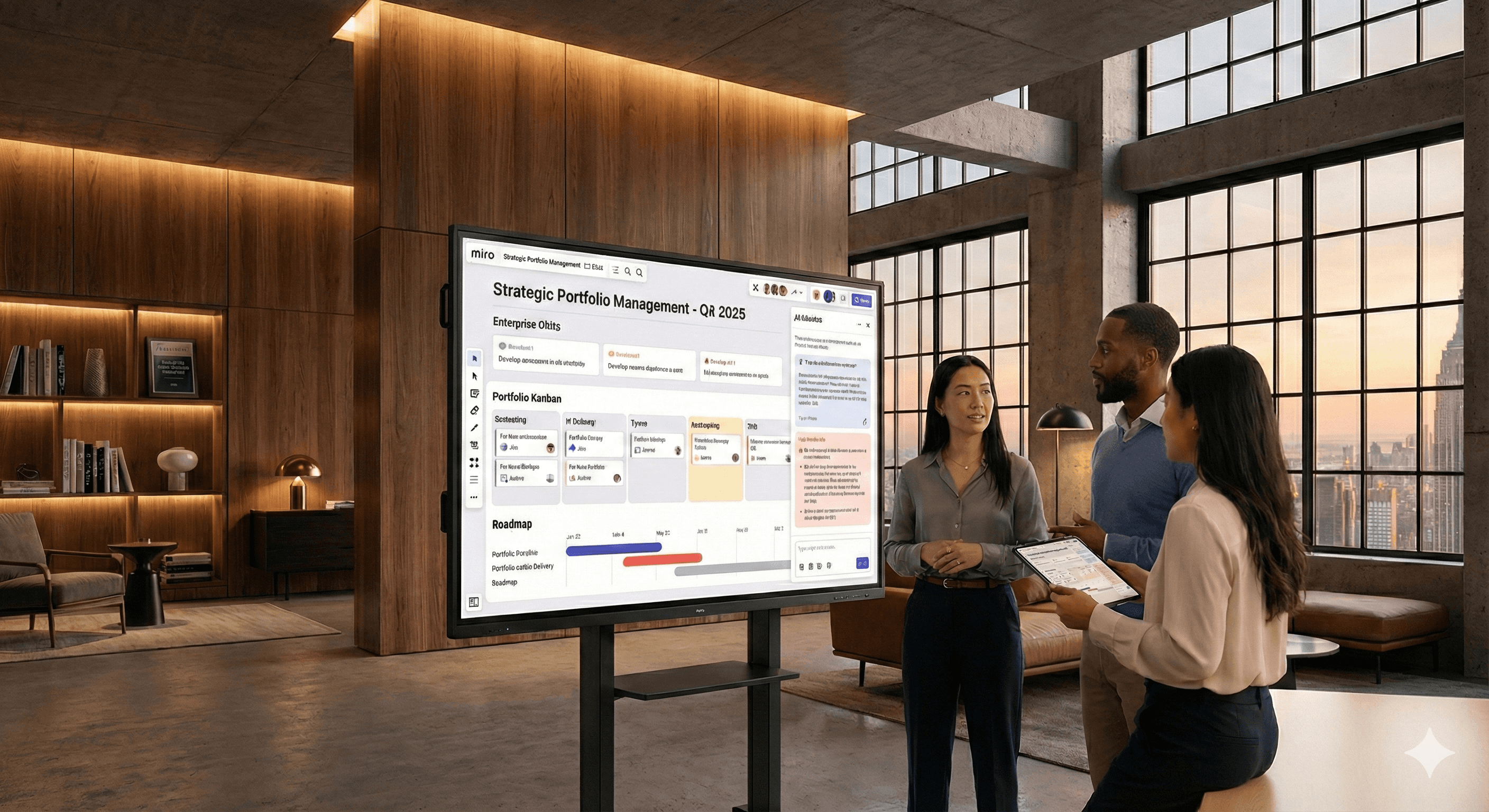
Miro ha sido reconocido en el panorama de Herramientas de Gestión Estratégica de Portafolios de Forrester para el cuarto trimestre de 2025. En la práctica, esto es importante porque las herramientas SPM no solo "rastrean proyectos"; ayudan a los líderes a traducir la estrategia en iniciativas financiadas, priorizar el trabajo y reequilibrar continuamente los portafolios a medida que cambian las condiciones. El diferenciador de Miro es llevar esas decisiones a un espacio de trabajo visual compartido donde los datos de planificación y entrega están lado a lado, y donde la IA puede resaltar lo que necesita atención.
¿Por qué elegir Miro para la gestión de portafolios?
Un espacio desde la visión hasta el valor. Mapea objetivos y OKRs, desarrolla iniciativas y observa el estado de entrega sin pasar por diapositivas, hojas de cálculo y herramientas de estado.
IA que detecta patrones. Los Sidekicks de IA de Miro escanean tableros y datos del portafolio para señalar riesgos, brechas y próximos pasos, como iniciativas con fechas en retraso o dependencias no cumplidas, para que los líderes puedan actuar antes de que los problemas se propaguen.
Datos de entrega en vivo. Integraciones bidireccionales con Jira, Azure DevOps y Asana significan que tus épicos, historias y estados se actualizan en tiempo real, manteniendo las vistas de planificación honestas.
Vistas flexibles para cada audiencia. Cambia de Kanban de portafolio a hoja de ruta, de mapas de dependencia a resúmenes de OKR, o abre una sola iniciativa para un análisis profundo, todo en el mismo lienzo.
Listo para empresa. Espacios, permisos, plantillas y guías de gobernanza hacen que sea sencillo estandarizar cómo se planifican y revisan los proyectos en las unidades de negocio.
¿Qué incluye Miro Portfolios?
Kanban de portafolio y hojas de ruta. Marcos tu portafolio como un flujo Kanban (por ejemplo, Embudo → Evaluando → Comprometido → En Entrega → Hecho) o como una hoja de ruta basada en el tiempo por trimestre. Agrega carriles para temas estratégicos.
Alineación con OKR. Vincula iniciativas y proyectos a los objetivos de la empresa. Agrupa el progreso y la confianza para mostrar dónde realmente se está acumulando valor.
Sidekicks de IA para perspectivas del portafolio. Haz preguntas en español claro (“¿Cuáles iniciativas están en riesgo este trimestre?”) y obtén respuestas destacadas con contexto. Usa recomendaciones para desbloquear equipos o re-secuenciar el trabajo.
Vistas de métricas. Recoge los KPIs clave de las herramientas de entrega (tiempo de ciclo, rendimiento), datos financieros o señales de clientes para que cada revisión sea guiada por datos.
Integraciones que mantienen todo sincronizado. Arrastra elementos de Jira o Azure DevOps como tarjetas; actualiza el estado aquí o allá, permanece alineado. Agrega tareas de Asana para flujos de trabajo transversales.
Visualización de dependencias. Mapea dependencias entre equipos directamente en el tablero. Registra decisiones y responsables durante la planificación en salas grandes.
Plantillas y esquemas. Estandariza cómo se definen, estiman, aprueban y revisan las iniciativas con plantillas reutilizables.
Un comienzo rápido de 30 minutos: de cero a revisión de portafolio
Paso 1 — Crea tu espacio de Portafolio (5 min). Usa un esquema de Portafolio o comienza desde una plantilla de tablero. Establece columnas y políticas (por ejemplo, límites de trabajo en progreso) para tu flujo Kanban. Agrega temas estratégicos como carriles.
Paso 2 — Conecta herramientas de entrega (5–10 min). Activa integraciones con Jira y/o Azure DevOps. Introduce épicos existentes en la columna correspondiente; establece la sincronización bidireccional para que las actualizaciones fluyan en ambas direcciones. Crea un marco de “Estacionamiento” para iniciativas candidatas.
Paso 3 — Alinea con OKRs (5 min). Agrega los Objetivos de la empresa en la parte superior y vincula las iniciativas debajo. Para cada iniciativa, captura resultados esperados, indicadores líderes y una hipótesis de valor a alto nivel.
Paso 4 — Mapea dependencias (5 min). Usa enlaces de dependencia entre iniciativas a través de equipos. Marca rutas críticas y anota a los responsables para mitigar situaciones.
Paso 5 — Añade métricas y señales del cliente (5 min). Fija un panel pequeño con tiempo de ciclo/rendimiento, consumo de presupuesto y un feed de “Voz del Cliente” (por ejemplo, los 3 principales insights de retroalimentación). Esto mantiene cada revisión anclada.
Paso 6 — Revisa con asistencia de IA (5 min). Pide al Sidekick de IA que resalte elementos en riesgo, bloqueos y retrasos de fechas. Captura acciones directamente en las tarjetas.
Al finalizar este proceso de configuración, tendrás un tablero de portafolio funcional con datos de entrega en vivo, riesgo visible y una narrativa ejecutiva clara.
Gobernanza que realmente funciona
Cadencia. Realiza un “Consejo de Portafolio” mensual (60 minutos) y una revisión quincenal más ligera (30 minutos). Usa el mismo tablero; cambia la vista, no la herramienta.
Criterios estándar de entrada/salida. Define la información que cada iniciativa debe mostrar antes de pasar de etapa: declaración del problema, resultado medible, escaneo de dependencias, estimación técnica y esquema de costo/beneficio.
Responsables transversales. Cada iniciativa recibe un responsable de negocio y uno de entrega. Las decisiones se anotan en la tarjeta con fecha y hora.
Repriorización transparente. Cuando cambian la capacidad, el riesgo o el mercado, re-secuencia en el Kanban y documenta la razón. Esto construye confianza con los interesados.
Casos de uso ejecutivo y de la PMO
Oficina de Valor Estratégico (SVO). Rastrea temas empresariales y progreso de OKRs, clasifica por unidad de negocio y resuelve la contención entre portafolios.
Portafolio de productos. Vincula el descubrimiento con la entrega con una visión compartida de declaraciones de problemas, insights de clientes y apuestas de la hoja de ruta.
Portafolio de transformación/cambio. Visualiza dependencias entre el trabajo en plataformas, la mejora de capacidades y los resultados empresariales.
Portafolio de Marketing y GTM. Alinea planes de lanzamiento, habilitación y contenido con los hitos del producto.
Integraciones que valen la pena habilitar desde el primer día
Jira / Atlassian. Importa épicos e historias en Miro, convierte notas adhesivas en problemas y mantiene en sincronización los estados y los asignados. Ideal para equipos ágiles que desean que la planificación y ejecución estén alineadas.
Azure DevOps. Sincroniza elementos de trabajo, muestra capacidad durante la planificación PI/trimestral y usa enlaces de dependencia para entrega multi-equipo.
Asana. Introduce tareas transversales para campañas u operaciones, de modo que el trabajo "no técnico" permanezca visible en el portafolio.
Consejos para hacer realidad en tu organización
Comienza con un portafolio. Prueba el modelo en un solo dominio (por ejemplo, ingeniería de productos o transformación), luego escala a otros con un esquema.
Haz explícitos los resultados. Cada iniciativa debe vincularse a un objetivo medible y señal del cliente. Si no puede, cuestiona la prioridad.
Usa Sidekicks de IA como segunda opinión. Antes de cada revisión, pídele que resuma riesgos y sugiera las tres acciones principales para mitigar riesgos.
Mantén la reunión ligera. El tablero es la agenda. Captura decisiones en el lienzo y asigna responsables en el acto.
Cómo Generation Digital puede ayudar
Configuraremos tu esquema de Portafolio, conectaremos Jira/Azure DevOps, capacitaremos a tus líderes en manejar la cadencia y agregaremos prompts y plantillas de IA adaptadas a tu contexto. El resultado es un portafolio funcional en semanas, no meses, con gobernanza clara y un ritmo repetible.
Ponte en contacto para reservar un taller de gestión de portafolios en Miro con Generation Digital.
Preguntas Frecuentes
¿Miro realmente gestiona portafolios o solo visualiza?
Miro Portfolios te ofrece un flujo gobernado (Kanban/hoja de ruta), alineación con OKR, insights asistidos por IA e integraciones de entrega en vivo. Está diseñado para uso ejecutivo y de PMO, no solo para lluvia de ideas.
¿Cómo enlaza Miro la estrategia con la ejecución?
Los objetivos están en la cima; las iniciativas y proyectos se agrupan debajo. Las tarjetas se sincronizan con Jira/Azure, por lo que el estado de entrega siempre está actualizado.
¿Puedo mantener nuestra planificación PI y revisiones trimestrales en un solo lugar?
Sí. Usa el mismo tablero para planificación en salas grandes, mapeo de dependencias y revisiones ejecutivas. Cambia vistas para diferentes audiencias.
¿Qué hay del reporte?
Usa paneles de métricas para rendimiento, tiempo de ciclo y medidas de valor. Exporta instantáneas o comparte el tablero en vivo para visibilidad autoservicio.
¿Es seguro y escalable?
Miro Enterprise soporta SSO, SCIM, permisos granulares y controles de administrador para espacios, aplicaciones y plantillas en organizaciones grandes.
Recibe noticias y consejos sobre IA cada semana en tu bandeja de entrada
Al suscribirte, das tu consentimiento para que Generation Digital almacene y procese tus datos de acuerdo con nuestra política de privacidad. Puedes leer la política completa en gend.co/privacy.



Generación
Digital

Oficina en Reino Unido
Generation Digital Ltd
33 Queen St,
Londres
EC4R 1AP
Reino Unido
Oficina en Canadá
Generation Digital Americas Inc
181 Bay St., Suite 1800
Toronto, ON, M5J 2T9
Canadá
Oficina en EE. UU.
Generation Digital Américas Inc
77 Sands St,
Brooklyn, NY 11201,
Estados Unidos
Oficina de la UE
Software Generación Digital
Edificio Elgee
Dundalk
A91 X2R3
Irlanda
Oficina en Medio Oriente
6994 Alsharq 3890,
An Narjis,
Riad 13343,
Arabia Saudita







Número de la empresa: 256 9431 77 | Derechos de autor 2026 | Términos y Condiciones | Política de Privacidad