Asana for Sales: Run Pipeline, Deals & Handoffs

Asana for Sales: Run Pipeline, Deals & Handoffs

Asana

2 mars 2026

The image depicts a group of professionals in a modern office setting, collaborating around a wooden table with laptops while a large screen displays a sales workflow, highlighting 'Pipeline, Deals & Handoffs' in an organized format.

Pas sûr de quoi faire ensuite avec l'IA?
Évaluez la préparation, les risques et les priorités en moins d'une heure.

Pas sûr de quoi faire ensuite avec l'IA?
Évaluez la préparation, les risques et les priorités en moins d'une heure.

➔ Téléchargez notre kit de préparation à l'IA gratuit

Asana for sales is a way to manage the work around your CRM: pipeline actions, account plans, deal support, approvals, and customer handoffs. By linking tasks, owners, and timelines in one place—and integrating with tools like Salesforce and HubSpot—sales teams get clearer execution and real-time visibility.

Sales teams don’t struggle because they lack activity. They struggle because critical work happens outside the CRM—in email, spreadsheets, meetings, and Slack.

That’s where deals slow down: follow-ups get missed, handoffs are messy, approvals drag, and leadership visibility depends on status chasing.

Asana gives sales a clear execution layer around the CRM. You keep customer data where it belongs, and run the workflows that move revenue forward—pipeline actions, account plans, deal support, onboarding handoffs, renewals, and cross-functional coordination.

Updated: 02/03/2026

Why sales teams use Asana (even with a CRM)

CRMs are excellent at tracking customer data and forecasting. But most revenue work is operational:

  • coordinating deal support across marketing, legal and finance,

  • tracking next steps and mutual action plans,

  • managing approvals and risk checks,

  • handling post-sales handoffs and onboarding,

  • and running repeatable processes across territories and teams.

Asana is built for that layer of work management, with flexible views for teams and leadership.

Common sales workflows you can run in Asana
1) Sales pipeline execution (beyond the stages)

Pipeline stages are useful. But deals progress because of actions.

With a pipeline project in Asana, reps and managers can track:

  • account notes and stakeholders,

  • next steps and due dates,

  • risks, blockers, and dependencies,

  • and the work needed from other teams.

Asana provides sales pipeline templates designed for account tracking and follow-through. (asana.com)

2) Account planning and mutual action plans

For strategic accounts, success comes down to clarity:

  • what value you’re proving,

  • what decisions need to happen,

  • and which stakeholders are involved.

An account plan project in Asana centralises action items, meeting outcomes, and deliverables—so the plan actually gets executed. Asana also provides lightweight account tracking templates used by sales and customer-facing teams.

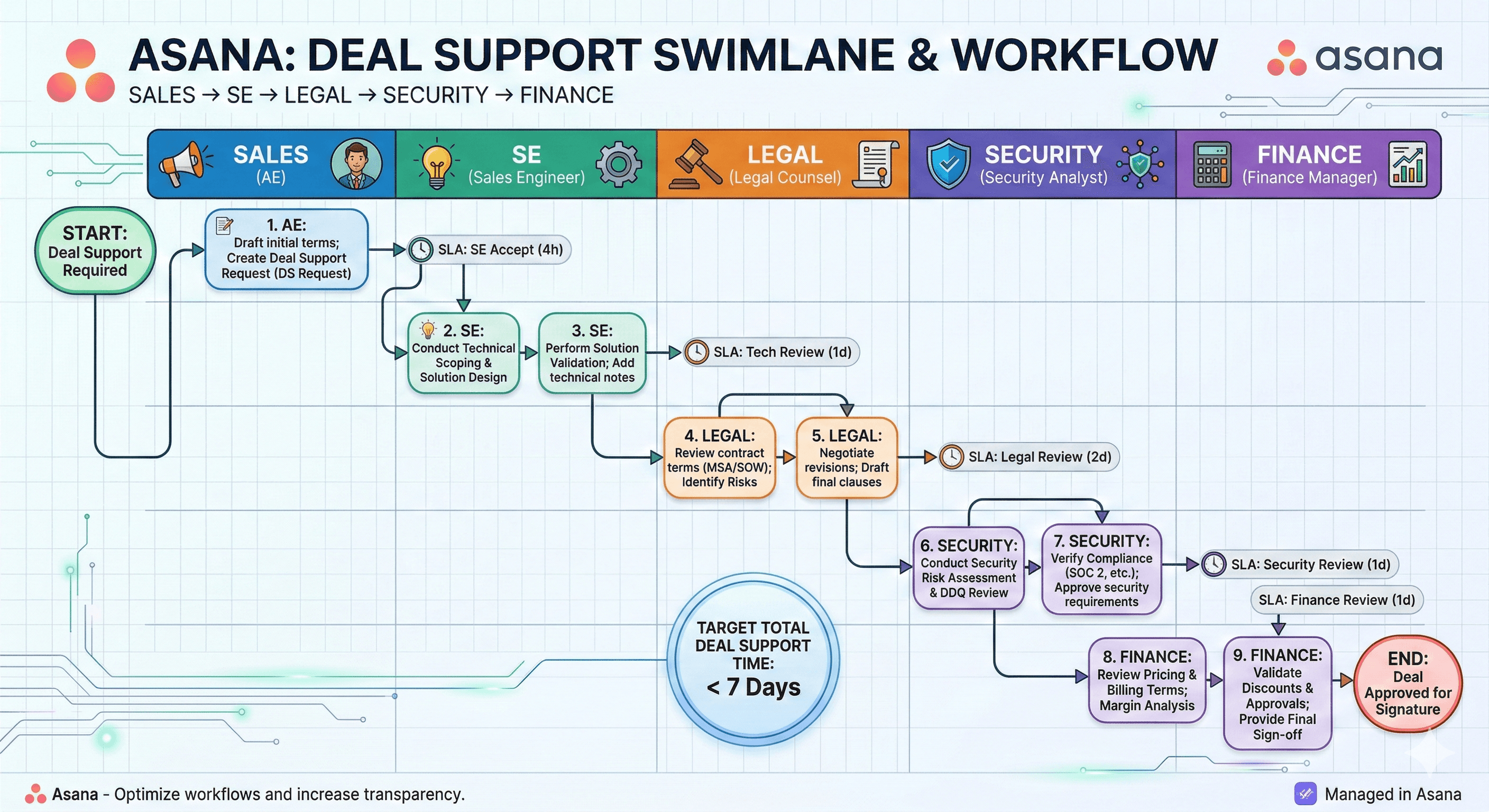
3) Pre-sales deal support (SE, product, security, legal)

Complex deals are cross-functional. Asana helps you run deal support like a programme:

  • request intake (what’s needed, by when, by whom),

  • approvals and sign-off steps,

  • dependencies and handovers,

  • and a single source of truth for the deal team.

Asana’s sales template gallery includes pre-sales deal support and standardised handoff patterns.

4) Post-sales handoff and customer onboarding

The biggest trust moment isn’t the signature—it’s the handoff.

Asana lets you standardise onboarding steps, responsibilities, and timelines so customers experience a smooth start. Asana explicitly recommends templates and checklists to manage onboarding as a repeatable workflow.

5) Renewals, expansions, and customer success coordination

Renewals and expansions depend on consistent execution: QBR prep, usage reviews, risk flags, and stakeholder alignment.

Asana can be the operating system for those plays—keeping commercial and delivery teams aligned, with shared visibility.

Integrations: keep your CRM, connect your workflows

A common question is whether Asana can integrate with your existing revenue stack.

Asana states it can integrate with CRM and revenue tools including Salesforce, HubSpot, Gmail, Outlook, and LinkedIn Sales Navigator.

For broader options, Asana maintains an apps and integrations directory spanning CRM, support, dev, and productivity tools.

Practical approach: Use the CRM as your system of record for customer data, and use Asana to run the operational workflows that move the deal forward.

What great looks like for a sales team in Asana

A strong setup tends to include:

  • One pipeline execution system (not five spreadsheets)

  • Standard templates for pipeline, account plans, deal support and handoffs

  • Clear ownership for every request and approval

  • Live reporting so managers see risk without chasing updates

  • Cross-functional visibility that doesn’t require extra meetings

How Generation Digital helps

Most sales teams don’t need “more tooling”. They need a cleaner operating rhythm.

As an Asana Platinum Solutions Partner, Generation Digital helps you design sales workflows that stick:

  • sales pipeline and account planning templates built for your process,

  • deal support and approval workflows (legal, security, finance),

  • dashboards for management and RevOps visibility,

  • integrations with your existing revenue stack,

  • onboarding and adoption so reps actually use it.

Next step: If you want to see what this looks like in your environment, speak to our team → /contact

Related reading

  • Asana partner services → /asana (gend.co)

  • Asana pricing (what you actually get by plan) → /blog/asana-pricing (gend.co)

  • Asana AI Studio (no-code AI steps in workflows) → /blog/asana-ai-studio (gend.co)

  • Asana AI Teammates (governance + rollout guidance) → /blog/asana-ai-teammates (gend.co)

FAQs

Can Asana replace a CRM for sales?
For most teams, no—and it shouldn’t. A CRM is best for customer data and forecasting. Asana is best for managing the work around deals: actions, approvals, handoffs, and cross-functional delivery.

Does Asana integrate with Salesforce and HubSpot?
Asana says it integrates with CRM systems including Salesforce and HubSpot, as well as tools like Gmail, Outlook, and LinkedIn Sales Navigator. (asana.com)

What’s the fastest way to roll out Asana for sales?
Start with one workflow that causes pain (deal support or onboarding handoff), build a template, set clear ownership, and add lightweight reporting. Then expand to pipeline execution and account plans.

Is Asana suitable for enterprise revenue teams?
Yes—particularly where cross-functional work and governance are required. The key is designing the right workspace structure, permissions, templates, and reporting.

Can AI help reduce sales admin in Asana?
It can. Asana’s recent AI capabilities (including AI Studio) are designed to add AI steps to workflows, such as summarising context, drafting updates, and assisting with structured actions inside projects. (gend.co)

Asana for sales is a way to manage the work around your CRM: pipeline actions, account plans, deal support, approvals, and customer handoffs. By linking tasks, owners, and timelines in one place—and integrating with tools like Salesforce and HubSpot—sales teams get clearer execution and real-time visibility.

Sales teams don’t struggle because they lack activity. They struggle because critical work happens outside the CRM—in email, spreadsheets, meetings, and Slack.

That’s where deals slow down: follow-ups get missed, handoffs are messy, approvals drag, and leadership visibility depends on status chasing.

Asana gives sales a clear execution layer around the CRM. You keep customer data where it belongs, and run the workflows that move revenue forward—pipeline actions, account plans, deal support, onboarding handoffs, renewals, and cross-functional coordination.

Updated: 02/03/2026

Why sales teams use Asana (even with a CRM)

CRMs are excellent at tracking customer data and forecasting. But most revenue work is operational:

  • coordinating deal support across marketing, legal and finance,

  • tracking next steps and mutual action plans,

  • managing approvals and risk checks,

  • handling post-sales handoffs and onboarding,

  • and running repeatable processes across territories and teams.

Asana is built for that layer of work management, with flexible views for teams and leadership.

Common sales workflows you can run in Asana

1) Sales pipeline execution (beyond the stages)

Pipeline stages are useful. But deals progress because of actions.

With a pipeline project in Asana, reps and managers can track:

  • account notes and stakeholders,

  • next steps and due dates,

  • risks, blockers, and dependencies,

  • and the work needed from other teams.

Asana provides sales pipeline templates designed for account tracking and follow-through. (asana.com)

2) Account planning and mutual action plans

For strategic accounts, success comes down to clarity:

  • what value you’re proving,

  • what decisions need to happen,

  • and which stakeholders are involved.

An account plan project in Asana centralises action items, meeting outcomes, and deliverables—so the plan actually gets executed. Asana also provides lightweight account tracking templates used by sales and customer-facing teams.

3) Pre-sales deal support (SE, product, security, legal)

Complex deals are cross-functional. Asana helps you run deal support like a programme:

  • request intake (what’s needed, by when, by whom),

  • approvals and sign-off steps,

  • dependencies and handovers,

  • and a single source of truth for the deal team.

Asana’s sales template gallery includes pre-sales deal support and standardised handoff patterns.

4) Post-sales handoff and customer onboarding

The biggest trust moment isn’t the signature—it’s the handoff.

Asana lets you standardise onboarding steps, responsibilities, and timelines so customers experience a smooth start. Asana explicitly recommends templates and checklists to manage onboarding as a repeatable workflow.

5) Renewals, expansions, and customer success coordination

Renewals and expansions depend on consistent execution: QBR prep, usage reviews, risk flags, and stakeholder alignment.

Asana can be the operating system for those plays—keeping commercial and delivery teams aligned, with shared visibility.

Integrations: keep your CRM, connect your workflows

A common question is whether Asana can integrate with your existing revenue stack.

Asana states it can integrate with CRM and revenue tools including Salesforce, HubSpot, Gmail, Outlook, and LinkedIn Sales Navigator.

For broader options, Asana maintains an apps and integrations directory spanning CRM, support, dev, and productivity tools.

Practical approach: Use the CRM as your system of record for customer data, and use Asana to run the operational workflows that move the deal forward.

What great looks like for a sales team in Asana

A strong setup tends to include:

  • One pipeline execution system (not five spreadsheets)

  • Standard templates for pipeline, account plans, deal support and handoffs

  • Clear ownership for every request and approval

  • Live reporting so managers see risk without chasing updates

  • Cross-functional visibility that doesn’t require extra meetings

How Generation Digital helps

Most sales teams don’t need “more tooling”. They need a cleaner operating rhythm.

As an Asana Platinum Solutions Partner, Generation Digital helps you design sales workflows that stick:

  • sales pipeline and account planning templates built for your process,

  • deal support and approval workflows (legal, security, finance),

  • dashboards for management and RevOps visibility,

  • integrations with your existing revenue stack,

  • onboarding and adoption so reps actually use it.

Next step: If you want to see what this looks like in your environment, speak to our team → /contact

Related reading

  • Asana partner services → /asana (gend.co)

  • Asana pricing (what you actually get by plan) → /blog/asana-pricing (gend.co)

  • Asana AI Studio (no-code AI steps in workflows) → /blog/asana-ai-studio (gend.co)

  • Asana AI Teammates (governance + rollout guidance) → /blog/asana-ai-teammates (gend.co)

FAQs

Can Asana replace a CRM for sales?
For most teams, no—and it shouldn’t. A CRM is best for customer data and forecasting. Asana is best for managing the work around deals: actions, approvals, handoffs, and cross-functional delivery.

Does Asana integrate with Salesforce and HubSpot?
Asana says it integrates with CRM systems including Salesforce and HubSpot, as well as tools like Gmail, Outlook, and LinkedIn Sales Navigator. (asana.com)

What’s the fastest way to roll out Asana for sales?
Start with one workflow that causes pain (deal support or onboarding handoff), build a template, set clear ownership, and add lightweight reporting. Then expand to pipeline execution and account plans.

Is Asana suitable for enterprise revenue teams?
Yes—particularly where cross-functional work and governance are required. The key is designing the right workspace structure, permissions, templates, and reporting.

Can AI help reduce sales admin in Asana?
It can. Asana’s recent AI capabilities (including AI Studio) are designed to add AI steps to workflows, such as summarising context, drafting updates, and assisting with structured actions inside projects. (gend.co)

Recevez chaque semaine des nouvelles et des conseils sur l'IA directement dans votre boîte de réception

En vous abonnant, vous consentez à ce que Génération Numérique stocke et traite vos informations conformément à notre politique de confidentialité. Vous pouvez lire la politique complète sur gend.co/privacy.


Ateliers et webinaires à venir

A diverse group of professionals collaborating around a table in a bright, modern office setting.

Clarté opérationnelle à grande échelle - Asana

Webinaire Virtuel
Mercredi 25 février 2026
En ligne

A diverse group of professionals collaborating around a table in a bright, modern office setting.

Collaborez avec des coéquipiers IA - Asana

Atelier en personne
Jeudi 26 février 2026
London, UK

A diverse group of professionals collaborating around a table in a bright, modern office setting.

De l'idée au prototype - L'IA dans Miro

Webinaire virtuel
Mercredi 18 février 2026
En ligne

Génération
Numérique

Bureau du Royaume-Uni

Génération Numérique Ltée
33 rue Queen,
Londres
EC4R 1AP
Royaume-Uni

Bureau au Canada

Génération Numérique Amériques Inc
181 rue Bay, Suite 1800
Toronto, ON, M5J 2T9
Canada

Bureau aux États-Unis

Generation Digital Americas Inc
77 Sands St,
Brooklyn, NY 11201,
États-Unis

Bureau de l'UE

Génération de logiciels numériques
Bâtiment Elgee
Dundalk
A91 X2R3
Irlande

Bureau du Moyen-Orient

6994 Alsharq 3890,
An Narjis,
Riyad 13343,
Arabie Saoudite

UK Fast Growth Index UBS Logo
Financial Times FT 1000 Logo
Febe Growth 100 Logo (Background Removed)

Numéro d'entreprise : 256 9431 77 | Droits d'auteur 2026 | Conditions générales | Politique de confidentialité

Génération
Numérique

Bureau du Royaume-Uni

Génération Numérique Ltée
33 rue Queen,
Londres
EC4R 1AP
Royaume-Uni

Bureau au Canada

Génération Numérique Amériques Inc
181 rue Bay, Suite 1800
Toronto, ON, M5J 2T9
Canada

Bureau aux États-Unis

Generation Digital Americas Inc
77 Sands St,
Brooklyn, NY 11201,
États-Unis

Bureau de l'UE

Génération de logiciels numériques
Bâtiment Elgee
Dundalk
A91 X2R3
Irlande

Bureau du Moyen-Orient

6994 Alsharq 3890,
An Narjis,
Riyad 13343,
Arabie Saoudite

UK Fast Growth Index UBS Logo
Financial Times FT 1000 Logo
Febe Growth 100 Logo (Background Removed)


Numéro d'entreprise : 256 9431 77
Conditions générales
Politique de confidentialité
Droit d'auteur 2026




