Augmentez la Productivité : Automatisez les sessions de code avec Claude dans Slack
Claude
Pas sûr de quoi faire ensuite avec l'IA?Évaluez la préparation, les risques et les priorités en moins d'une heure.
➔ Téléchargez notre kit de préparation à l'IA gratuit
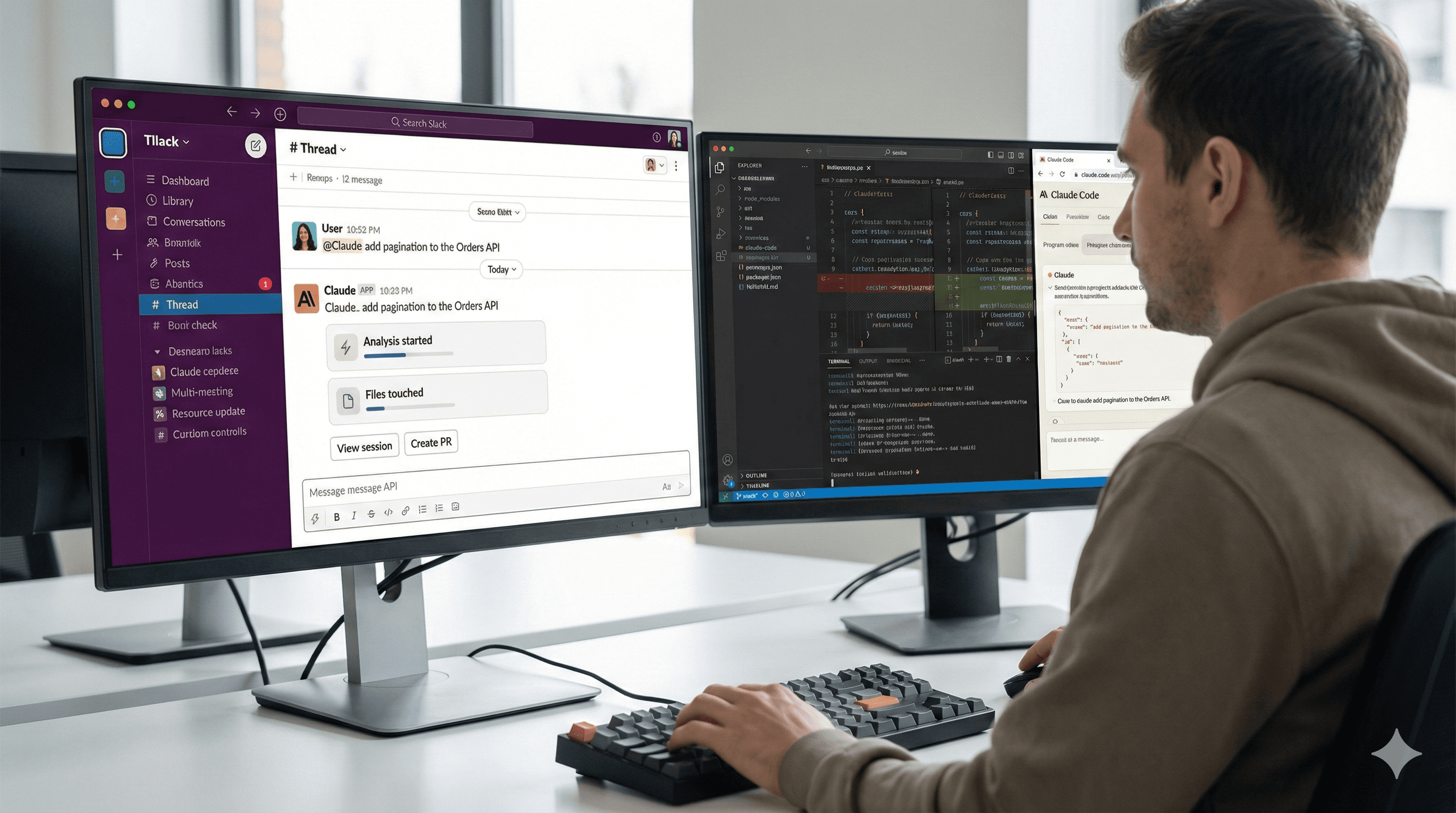
Claude Code fonctionne maintenant main dans la main avec Slack. Mentionnez @Claude dans un message lié au codage et il lancera une session Claude Code en utilisant le contexte de votre fil de discussion, exécutera la tâche dans le bon dépôt, et affichera les mises à jour de progression dans Slack. Lorsque le travail est prêt, vous obtiendrez des liens pour examiner les changements et ouvrir une pull request - le tout sans quitter la conversation.
Pourquoi cela importe
La plupart des équipes de développement discutent des bogues et des fonctionnalités dans Slack, puis copient les détails dans un IDE ou un outil de suivi des problèmes. Cette intégration élimine cette étape de transfert. Parce que Claude peut lire le fil pertinent (avec votre permission) et diriger la tâche vers Claude Code, il transforme les demandes en langage naturel - “enquêter sur cette pile de traces”, “ajouter la pagination à l'API des commandes”, “corriger le test intermittent à la caisse” - en changements concrets liés à vos dépôts. Moins de transferts, retours d'information plus rapides.
Comment cela fonctionne en pratique
Lorsque vous mentionnez @Claude dans un canal ou un fil de discussion, l'application Slack vérifie si la demande est une tâche de codage. Si oui, elle ouvre une session Claude Code à distance sur le web, alimentée par les messages de la conversation. Claude choisit un dépôt que vous avez déjà authentifié pour Claude Code, exécute la tâche et publie des cartes de statut dans le même fil (par exemple : analyse commencée → fichiers modifiés → tests exécutés). Depuis le message Slack, vous pouvez ouvrir la session complète, créer une PR à partir des changements, réessayer la demande explicitement comme code, ou changer de dépôt si le mauvais a été choisi.
Par où commencer (configuration rapide)
Installer Claude pour Slack dans votre espace de travail et assurez-vous que vos canaux de développement peuvent mentionner l'application.
Connecter les dépôts à Claude Code sur le web et accorder à l'application GitHub les autorisations requises (contenus, problèmes, pull requests).
Dans Slack, mentionnez @Claude sur un vrai fil de discussion de bogue/fonctionnalité et demandez-lui de traiter comme une tâche de codage (par exemple, “@Claude corrige la requête N+1 dans
orders_controller.rb, ajoute un test unitaire”).Examinez dans Slack à mesure que les mises à jour de statut arrivent; cliquez sur Voir la session pour vérifier les différences et les tests, ou Créer une PR lorsque vous êtes satisfait.
Conseil : Si Claude répond comme assistant chat mais que vous aviez prévu une exécution de code, cliquez sur Réessayer comme code dans le message Slack.
Exemples
“@Claude diagnostique les erreurs 500 dans le service de paiement; liez tout problème Sentry connexe et proposez une solution.”
“@Claude ajoutez la pagination à l'API des commandes (taille de la page 50), mettez à jour la documentation et le SDK client.”
“@Claude refactoriser cette fonction pour une meilleure lisibilité et créer une PR avec des benchmarks.”
FAQ
Comment démarrer une session?
Mentionnez @Claude dans un canal ou fil de discussion et décrivez la tâche de codage. Claude créera une session Claude Code s'il détecte une demande de développement; vous pouvez également lui dire de “traiter cela comme un code”.
Puis-je gérer les pull requests depuis Slack?
Vous pouvez créer une PR à partir des changements de la session directement depuis le message Slack et passer à votre VCS pour compléter l'examen et la fusion.
Quels sont les mises à jour que je verrai?
Les mises à jour de fil de discussion Slack incluent généralement le début de la tâche, le raisonnement/le plan, les fichiers modifiés, les tests exécutés, et les liens vers la session et la PR complètes.
Et si le mauvais dépôt est sélectionné?
Utilisez Changer de dépôt depuis le message Slack pour pointer la session vers le bon dépôt.
Est-ce disponible pour tout le monde?
Vous aurez besoin d'accéder à Claude Code sur le web et de l'application Claude Slack activée par les administrateurs de votre espace de travail.
Résumé
Slack est l'endroit où le travail commence; Claude Code est là où les changements se réalisent. Connecter les deux signifie moins de tâches de copier-coller et des corrections plus rapides. Si vous déployez cela, commencez par un seul canal de développement, connectez un dépôt de staging, et mettez-vous d'accord sur les règles d'examen avant de permettre la création de PR.
Besoin d'aide pour la configuration, la gouvernance, ou les prompts? Génération Digital peut aider avec la mise en œuvre et la gestion du changement pour vos équipes techniques.
Recevez chaque semaine des nouvelles et des conseils sur l'IA directement dans votre boîte de réception
En vous abonnant, vous consentez à ce que Génération Numérique stocke et traite vos informations conformément à notre politique de confidentialité. Vous pouvez lire la politique complète sur gend.co/privacy.



Génération
Numérique

Bureau du Royaume-Uni
Génération Numérique Ltée
33 rue Queen,
Londres
EC4R 1AP
Royaume-Uni
Bureau au Canada
Génération Numérique Amériques Inc
181 rue Bay, Suite 1800
Toronto, ON, M5J 2T9
Canada
Bureau aux États-Unis
Generation Digital Americas Inc
77 Sands St,
Brooklyn, NY 11201,
États-Unis
Bureau de l'UE
Génération de logiciels numériques
Bâtiment Elgee
Dundalk
A91 X2R3
Irlande
Bureau du Moyen-Orient
6994 Alsharq 3890,
An Narjis,
Riyad 13343,
Arabie Saoudite







Numéro d'entreprise : 256 9431 77 | Droits d'auteur 2026 | Conditions générales | Politique de confidentialité