Stimulez la créativité avec Miro Flows pour les spécialistes du marketing
Miro
Pas sûr de quoi faire ensuite avec l'IA?Évaluez la préparation, les risques et les priorités en moins d'une heure.
➔ Téléchargez notre kit de préparation à l'IA gratuit
Pourquoi les créatifs adorent Miro Flows (et ce qui est différent)
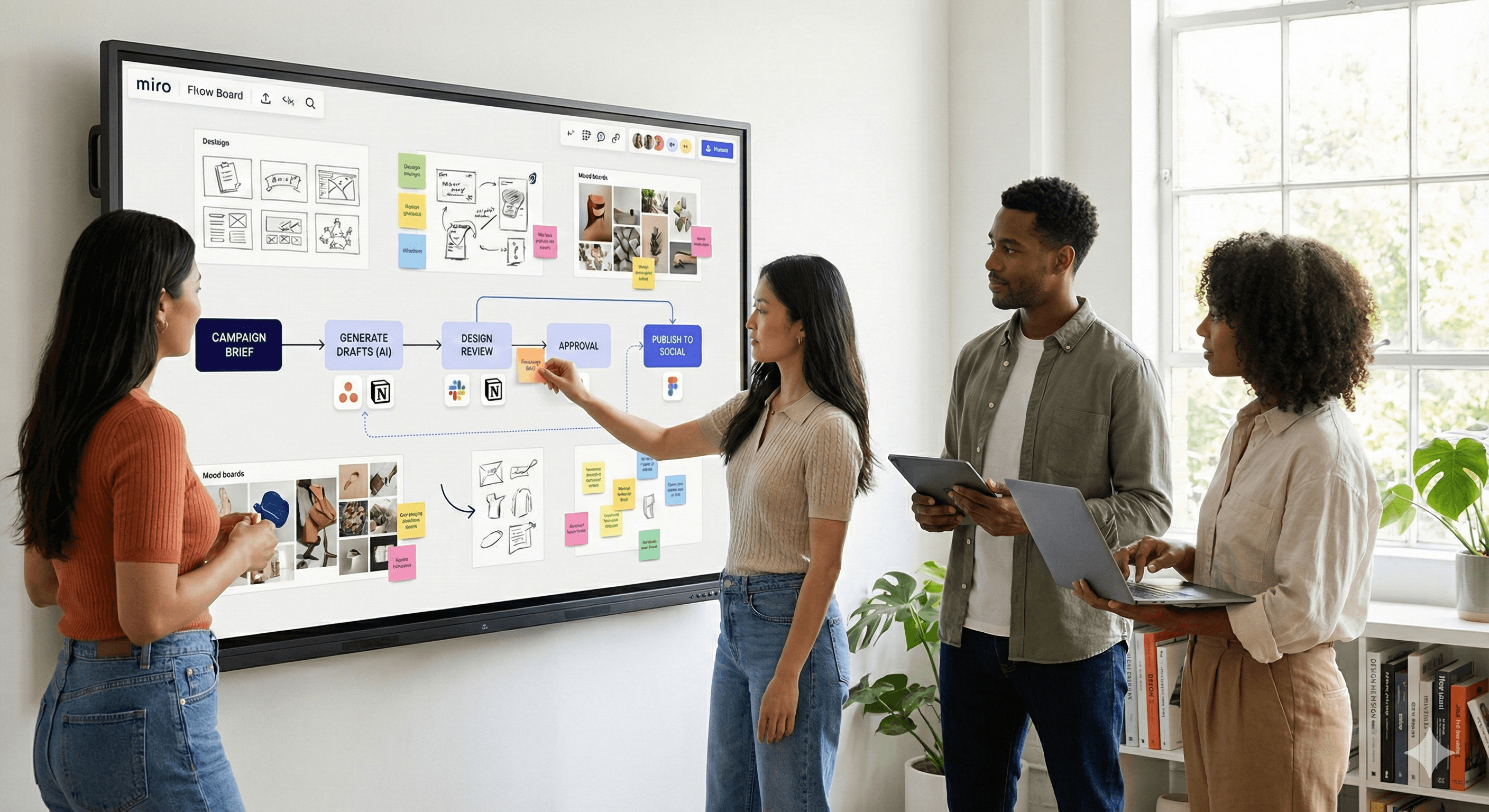
Les tableaux blancs traditionnels s'arrêtent aux idées. Les Flows se trouvent sur la même toile que votre recherche, vos wireframes et votre contenu écrit—donc le contexte, les prompts et les résultats voyagent ensemble. Les équipes marketing obtiennent de la clarté (étapes répétables), de la rapidité (moins de travail fastidieux), et de la cohérence (règles de marque intégrées au Flow).
Comment fonctionnent Miro Flows
Flux de travail sur toile. Créez un chemin d'étapes comme créer un brief → ébauche → révision → approbation → publication et exécutez-le sur place.
Étapes multiples avec l'IA. Ajoutez des actions AI pour résumer, générer ou transformer le contenu à chaque étape.
Connectez vos outils. Synchronisez les résultats avec les suivis de travail ou les outils de communication (par exemple, créez des tâches Asana, publiez sur Slack, attachez des liens à Notion).
Gouvernance intégrée. Définissez les approbateurs, les SLAs et les journaux pour que rien ne se perde.
Manuels de flux de travail créatifs
1) Brief de campagne → première ébauche
Déclencheur : le marketeur lance le Flow Créer un Brief de Campagne.
Étapes : capter les objectifs/public/CTA/budget; générer un brief Notion; ouvrir un projet Asana; créer une page Figma avec des cadres; rédiger des variantes de titre/sous-titre/texte; taguer les propriétaires et les dates d'échéance.
Garde-fous : voix de marque, phrases interdites, ligne légale obligatoire.
Résultat : lien du brief, tâches, ébauche v0.1, panneau de statut sur la planche.
2) Révision → approbation
Déclencheur : le designer définit le statut Prêt pour révision.
Étapes : résumer les changements; exécuter la liste de contrôle (ton, grammaire, accessibilité); acheminer vers l'approbateur; rappeler après 24 heures; si rejeté, compiler les commentaires et ouvrir des sous-tâches.
Résultat : journal de décision, notes de version.
3) Variantes d'actifs à grande vitesse (ensemble social)
Déclencheur : Flow Générer des variantes.
Étapes : cloner l'actif de base aux tailles requises; adapter le texte aux limites de caractères; générer un texte alternatif; programmer les publications; pousser vers l'approbation.
Résultat : liste de publications programmées avec des liens.
4) Pack RP à partir d'une ébauche
Déclencheur : Flow Pack RP.
Étapes : transformer une ébauche en communiqué de presse, citations, FAQ, légendes d'images; créer une page de salle de presse dans Notion; construire un suivi de portée.
Résultat : lien de la salle de presse + fichier zip des actifs.
Kit de démarrage (modèles)
Modèle de brief (Notion) : objectif, public, propositions de valeur, livrables, délais, métriques de succès.
Liste de contrôle design : couleurs de marque, espacement, typographie, contraste, préréglages d'exportation.
Liste de contrôle de copie : voix/ton, localisation, revendications & sources, niveau de lecture.
Matrice d'approbation : qui signe quoi par dépense/risque; SLAs pour la révision.
Notes de version : version, changements, approbateur, retour en arrière.
Guide de mise en œuvre (semaine par semaine)
Semaine 1 : Cartographier & décider. Choisissez 1-2 types de campagne. Diagrammez votre chemin actuel sur un tableau Miro; marquez les retards et les transferts.
Semaine 2 : Construire v0. Créez le Flow sur la toile avec les entrées, sorties et garde-fous nécessaires; connectez à Asana et Notion.
Semaine 3 : Pilote. Exécutez 3-5 briefs réels; mesurez le temps jusqu'à la première ébauche et le retour de révision.
Semaine 4 : Renforcement. Ajoutez des vérifications d'accessibilité, des SLAs d'approbation, une journalisation et une commande manuelle de secours.
Semaine 5 : Échelle. Emballez le Flow comme modèle d'équipe; formez les parties prenantes; publiez un guide interne.
Métriques qui comptent
Temps jusqu'à la première ébauche (brief → v0.1)
Retour de révision (soumettre → approuvé)
Nombre de révisions par actif
Score de conformité à la marque (taux de réussite des listes de contrôle)
Taux de réussite vs. échéance
Coût par actif approuvé (tokens/outils/temps)
Complétude de l'accessibilité (texte alternatif, légendes, vérifications de contraste)
FAQs
Comment les Flows améliorent-ils la collaboration d'équipe ?
Tout se passe là où vivent les idées—sur la planche—ainsi les gens peuvent commenter, éditer et exécuter des étapes sans changer d'application.
Qu'est-ce qui rend les Flows différents des autres outils ?
Ils combinent des toiles visuelles avec l'IA et l'automatisation en plusieurs étapes, gardant le contexte, les prompts et les résultats ensemble.
Les Flows fonctionnent-ils pour les équipes à distance ?
Oui. Ils sont conçus pour le travail distribué avec des commentaires asynchrones, des mentions et des notifications.
Quelles compétences sont nécessaires pour commencer ?
Aucune au-delà de vos compétences Miro actuelles. Commencez avec des modèles; étendez-vous progressivement.
Résumé
Les Miro Flows apportent de la clarté créative: étapes répétables, moins de transferts, et des approbations plus rapides—tout sur la planche que vous utilisez déjà. Commencez avec un type de campagne, mesurez les métriques ci-dessus, et développez à partir de là. Génération Digitale peut vous aider à concevoir des Flows, connecter des systèmes, et former votre équipe.
Recevez chaque semaine des nouvelles et des conseils sur l'IA directement dans votre boîte de réception
En vous abonnant, vous consentez à ce que Génération Numérique stocke et traite vos informations conformément à notre politique de confidentialité. Vous pouvez lire la politique complète sur gend.co/privacy.



Génération
Numérique

Bureau du Royaume-Uni
Génération Numérique Ltée
33 rue Queen,
Londres
EC4R 1AP
Royaume-Uni
Bureau au Canada
Génération Numérique Amériques Inc
181 rue Bay, Suite 1800
Toronto, ON, M5J 2T9
Canada
Bureau aux États-Unis
Generation Digital Americas Inc
77 Sands St,
Brooklyn, NY 11201,
États-Unis
Bureau de l'UE
Génération de logiciels numériques
Bâtiment Elgee
Dundalk
A91 X2R3
Irlande
Bureau du Moyen-Orient
6994 Alsharq 3890,
An Narjis,
Riyad 13343,
Arabie Saoudite







Numéro d'entreprise : 256 9431 77 | Droits d'auteur 2026 | Conditions générales | Politique de confidentialité