Maîtriser la planification de projet avec le canevas intelligent de Miro
Miro
Pas sûr de quoi faire ensuite avec l'IA?Évaluez la préparation, les risques et les priorités en moins d'une heure.
➔ Téléchargez notre kit de préparation à l'IA gratuit
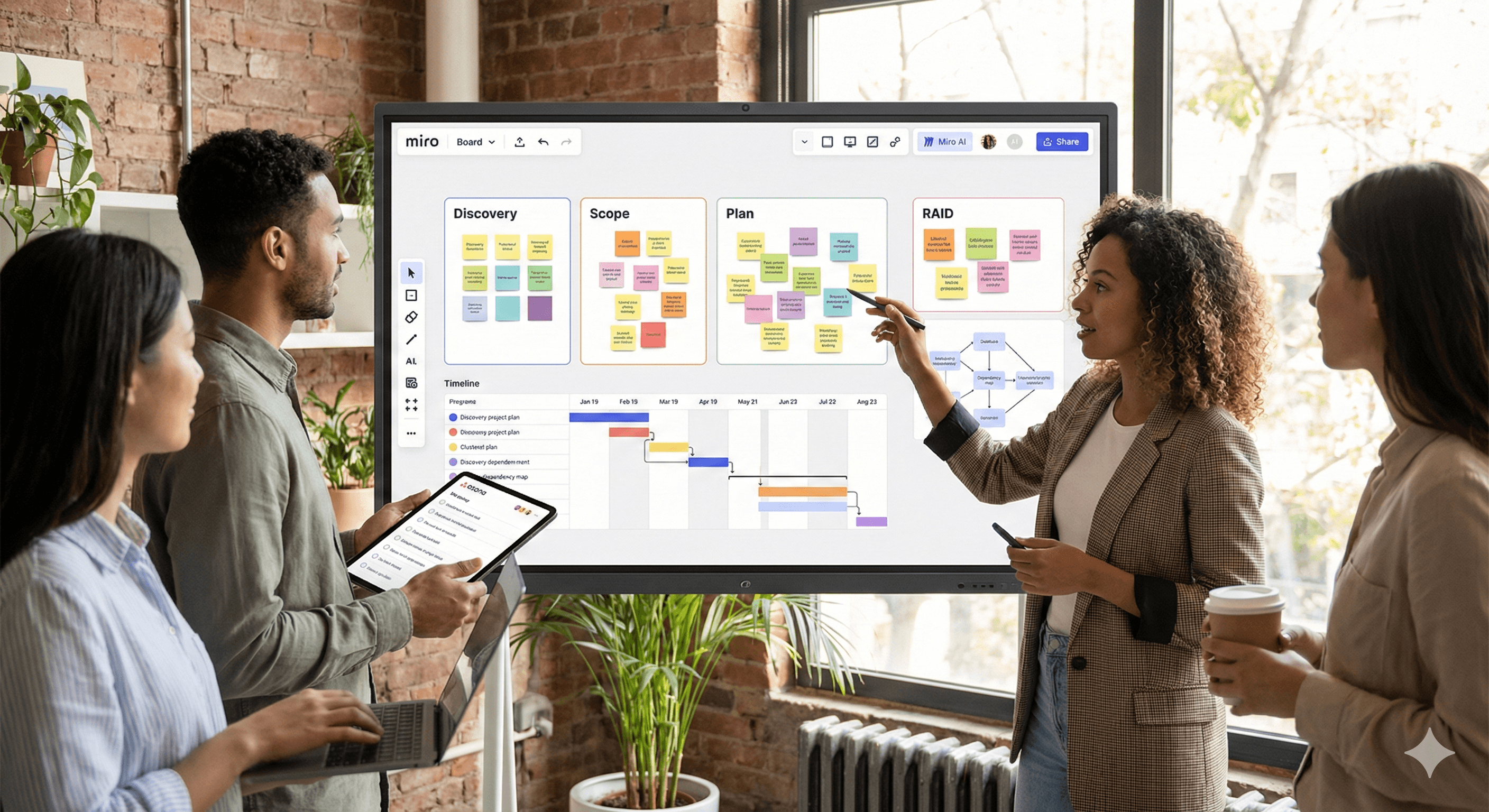
La toile intelligente de Miro combine des tableaux infinis, l'assistance IA et des intégrations pour transformer un brainstorming chaotique en un plan exécutable. Utilisez-la pour structurer la découverte, regrouper les insights, cartographier les dépendances, générer des chronologies et injecter des actions dans des outils comme Asana/Jira. Ce guide partage la configuration, les modèles de tableau, les invites IA, la gouvernance et les playbooks pour les chefs de projet.
Qui est concerné par ce guide
Les chefs de projet, PMO, chefs de produit et équipes transversales qui souhaitent une méthode reproductible pour passer des idées → à la portée → au plan d'action → à l'exécution en utilisant l'IA de Miro. Nous nous concentrons sur des modèles pratiques, des invites et des contrôles de qualité qui réduisent la retouche.
Liste de contrôle TL;DR
Créez un tableau de planification de projet avec les sections : Découverte, Portée, Plan, Risques, Dépendances, Décisions.
Activez Miro IA; utilisez le regroupement, la synthèse, les vérifications de diagrammes et la disposition automatique.
Appliquez les modèles de tableau (flux de travail ci-dessous) et les recettes d'invite.
Synchronisez les actions avec Asana/Jira; gardez les sources sur le tableau pour la traçabilité.
Révisez avec une cadence : révision hebdomadaire des décisions + examen des risques/dépendances.
Partie 1 — Configuration et structure
1) Tableau de planification de projet
Disposez des cadres clairement étiquetés :
Découverte (recherche, citations d'utilisateurs, notes des concurrents).
Portée (objectifs, hors de la portée, critères d'acceptation).
Plan (flux de travail, chronologie, jalons).
Risques et hypothèses (tableau RAID).
Dépendances (systèmes, équipes, externe).
Journal des décisions (propriétaire, date, justification, lien vers les artefacts).
2) Activez Miro IA
Activez les fonctionnalités IA sur le tableau. Favoris :
Regroupement de post-its par sujet/sentiment.
Résumé de grands cadres en briefs concis.
Assistance de diagrammes (organigramme/disposition automatique, vérification des erreurs).
Génération de cartes mentales/plans à partir de post-its ou d'invites.
3) Intégrations
Asana/Jira : convertissez les post-its/cartes en tâches, synchronisez le statut/assignation, gardez le lien de retour.
Drive/Confluence : attachez spécifications et recherches; gardez une source unique de vérité.
Calendrier/Vidéo : intégrez des revues de sprint, cérémonies de planification et replays.
Partie 2 — Modèles de tableau qui rapportent toujours
Modèle A — Découverte → Insights → Thèmes
Objectif : compresser les notes brutes en thèmes avec preuves.
Étapes :
Capturez les notes en tant que post-its avec des balises (personnage, fonctionnalité, douleur).
Demandez à l'IA de regrouper par thème; colorez par personnage.
Générez un brief d'insight d'une page avec citations des notes originales.
Déplacez les thèmes principaux dans le cadre de la portée.
Modèle B — Portée aux flux de travail (avec critères d'acceptation)
Objectif : créer une portée claire et testable.
Étapes :
Commencez par les objectifs et les contraintes.
Utilisez l'IA pour rédiger les flux de travail et les critères d'acceptation initiaux.
Ajoutez des tailles d'effort en t-shirts et des risques par flux de travail.
Convertissez en tâches dans Asana/Jira.
Modèle C — Cartographie des dépendances
Objectif : exposer les blocages inter-équipes/systèmes tôt.
Étapes :
Cartographiez les systèmes/équipes en tant que nœuds; tracez les arêtes pour les données ou le séquençage.
Faites des vérifications de diagramme IA pour repérer les éléments orphelins ou les chemins circulaires.
Étiquetez le chemin critique et créez les tâches de mitigation.
Modèle D — Chronologie & Jalons
Objectif : calendrier transparent et réaliste.
Étapes :
Générez un brouillon de chronologie à partir des flux de travail (IA).
Déplacez les jalons et ajoutez des tampons; identifiez les dépendances externes.
Fixez à des niveaux de zoom Trimestre/Mois/Sprint pour les revues.
Modèle E — RAID (Risques, Hypothèses, Problèmes, Décisions)
Objectif : garder la gouvernance légère mais rigoureuse.
Étapes :
Maintenez un tableau RAID avec les propriétaires, probabilité/impact, prochaine action.
L'IA suggère des mitigations et des escalades.
Lien des décisions aux changements de portée/chronologie pour audit.
Partie 3 — Recettes d'invites pour Miro IA
Regroupement d'insights
« Groupe ces post-its en 5–8 thèmes. Nom chaque thème, liste les meilleurs extraits de preuves, et mets en évidence les conflits. »
Esquisse de portée
« Transforme les insights sélectionnés en une esquisse de portée : objectifs, non-objectifs, 3–5 flux de travail, critères d'acceptation par flux de travail, et risques initiaux. »
Brouillon de chronologie
« À partir des flux de travail et des dépendances, propose une chronologie pour {période}. Indiquez le chemin critique et suggérez des tampons. »
Risques de dépendance
« Analysez cette carte de dépendance. Signalez les points de défaillance uniques, les dépendances externes, et les conflits de séquence. Suggérez des mitigations. »
Résumé pour excutifs
« Résumez les cadres Découverte, Portée et Plan en un brief de statut de 200 mots pour les dirigeants. Utilisez un ton neutre et incluez les 3 principaux risques. »
Entrée de journal de décision
« Créez une entrée de décision avec le contexte, les options considérées, l'option choisie, la justification, la date, et le propriétaire. »
Partie 4 — Playbooks
Playbook 1 : Du brainstorming à un plan exécutable en 90 minutes
15 min : Les parties prenantes ajoutent des post-its (problèmes, citations d'utilisateurs, contraintes).
10 min : IA regroupe et étiquète les thèmes.
15 min : Choisissez les 3 meilleurs thèmes; l'IA crée une esquisse de portée.
20 min : Construisez une carte de dépendance et effectuez des vérifications.
20 min : Générez une chronologie + tampons; poussez les actions vers Asana/Jira.
Playbook 2 : Planification PI/trimestrielle sur un seul tableau
Importez les backlogs des équipes; auto-groupez par valeur/effort.
Alignez sur les objectifs et les garde-fous.
Élaborez des dépendances inter-équipes; escaladez les conflits.
Produisez des cadres de feuille de route trimestrielle par équipe; synchronisez avec des outils d'exécution.
Enregistrez les décisions + risques; exportez un lien en lecture seule pour les parties prenantes.
Playbook 3 : Analyse des risques et dépendances (hebdomadaire)
Filtrez le tableau des risques pour Élevé/Moyen.
Demandez à l'IA des mises à jour de mitigation et les propriétaires.
Effectuez à nouveau des vérifications de diagramme sur la carte de dépendance.
Créez/Mettre à jour les tâches dans Asana/Jira; partagez un brief exécutif de 150 mots.
Partie 5 — Gouvernance, qualité et hygiène du tableau
Cadres comme source de vérité : Découverte, Portée, Plan, RAID, Dépendances, Décisions.
Versioning : dupliquez le tableau par cycle de planification; verrouillez les cadres anciens.
Liens de preuve : gardez les documents, recherches et spécifications attachés près des insights.
Rôles : Facilitateur (gère le tableau), Scribe (assure la curation), Propriétaires (approuvent la portée et les changements).
Définition du terminé : portée approuvée, chronologie établie, dépendances capturées, actions synchronisées, RAID à jour.
Mesurer l'impact
Suivez : temps de cycle de planification, rework (% de changements de portée après approbation), latence des décisions, nombre de dépendances non cartographiées découvertes plus tard, et heures économisées sur les mises à jour de statut/RAID. Affichez sur un cadre de tableau de bord simple Miro.
Dépannage et FAQ
Le tableau devient chaotique.
Utilisez des cadres, des conventions de couleur et des modèles verrouillés. Gardez une légende.
Les résumés IA semblent génériques.
Sélectionnez des cadres spécifiques et fournissez du contexte; demandez des citations renvoyant aux post-its.
Les parties prenantes préfèrent les présentations.
Utilisez le mode présentation de Miro ou exportez des cadres sélectionnés en PDF. Gardez le tableau comme source vivante.
Rien ne se synchronise avec Asana/Jira.
Reconnectez l'intégration, vérifiez les autorisations, et confirmez la correspondance (projet, type de problème, champs).
Appel à l'action
Vous voulez ce tableau dans votre espace de travail?
Réservez un atelier de planification de 60 minutes. Nous installerons le tableau hub, personnaliserons les invites, connecterons la synchronisation Asana/Jira et animerons une session en direct avec vos parties prenantes.
Recevez chaque semaine des nouvelles et des conseils sur l'IA directement dans votre boîte de réception
En vous abonnant, vous consentez à ce que Génération Numérique stocke et traite vos informations conformément à notre politique de confidentialité. Vous pouvez lire la politique complète sur gend.co/privacy.



Génération
Numérique

Bureau du Royaume-Uni
Génération Numérique Ltée
33 rue Queen,
Londres
EC4R 1AP
Royaume-Uni
Bureau au Canada
Génération Numérique Amériques Inc
181 rue Bay, Suite 1800
Toronto, ON, M5J 2T9
Canada
Bureau aux États-Unis
Generation Digital Americas Inc
77 Sands St,
Brooklyn, NY 11201,
États-Unis
Bureau de l'UE
Génération de logiciels numériques
Bâtiment Elgee
Dundalk
A91 X2R3
Irlande
Bureau du Moyen-Orient
6994 Alsharq 3890,
An Narjis,
Riyad 13343,
Arabie Saoudite







Numéro d'entreprise : 256 9431 77 | Droits d'auteur 2026 | Conditions générales | Politique de confidentialité