Notion vs OpenAI: How They Work Better Together (2026)

Notion vs OpenAI: How They Work Better Together (2026)

Notion

24 févr. 2026

Two colleagues in a modern office space discuss ideas over a laptop displaying Notion and OpenAI collaboration features, illustrating "Notion vs OpenAI: How They Work Better Together (2026)," with a well-lit environment and people working in the background.

Pas sûr de quoi faire ensuite avec l'IA?
Évaluez la préparation, les risques et les priorités en moins d'une heure.

Pas sûr de quoi faire ensuite avec l'IA?
Évaluez la préparation, les risques et les priorités en moins d'une heure.

➔ Téléchargez notre kit de préparation à l'IA gratuit

Notion and OpenAI aren’t direct substitutes. Notion is a connected workspace for knowledge, projects, and collaboration. OpenAI provides the AI models and tools that power generation, reasoning, and agents. Used together, Notion becomes the governed “home” for work, while OpenAI capabilities automate and accelerate workflows.

When people compare Notion and OpenAI, it’s usually because they’re trying to solve the same underlying problem: how do we make knowledge work faster, more consistent, and easier to scale?

The reality is that they solve different parts of that problem.

  • Notion is where work lives: pages, databases, projects, decisions, templates, and shared knowledge.

  • OpenAI is where intelligence lives: models that can reason, generate, summarise, and power agentic workflows.

Notion becomes far more valuable when AI is embedded into the place your team already works. And OpenAI becomes far more useful when it’s grounded in trusted context and permissions.

What Notion is best at

Notion is a connected AI workspace designed to reduce tool sprawl and make information accessible. It helps teams move faster by keeping work organised, searchable, and repeatable—especially when you standardise templates and workflows. (gend.co)

Notion AI capabilities typically add value where the context is already inside your workspace. Generation Digital describes Notion AI as supporting summarisation, content generation, and quick action items—so teams spend less time on admin and more time on outcomes. (gend.co)

What OpenAI is best at

OpenAI provides models and tooling that enable:

  • high-quality generation and transformation of text and code

  • structured reasoning over complex instructions

  • tool use and orchestration for agentic workflows

In November 2025, OpenAI published a case study describing how Notion rebuilt its agent system using GPT‑5 to support more autonomous workflows—moving beyond isolated prompts toward an architecture designed for reasoning models and tool orchestration. (openai.com)
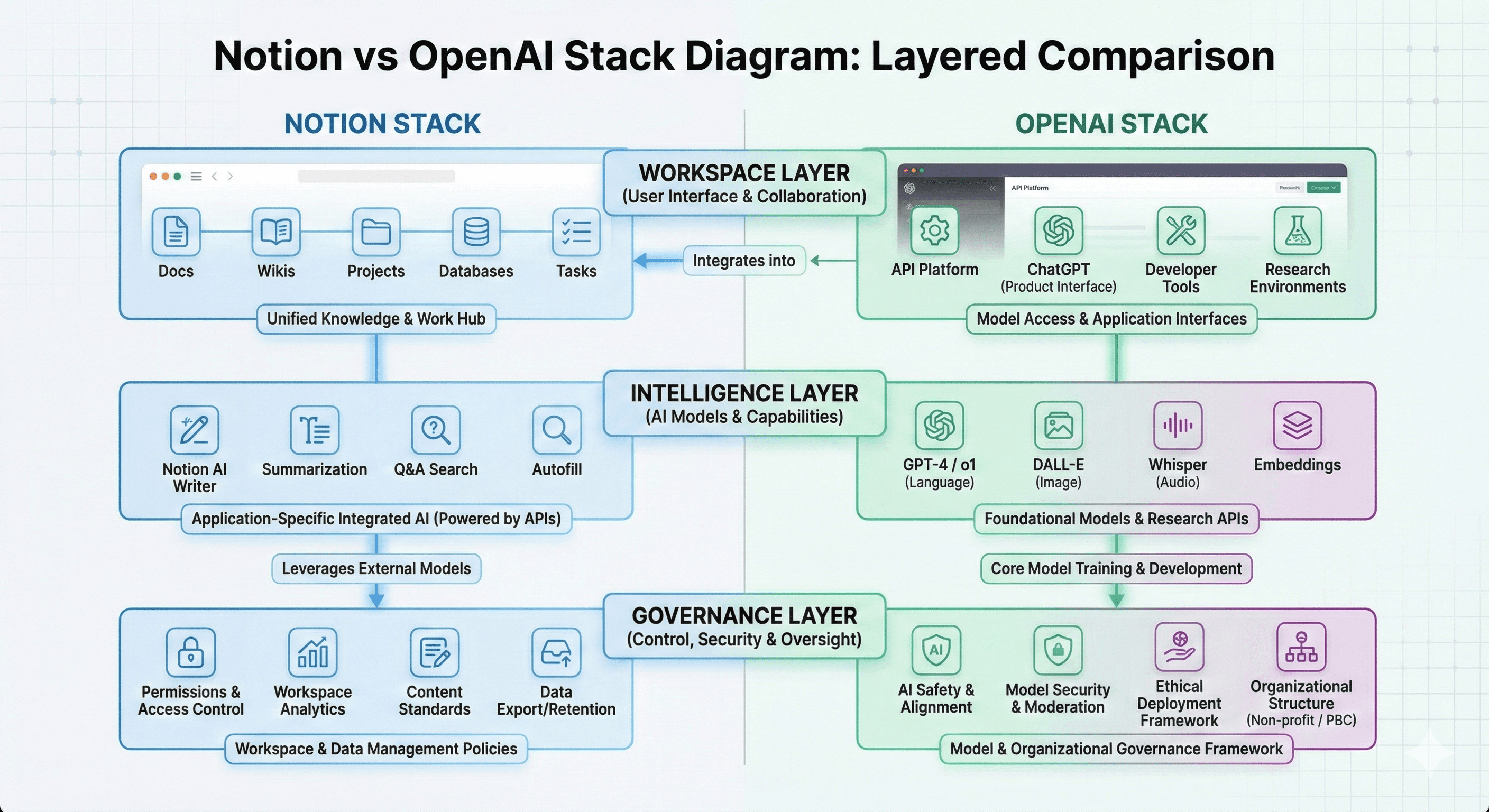
The simplest way to think about it

Notion = your organised source of truth
OpenAI = the intelligence that accelerates work using that truth

This is why the “Notion vs OpenAI” framing can be misleading. In most enterprise environments, you don’t choose one—you decide how to combine them safely.

A practical comparison table

Decision area

Notion (workspace layer)

OpenAI (capability layer)

Best together when…

Primary job

Organise knowledge + workflows

Reason, generate, automate

AI is embedded in day-to-day work

Context

Your pages, databases, permissions

Your prompts, tools, and connected data

Outputs must reflect internal truth

Best for

Wikis, project ops, documentation, templates

Assistants, model-powered apps, automations

You want governed agentic workflows

Risk control

Permissions, source-of-truth design

Policy, evaluation, logging, model choice

You need compliance + speed

Adoption

Strong when it replaces tool sprawl

Strong for specialist tasks and custom apps

You want usage to “stick”

Where Notion AI tends to outperform standalone chat

Notion AI wins when the work is already in Notion and the output should respect your workspace context.

Examples:

  • summarising meeting notes directly in the page

  • answering “what did we decide?” from accessible docs

  • creating onboarding packs using your templates

  • drafting weekly updates from project databases

Generation Digital’s Notion partner announcement highlights Notion AI’s focus on Q&A and Agents, noting Q&A uses content a user can access and respects workspace permissions. It also describes Agents in Notion 3.1 completing multi-step tasks inside the workspace, including creating and editing pages and databases. (gend.co)

Where OpenAI tends to outperform embedded workspace AI

OpenAI shines when you need:

  • deeper model capability for complex reasoning and transformation

  • custom applications and integrations via APIs

  • sophisticated evaluation and control layers

  • broader tooling for automation outside a single workspace

Notion’s own rebuild for agentic AI illustrates this direction: agents that can search, plan, and orchestrate tools required architectural changes designed around reasoning models—not just prompting. (openai.com)

How to decide: a quick framework

Choose Notion-first when…

  • your priority is reducing tool sprawl and standardising work

  • you need one place for knowledge + projects + decisions

  • you want AI to use workspace context and permissions

Choose OpenAI-first when…

  • you’re building custom AI apps or automations across systems

  • you need advanced reasoning and structured outputs at scale

  • you want fine-grained control over model selection, evaluation, and routing

Combine them when…

  • you want AI to operate inside workflows, using governed context

  • you’re moving from “copilot” to agentic execution

  • you want adoption to stick because the AI is where people already work

Governance: the part most comparisons miss

Most organisations don’t fail because they picked the “wrong AI”. They fail because they didn’t define:

  • what data can be used (and where it can go)

  • who can access what context

  • how outputs are checked and improved

  • how to prevent unmanaged “Shadow AI”

Generation Digital explicitly calls out governance, security, permissions, vendor risk, and “Shadow AI” as common enterprise concerns—alongside change management and training to make adoption stick. (gend.co)

Next steps

If you’re evaluating “Notion vs OpenAI”, treat it as an architecture question.

  1. Identify 3–5 workflows where speed and consistency matter (research briefs, onboarding, Q&A, weekly updates).

  2. Decide what belongs in Notion as your source of truth (templates, project databases, decisions).

  3. Define guardrails (permissions, data rules, review requirements).

  4. Pilot with measurable outcomes and iterate.

If you want a fast way to map where Notion fits in your stack and what guardrails you need, Generation Digital’s Notion partner post points to workshops and an AI readiness pack designed to help teams move from experimentation to confident adoption. (gend.co)

FAQ

1) Is Notion AI the same as OpenAI?
No. Notion is the workspace and product experience; OpenAI provides AI models and tooling. Notion can use OpenAI models inside its AI features, but they’re not the same product.

2) Should my team use Notion AI or ChatGPT?
If your work lives in Notion and you want outputs grounded in your workspace context and permissions, Notion AI is often the better default. If you need deeper reasoning, broader tooling, or custom applications, ChatGPT/OpenAI tools may be a better fit.

3) What are Notion Agents?
Notion’s agent features are designed to complete multi-step tasks within your workspace—creating or updating pages and databases and using connected context. (gend.co)

4) Why do OpenAI models matter if we already have Notion AI?
Because model capability and tooling affect what’s possible: complex reasoning, structured outputs, evaluation, and custom integrations can require direct OpenAI usage or a platform built on similar capabilities.

5) What’s the biggest risk when combining tools?
Uncontrolled data sharing and inconsistent governance. Define what data can be used, enforce permissions, and standardise review practices—especially in regulated environments. (gend.co)

Notion and OpenAI aren’t direct substitutes. Notion is a connected workspace for knowledge, projects, and collaboration. OpenAI provides the AI models and tools that power generation, reasoning, and agents. Used together, Notion becomes the governed “home” for work, while OpenAI capabilities automate and accelerate workflows.

When people compare Notion and OpenAI, it’s usually because they’re trying to solve the same underlying problem: how do we make knowledge work faster, more consistent, and easier to scale?

The reality is that they solve different parts of that problem.

  • Notion is where work lives: pages, databases, projects, decisions, templates, and shared knowledge.

  • OpenAI is where intelligence lives: models that can reason, generate, summarise, and power agentic workflows.

Notion becomes far more valuable when AI is embedded into the place your team already works. And OpenAI becomes far more useful when it’s grounded in trusted context and permissions.

What Notion is best at

Notion is a connected AI workspace designed to reduce tool sprawl and make information accessible. It helps teams move faster by keeping work organised, searchable, and repeatable—especially when you standardise templates and workflows. (gend.co)

Notion AI capabilities typically add value where the context is already inside your workspace. Generation Digital describes Notion AI as supporting summarisation, content generation, and quick action items—so teams spend less time on admin and more time on outcomes. (gend.co)

What OpenAI is best at

OpenAI provides models and tooling that enable:

  • high-quality generation and transformation of text and code

  • structured reasoning over complex instructions

  • tool use and orchestration for agentic workflows

In November 2025, OpenAI published a case study describing how Notion rebuilt its agent system using GPT‑5 to support more autonomous workflows—moving beyond isolated prompts toward an architecture designed for reasoning models and tool orchestration. (openai.com)

The simplest way to think about it

Notion = your organised source of truth
OpenAI = the intelligence that accelerates work using that truth

This is why the “Notion vs OpenAI” framing can be misleading. In most enterprise environments, you don’t choose one—you decide how to combine them safely.

A practical comparison table

Decision area

Notion (workspace layer)

OpenAI (capability layer)

Best together when…

Primary job

Organise knowledge + workflows

Reason, generate, automate

AI is embedded in day-to-day work

Context

Your pages, databases, permissions

Your prompts, tools, and connected data

Outputs must reflect internal truth

Best for

Wikis, project ops, documentation, templates

Assistants, model-powered apps, automations

You want governed agentic workflows

Risk control

Permissions, source-of-truth design

Policy, evaluation, logging, model choice

You need compliance + speed

Adoption

Strong when it replaces tool sprawl

Strong for specialist tasks and custom apps

You want usage to “stick”

Where Notion AI tends to outperform standalone chat

Notion AI wins when the work is already in Notion and the output should respect your workspace context.

Examples:

  • summarising meeting notes directly in the page

  • answering “what did we decide?” from accessible docs

  • creating onboarding packs using your templates

  • drafting weekly updates from project databases

Generation Digital’s Notion partner announcement highlights Notion AI’s focus on Q&A and Agents, noting Q&A uses content a user can access and respects workspace permissions. It also describes Agents in Notion 3.1 completing multi-step tasks inside the workspace, including creating and editing pages and databases. (gend.co)

Where OpenAI tends to outperform embedded workspace AI

OpenAI shines when you need:

  • deeper model capability for complex reasoning and transformation

  • custom applications and integrations via APIs

  • sophisticated evaluation and control layers

  • broader tooling for automation outside a single workspace

Notion’s own rebuild for agentic AI illustrates this direction: agents that can search, plan, and orchestrate tools required architectural changes designed around reasoning models—not just prompting. (openai.com)

How to decide: a quick framework

Choose Notion-first when…

  • your priority is reducing tool sprawl and standardising work

  • you need one place for knowledge + projects + decisions

  • you want AI to use workspace context and permissions

Choose OpenAI-first when…

  • you’re building custom AI apps or automations across systems

  • you need advanced reasoning and structured outputs at scale

  • you want fine-grained control over model selection, evaluation, and routing

Combine them when…

  • you want AI to operate inside workflows, using governed context

  • you’re moving from “copilot” to agentic execution

  • you want adoption to stick because the AI is where people already work

Governance: the part most comparisons miss

Most organisations don’t fail because they picked the “wrong AI”. They fail because they didn’t define:

  • what data can be used (and where it can go)

  • who can access what context

  • how outputs are checked and improved

  • how to prevent unmanaged “Shadow AI”

Generation Digital explicitly calls out governance, security, permissions, vendor risk, and “Shadow AI” as common enterprise concerns—alongside change management and training to make adoption stick. (gend.co)

Next steps

If you’re evaluating “Notion vs OpenAI”, treat it as an architecture question.

  1. Identify 3–5 workflows where speed and consistency matter (research briefs, onboarding, Q&A, weekly updates).

  2. Decide what belongs in Notion as your source of truth (templates, project databases, decisions).

  3. Define guardrails (permissions, data rules, review requirements).

  4. Pilot with measurable outcomes and iterate.

If you want a fast way to map where Notion fits in your stack and what guardrails you need, Generation Digital’s Notion partner post points to workshops and an AI readiness pack designed to help teams move from experimentation to confident adoption. (gend.co)

FAQ

1) Is Notion AI the same as OpenAI?
No. Notion is the workspace and product experience; OpenAI provides AI models and tooling. Notion can use OpenAI models inside its AI features, but they’re not the same product.

2) Should my team use Notion AI or ChatGPT?
If your work lives in Notion and you want outputs grounded in your workspace context and permissions, Notion AI is often the better default. If you need deeper reasoning, broader tooling, or custom applications, ChatGPT/OpenAI tools may be a better fit.

3) What are Notion Agents?
Notion’s agent features are designed to complete multi-step tasks within your workspace—creating or updating pages and databases and using connected context. (gend.co)

4) Why do OpenAI models matter if we already have Notion AI?
Because model capability and tooling affect what’s possible: complex reasoning, structured outputs, evaluation, and custom integrations can require direct OpenAI usage or a platform built on similar capabilities.

5) What’s the biggest risk when combining tools?
Uncontrolled data sharing and inconsistent governance. Define what data can be used, enforce permissions, and standardise review practices—especially in regulated environments. (gend.co)

Recevez chaque semaine des nouvelles et des conseils sur l'IA directement dans votre boîte de réception

En vous abonnant, vous consentez à ce que Génération Numérique stocke et traite vos informations conformément à notre politique de confidentialité. Vous pouvez lire la politique complète sur gend.co/privacy.


Ateliers et webinaires à venir

A diverse group of professionals collaborating around a table in a bright, modern office setting.

Clarté opérationnelle à grande échelle - Asana

Webinaire Virtuel
Mercredi 25 février 2026
En ligne

A diverse group of professionals collaborating around a table in a bright, modern office setting.

Collaborez avec des coéquipiers IA - Asana

Atelier en personne
Jeudi 26 février 2026
London, UK

A diverse group of professionals collaborating around a table in a bright, modern office setting.

De l'idée au prototype - L'IA dans Miro

Webinaire virtuel
Mercredi 18 février 2026
En ligne

Génération
Numérique

Bureau du Royaume-Uni

Génération Numérique Ltée
33 rue Queen,
Londres
EC4R 1AP
Royaume-Uni

Bureau au Canada

Génération Numérique Amériques Inc
181 rue Bay, Suite 1800
Toronto, ON, M5J 2T9
Canada

Bureau aux États-Unis

Generation Digital Americas Inc
77 Sands St,
Brooklyn, NY 11201,
États-Unis

Bureau de l'UE

Génération de logiciels numériques
Bâtiment Elgee
Dundalk
A91 X2R3
Irlande

Bureau du Moyen-Orient

6994 Alsharq 3890,
An Narjis,
Riyad 13343,
Arabie Saoudite

UK Fast Growth Index UBS Logo
Financial Times FT 1000 Logo
Febe Growth 100 Logo (Background Removed)

Numéro d'entreprise : 256 9431 77 | Droits d'auteur 2026 | Conditions générales | Politique de confidentialité

Génération
Numérique

Bureau du Royaume-Uni

Génération Numérique Ltée
33 rue Queen,
Londres
EC4R 1AP
Royaume-Uni

Bureau au Canada

Génération Numérique Amériques Inc
181 rue Bay, Suite 1800
Toronto, ON, M5J 2T9
Canada

Bureau aux États-Unis

Generation Digital Americas Inc
77 Sands St,
Brooklyn, NY 11201,
États-Unis

Bureau de l'UE

Génération de logiciels numériques
Bâtiment Elgee
Dundalk
A91 X2R3
Irlande

Bureau du Moyen-Orient

6994 Alsharq 3890,
An Narjis,
Riyad 13343,
Arabie Saoudite

UK Fast Growth Index UBS Logo
Financial Times FT 1000 Logo
Febe Growth 100 Logo (Background Removed)


Numéro d'entreprise : 256 9431 77
Conditions générales
Politique de confidentialité
Droit d'auteur 2026





