OpenAI Codex + Figma: Seamless Code-to-Canvas Workflow
OpenAI
26 févr. 2026

Pas sûr de quoi faire ensuite avec l'IA?Évaluez la préparation, les risques et les priorités en moins d'une heure.
➔ Téléchargez notre kit de préparation à l'IA gratuit
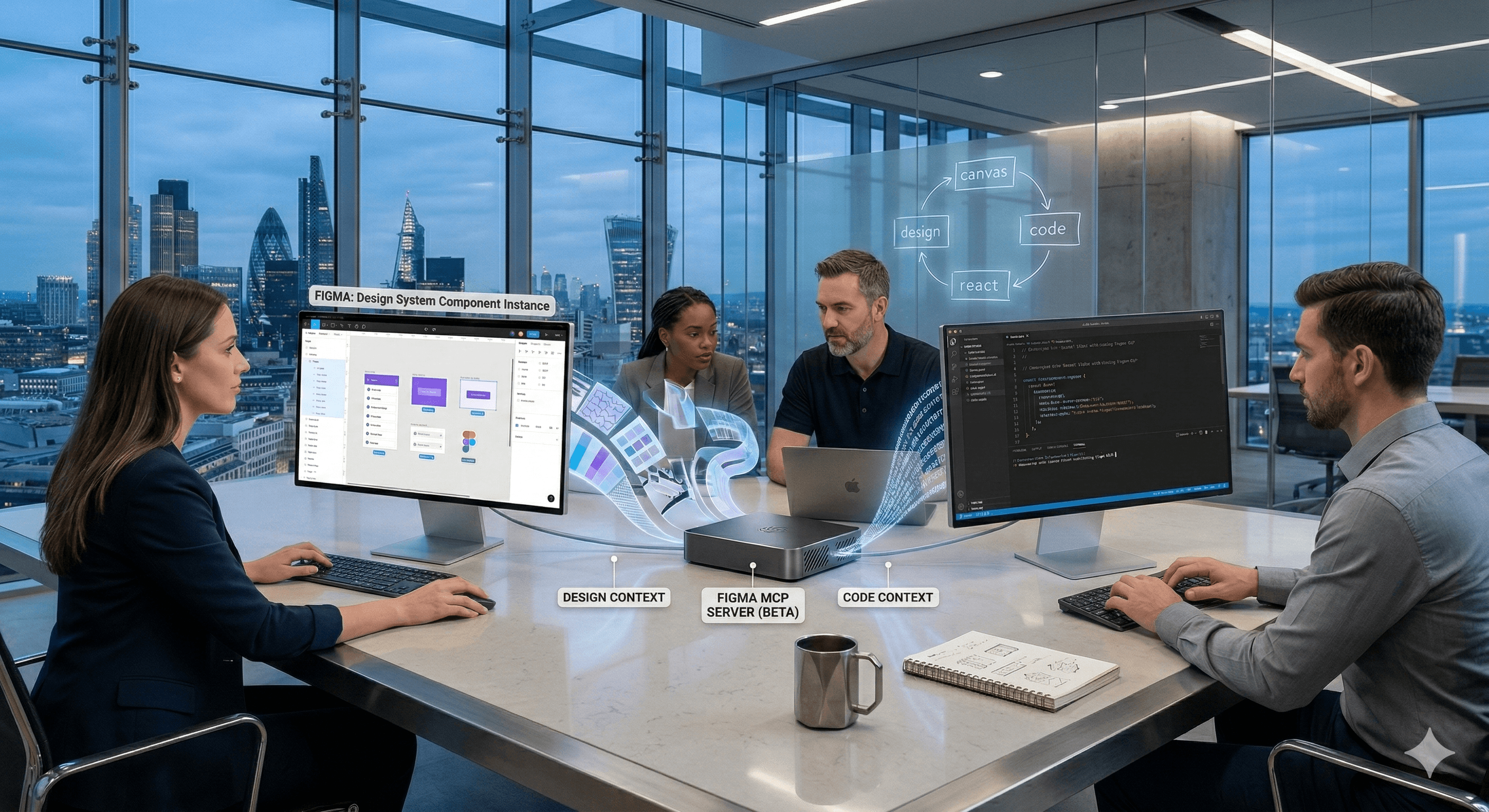
The OpenAI Codex × Figma integration (Codex to Figma) connects Codex to Figma via the Model Context Protocol (MCP) server, enabling teams to move between running UI/code and the Figma canvas with shared design context. It reduces handoff friction so designers and developers can iterate faster—while keeping access control and review workflows intact.
Design and code drift is one of the quietest causes of rework in product teams. Even with excellent design systems, small UI changes can turn into long feedback loops: translate a design into code, rebuild it, then repeat when the design updates.
On 26 February 2026, OpenAI and Figma announced Codex to Figma, an integration built to close that gap. The goal is practical: let teams work in the environment they prefer—Codex for implementation, Figma for collaboration—without losing context as they move between the two.
What is Codex to Figma?
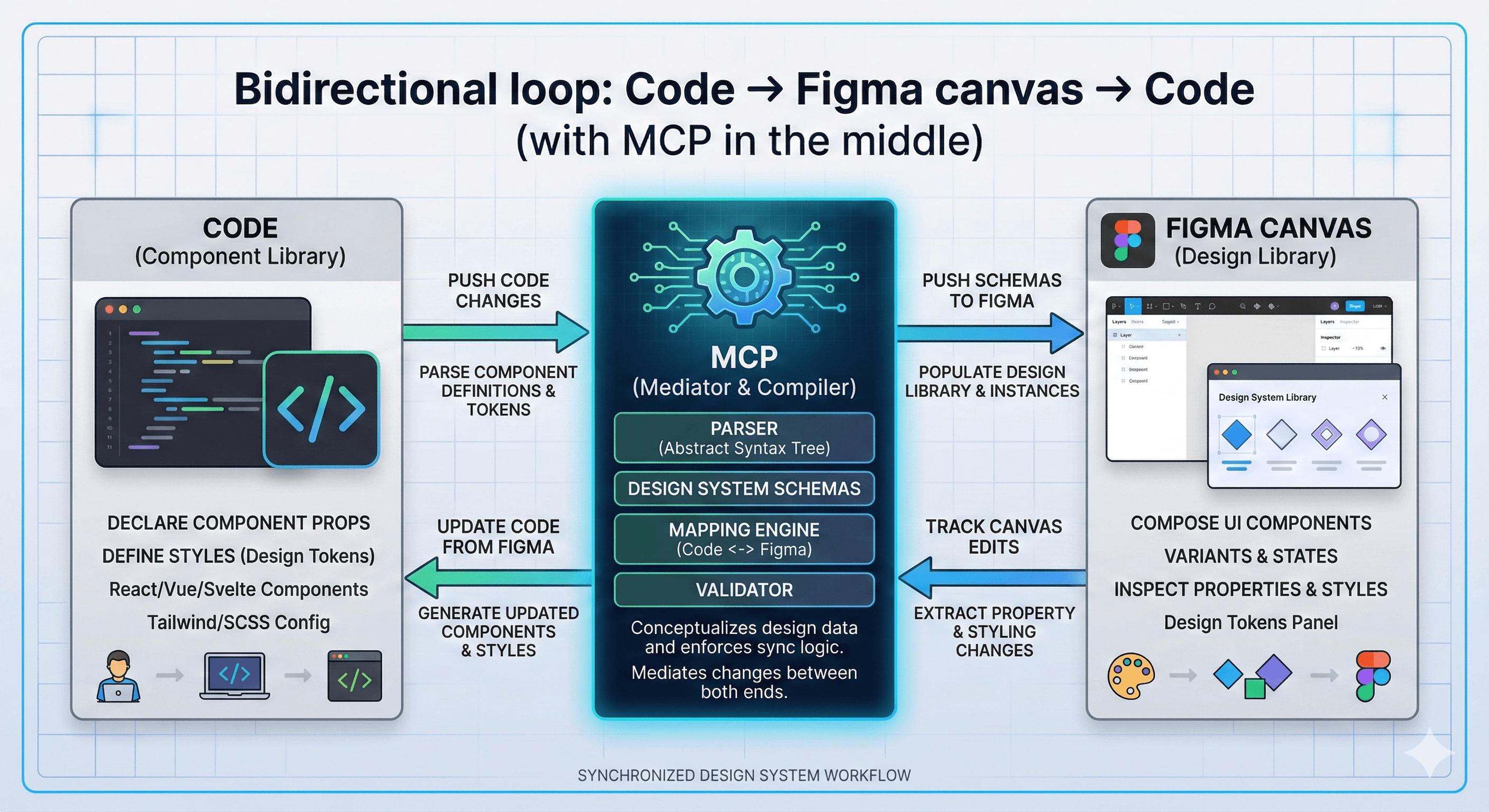
Codex to Figma is an integration that connects OpenAI Codex to Figma through Figma’s MCP (Model Context Protocol) server. In simple terms, MCP provides a structured way for Codex to access Figma context (files, components, properties) so the model can implement UI changes with fewer assumptions.
Rather than treating designs and code as separate artefacts, the integration aims to support a round-trip workflow:
Bring a real, running interface into Figma to review and refine.
Use that design context in Codex to implement changes more accurately.
Iterate quickly with fewer translation steps.
What’s new: how the integration works
The key technical shift is context with structure.
Traditional “design-to-code” flows often rely on screenshots, manual specs, or reverse-engineering spacing and tokens. With MCP, Codex can work from clearer, more explicit design information.
In practice, the integration enables:
1) Shared context between designers and developers
Design decisions live in Figma. Implementation lives in code. Codex to Figma helps the two stay aligned by keeping design context available during implementation tasks.
2) Faster iteration loops
Instead of waiting for a full handoff package, teams can run shorter cycles:
implement → review on canvas → refine → merge
3) Better use of design systems
When your components and tokens are properly defined, the integration becomes more reliable. Codex can reason about what to reuse, what to extend, and what to avoid.
Practical examples you can apply immediately
Here are three low-risk, high-value ways teams are using the pattern.
Example 1: Component clean-up and consistency
Pull a Figma screen and identify inconsistent components.
Ask Codex to replace ad hoc UI with the official design system components.
Review the result in Figma, then ship the patch.
Example 2: Design-token alignment
Update tokens (colours, spacing, typography) in the design system.
Use Codex with Figma context to apply token changes across the codebase.
Validate visually with a canvas review before merging.
Example 3: UI bug triage with visual confirmation
Bring a running UI state into Figma for collaborative review.
Use Codex to diagnose the bug and propose a fix.
Confirm the fix matches the intended design, then release.
How to implement Codex to Figma in a team
A safe rollout is less about the integration itself and more about how you control access and change.
Step 1: Start with one UI flow
Choose a contained feature (checkout step, settings page, onboarding screen). Measure:
cycle time
number of review loops
rework rate
Step 2: Lock down permissions
Treat design access and repo access as privileged.
SSO + MFA
role-based permissions (who can read which files)
least-privilege scope for repositories and Figma projects
Step 3: Define review checkpoints
Even with better context, you still need human review:
design approval before merge
code review in PR
accessibility checks
Step 4: Standardise how you prompt the workflow
Provide:
which design system to use
token rules
constraints (don’t introduce new dependencies, don’t change layout semantics)
acceptance criteria (pixel tolerance, a11y requirements)
Common pitfalls (and how to avoid them)
Pitfall 1: Weak design system foundations
If components and tokens aren’t consistent, the model has fewer reliable anchors. Tighten your design system first, then scale the integration.
Pitfall 2: Over-automating without approvals
Connecting tools to code and design creates power. Keep human-in-the-loop checks for:
brand-critical UI
accessibility changes
production deployments
Pitfall 3: Assuming “code-to-design” equals “one-click production”
This is an iteration accelerator, not an excuse to skip engineering discipline. Treat outputs like any other change: review, test, and measure.
What this means for enterprise teams
For larger organisations, the integration is most valuable when paired with governance:
clear ownership of design systems
permissions and access reviews
audit logging of actions
defined escalation paths when something goes wrong
Done well, it reduces the friction between design and implementation without compromising control.
Summary
Codex to Figma connects OpenAI Codex and Figma through MCP so teams can iterate between running code and the design canvas with shared context. The result is faster UI delivery, fewer translation steps, and tighter collaboration—especially when your design system and review workflows are mature.
Next steps (with Generation Digital)
Generation Digital can help you:
choose the best pilot workflow and define success metrics
configure secure access (SSO, RBAC, scopes) across design + code
create standard operating procedures for review and approvals
build an evaluation framework to measure speed, quality, and risk
FAQs
Q1: What is the primary benefit of the Codex–Figma integration?
It reduces handoff friction by letting teams move between implementation and the Figma canvas with shared context, so UI changes require fewer manual translations.
Q2: Does Codex automatically convert any code into perfect Figma designs?
Not reliably as a one-click guarantee. The strongest value is in the round-trip workflow: bringing UI into Figma for review and using structured design context to implement changes more accurately.
Q3: How does it affect collaboration between designers and developers?
It shortens feedback loops by making it easier to review working UI on the canvas and implement design-informed changes without losing context.
Q4: Can it speed up product launches?
Yes—particularly for teams with a mature design system—by reducing rework and accelerating iteration between design review and code changes.
Q5: Is there a learning curve?
Typically minimal, but teams get the best results by standardising prompts, defining constraints, and setting clear review checkpoints.
The OpenAI Codex × Figma integration (Codex to Figma) connects Codex to Figma via the Model Context Protocol (MCP) server, enabling teams to move between running UI/code and the Figma canvas with shared design context. It reduces handoff friction so designers and developers can iterate faster—while keeping access control and review workflows intact.
Design and code drift is one of the quietest causes of rework in product teams. Even with excellent design systems, small UI changes can turn into long feedback loops: translate a design into code, rebuild it, then repeat when the design updates.
On 26 February 2026, OpenAI and Figma announced Codex to Figma, an integration built to close that gap. The goal is practical: let teams work in the environment they prefer—Codex for implementation, Figma for collaboration—without losing context as they move between the two.
What is Codex to Figma?
Codex to Figma is an integration that connects OpenAI Codex to Figma through Figma’s MCP (Model Context Protocol) server. In simple terms, MCP provides a structured way for Codex to access Figma context (files, components, properties) so the model can implement UI changes with fewer assumptions.
Rather than treating designs and code as separate artefacts, the integration aims to support a round-trip workflow:
Bring a real, running interface into Figma to review and refine.
Use that design context in Codex to implement changes more accurately.
Iterate quickly with fewer translation steps.
What’s new: how the integration works
The key technical shift is context with structure.
Traditional “design-to-code” flows often rely on screenshots, manual specs, or reverse-engineering spacing and tokens. With MCP, Codex can work from clearer, more explicit design information.
In practice, the integration enables:
1) Shared context between designers and developers
Design decisions live in Figma. Implementation lives in code. Codex to Figma helps the two stay aligned by keeping design context available during implementation tasks.
2) Faster iteration loops
Instead of waiting for a full handoff package, teams can run shorter cycles:
implement → review on canvas → refine → merge
3) Better use of design systems
When your components and tokens are properly defined, the integration becomes more reliable. Codex can reason about what to reuse, what to extend, and what to avoid.
Practical examples you can apply immediately
Here are three low-risk, high-value ways teams are using the pattern.
Example 1: Component clean-up and consistency
Pull a Figma screen and identify inconsistent components.
Ask Codex to replace ad hoc UI with the official design system components.
Review the result in Figma, then ship the patch.
Example 2: Design-token alignment
Update tokens (colours, spacing, typography) in the design system.
Use Codex with Figma context to apply token changes across the codebase.
Validate visually with a canvas review before merging.
Example 3: UI bug triage with visual confirmation
Bring a running UI state into Figma for collaborative review.
Use Codex to diagnose the bug and propose a fix.
Confirm the fix matches the intended design, then release.
How to implement Codex to Figma in a team
A safe rollout is less about the integration itself and more about how you control access and change.
Step 1: Start with one UI flow
Choose a contained feature (checkout step, settings page, onboarding screen). Measure:
cycle time
number of review loops
rework rate
Step 2: Lock down permissions
Treat design access and repo access as privileged.
SSO + MFA
role-based permissions (who can read which files)
least-privilege scope for repositories and Figma projects
Step 3: Define review checkpoints
Even with better context, you still need human review:
design approval before merge
code review in PR
accessibility checks
Step 4: Standardise how you prompt the workflow
Provide:
which design system to use
token rules
constraints (don’t introduce new dependencies, don’t change layout semantics)
acceptance criteria (pixel tolerance, a11y requirements)
Common pitfalls (and how to avoid them)
Pitfall 1: Weak design system foundations
If components and tokens aren’t consistent, the model has fewer reliable anchors. Tighten your design system first, then scale the integration.
Pitfall 2: Over-automating without approvals
Connecting tools to code and design creates power. Keep human-in-the-loop checks for:
brand-critical UI
accessibility changes
production deployments
Pitfall 3: Assuming “code-to-design” equals “one-click production”
This is an iteration accelerator, not an excuse to skip engineering discipline. Treat outputs like any other change: review, test, and measure.
What this means for enterprise teams
For larger organisations, the integration is most valuable when paired with governance:
clear ownership of design systems
permissions and access reviews
audit logging of actions
defined escalation paths when something goes wrong
Done well, it reduces the friction between design and implementation without compromising control.
Summary
Codex to Figma connects OpenAI Codex and Figma through MCP so teams can iterate between running code and the design canvas with shared context. The result is faster UI delivery, fewer translation steps, and tighter collaboration—especially when your design system and review workflows are mature.
Next steps (with Generation Digital)
Generation Digital can help you:
choose the best pilot workflow and define success metrics
configure secure access (SSO, RBAC, scopes) across design + code
create standard operating procedures for review and approvals
build an evaluation framework to measure speed, quality, and risk
FAQs
Q1: What is the primary benefit of the Codex–Figma integration?
It reduces handoff friction by letting teams move between implementation and the Figma canvas with shared context, so UI changes require fewer manual translations.
Q2: Does Codex automatically convert any code into perfect Figma designs?
Not reliably as a one-click guarantee. The strongest value is in the round-trip workflow: bringing UI into Figma for review and using structured design context to implement changes more accurately.
Q3: How does it affect collaboration between designers and developers?
It shortens feedback loops by making it easier to review working UI on the canvas and implement design-informed changes without losing context.
Q4: Can it speed up product launches?
Yes—particularly for teams with a mature design system—by reducing rework and accelerating iteration between design review and code changes.
Q5: Is there a learning curve?
Typically minimal, but teams get the best results by standardising prompts, defining constraints, and setting clear review checkpoints.
Recevez chaque semaine des nouvelles et des conseils sur l'IA directement dans votre boîte de réception
En vous abonnant, vous consentez à ce que Génération Numérique stocke et traite vos informations conformément à notre politique de confidentialité. Vous pouvez lire la politique complète sur gend.co/privacy.

Génération
Numérique

Bureau du Royaume-Uni
Génération Numérique Ltée
33 rue Queen,
Londres
EC4R 1AP
Royaume-Uni
Bureau au Canada
Génération Numérique Amériques Inc
181 rue Bay, Suite 1800
Toronto, ON, M5J 2T9
Canada
Bureau aux États-Unis
Generation Digital Americas Inc
77 Sands St,
Brooklyn, NY 11201,
États-Unis
Bureau de l'UE
Génération de logiciels numériques
Bâtiment Elgee
Dundalk
A91 X2R3
Irlande
Bureau du Moyen-Orient
6994 Alsharq 3890,
An Narjis,
Riyad 13343,
Arabie Saoudite

Numéro d'entreprise : 256 9431 77 | Droits d'auteur 2026 | Conditions générales | Politique de confidentialité
Génération
Numérique

Bureau du Royaume-Uni
Génération Numérique Ltée
33 rue Queen,
Londres
EC4R 1AP
Royaume-Uni
Bureau au Canada
Génération Numérique Amériques Inc
181 rue Bay, Suite 1800
Toronto, ON, M5J 2T9
Canada
Bureau aux États-Unis
Generation Digital Americas Inc
77 Sands St,
Brooklyn, NY 11201,
États-Unis
Bureau de l'UE
Génération de logiciels numériques
Bâtiment Elgee
Dundalk
A91 X2R3
Irlande
Bureau du Moyen-Orient
6994 Alsharq 3890,
An Narjis,
Riyad 13343,
Arabie Saoudite

Numéro d'entreprise : 256 9431 77
Conditions générales
Politique de confidentialité
Droit d'auteur 2026