Claude Skills The Enterprise Guide. Patterns, Templates, and Governance

Claude Skills The Enterprise Guide. Patterns, Templates, and Governance

Claude

30 ene 2026

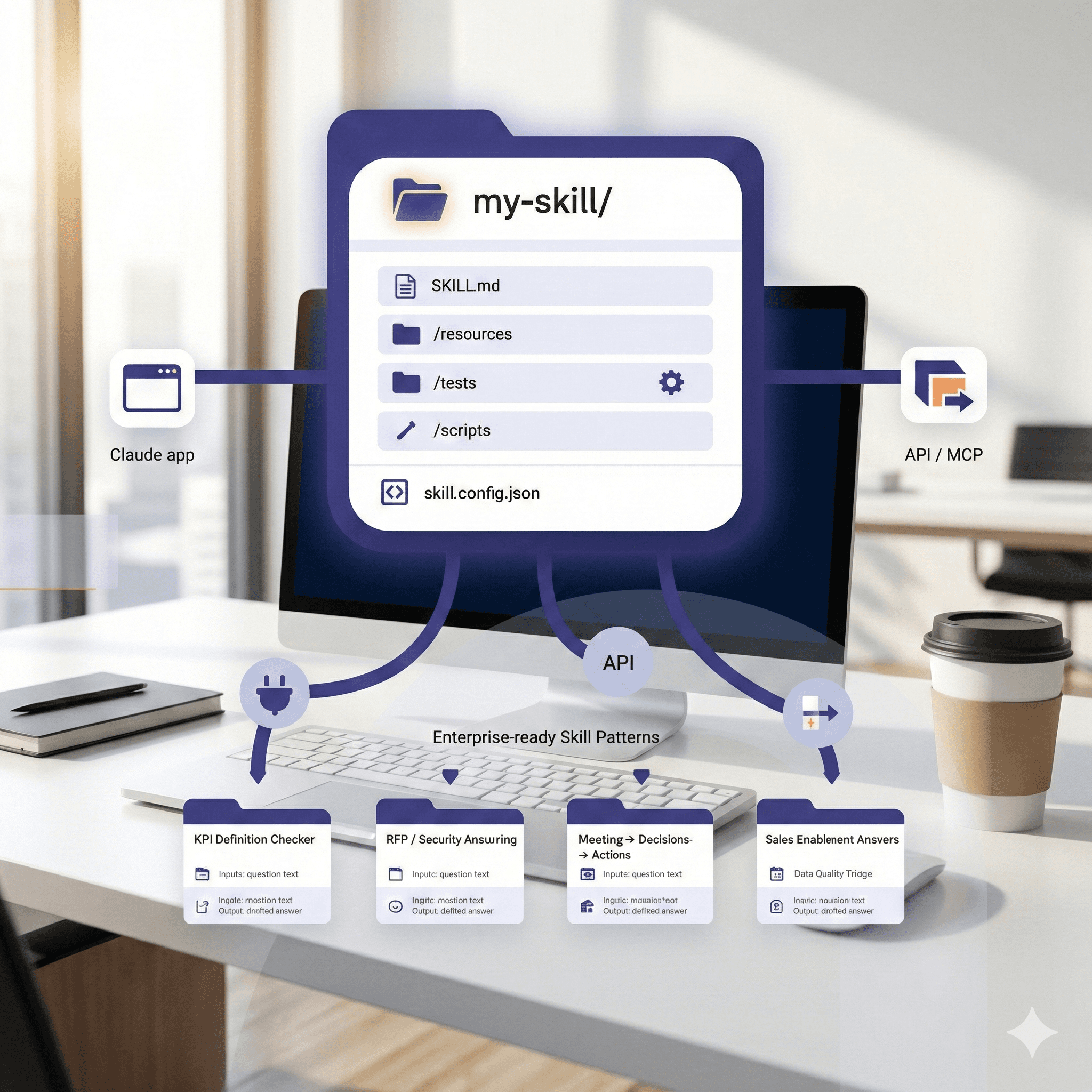
The image shows a stylized diagram of a skill management interface titled "my-skill" on a computer screen, featuring an organized display with folder icons, surrounded by a network of connected icons representing "Claude app," "API / MCP," and various skill patterns like "KPI Definition Checker," "RFP / Security Assurance," and "Sales Enablement Answers," set against a modern office background.

Not sure what to do next with AI?
Assess readiness, risk, and priorities in under an hour.

Not sure what to do next with AI?
Assess readiness, risk, and priorities in under an hour.

➔ Reserva una Consulta

Claude Skills are folders that package instructions, resources, and (optionally) scripts so Claude can perform repeatable workflows on command. Use Skills to standardise prompts, encode domain rules, and connect tools—then test, version, and share them across teams. This guide distils Anthropic’s latest advice into a pragmatic, enterprise-ready playbook.

Why this guide

Anthropic’s new guide clarifies how to structure, test, and distribute Skills—including how they pair with MCP and the API. Below we translate that into repeatable steps, templates, and governance so your teams get consistency without chaos.

What is a Claude Skill?

A Skill is a small, versioned package (a folder) that Claude can discover and load. At minimum, it includes:

  • SKILL.md — the authoritative behaviour and usage instructions.

  • Optional resources — examples, schemas, prompt snippets, reference docs.

  • Optional tools/scripts — invoked via code execution/API where safe.

Think of Skills as reusable playbooks Claude can follow, rather than one-off prompts buried in chats.

Skill anatomy (template)


SKILL.md starter


Setup paths (choose your lane)

  1. Claude app (no code) — Enable Skills in Settings → Capabilities. Use Skill Creator to scaffold, test with sample inputs, then publish to your workspace/team.

  2. API — Use Skills with the Claude API; keep code execution on for script-aware Skills; manage versions via Git and your CI.

  3. MCP + Skills — Combine vendor-neutral tool adapters (MCP) with Skills packaging for context and behaviour. Treat MCP as the plumbing, Skills as the playbook.

Five enterprise-ready Skill patterns

  1. KPI Definition Checker
    Use when: numbers drift across teams.
    Inputs: metric name, time window.
    Output: definition, SQL/logic snippet, owner, freshness, caveats.
    Guardrail: block if source freshness > threshold; require citation links.

  2. RFP / Security Answering
    Use when: repetitive questionnaires occur.
    Inputs: question text, product area, sensitivity.
    Output: drafted answer + citations to approved snippets.
    Guardrail: label as [AI-DRAFT]; route to reviewer before external send.

  3. Meeting → Decisions → Actions
    Use when: outcomes get lost.
    Inputs: notes/transcript, project key.
    Output: decisions list, action items (owner, due date).
    Guardrail: never assign externally; require human confirm.

  4. Data Quality Triage
    Use when: incident noise overwhelms data teams.
    Inputs: failed tests list; dataset lineage.
    Output: prioritised triage with suspected root causes and owners.
    Guardrail: read-only; link to runbooks; no destructive ops.

  5. Sales Enablement Answers
    Use when: sales repeats tech explanations.
    Inputs: question, vertical, product tier.
    Output: 200-word answer + optional 1-slide Artifact draft.
    Guardrail: stop words for pricing/legal; escalate to specialist.

Testing: make Skills trustworthy

  • Golden tests: put real inputs in /tests with expected outputs. Run them after edits.

  • Mutation tests: fuzz inputs (typos, missing fields) and assert safe failures.

  • Regression gates: block publish if any tests fail or outputs lose required fields/citations.

  • Human review: mandate at least one domain approver for risk-tier ≥ Medium.

Versioning & distribution

  • Semantic versions (1.2.0), changelog in SKILL.md.

  • Owners + backup owner in skill.config.json.

  • Publish channels: Team, Workspace, Org. Start small, then graduate.

  • Deprecation policy: auto-warning in the Skill description; sunset date.

Governance & risk

  • Data minimisation: keep PII out of inputs unless policy-approved.

  • Provenance: require citations to approved sources for factual outputs.

  • Execution safety: restrict scripts to helpers (format/validate). No external writes without explicit allow-list.

  • Observability: log usage, errors, and reviewer overrides to a central dashboard.

  • Licensing: ensure any embedded content is cleared for internal use.

Prompts you can paste

Author brief

“You are a Skill architect. Create SKILL.md for a {skill}. Define inputs/outputs precisely, list guardrails, and propose 5 examples with expected outputs.”

Test generator

“Given this SKILL.md, generate golden tests for common and edge cases as JSON records to store under /tests.”

Risk review

“Assess this skill against our policy. Flag PII risks, external calls, and escalation points. Suggest guardrails and default refusals.”

Example: SKILL.md for “KPI Definition Checker”


Rollout plan (14 days)

Days 1–2: pick three skills (low/medium risk) and owners.
Days 3–5: author SKILL.md and resources; scaffold with Skill Creator.
Days 6–7: write golden + mutation tests.
Days 8–10: pilot with 10 users; capture issues.
Days 11–12: add guardrails and version 1.0.0.
Days 13–14: publish to the Team channel; create a simple usage dashboard.

FAQs

Are Skills available to all plans?
Yes—Skills are available broadly in Claude (with code execution enabled); API users can use Skills via the platform docs. Check tenant controls for enterprise rollout.

Skills vs MCP vs Artifacts?

  • Skills package behaviour + resources.

  • MCP provides tool adapters (plumbing).

  • Artifacts are outputs you can open/edit (docs, apps). Use Skills to create consistent Artifacts.

How do we prevent drift?
Keep Skills in Git, with owners and tests. Treat SKILL.md as a mini-spec; changes require review.

Can Skills call external systems?
Only via approved connectors and within your guardrails; prefer read-only and human-confirmed writes.

Next Steps

Want a Skills starter pack for your org?
We’ll co-author three production-ready Skills with tests and guardrails, wire them to your stack, and train your team to maintain them.

Claude Skills are folders that package instructions, resources, and (optionally) scripts so Claude can perform repeatable workflows on command. Use Skills to standardise prompts, encode domain rules, and connect tools—then test, version, and share them across teams. This guide distils Anthropic’s latest advice into a pragmatic, enterprise-ready playbook.

Why this guide

Anthropic’s new guide clarifies how to structure, test, and distribute Skills—including how they pair with MCP and the API. Below we translate that into repeatable steps, templates, and governance so your teams get consistency without chaos.

What is a Claude Skill?

A Skill is a small, versioned package (a folder) that Claude can discover and load. At minimum, it includes:

  • SKILL.md — the authoritative behaviour and usage instructions.

  • Optional resources — examples, schemas, prompt snippets, reference docs.

  • Optional tools/scripts — invoked via code execution/API where safe.

Think of Skills as reusable playbooks Claude can follow, rather than one-off prompts buried in chats.

Skill anatomy (template)


SKILL.md starter


Setup paths (choose your lane)

  1. Claude app (no code) — Enable Skills in Settings → Capabilities. Use Skill Creator to scaffold, test with sample inputs, then publish to your workspace/team.

  2. API — Use Skills with the Claude API; keep code execution on for script-aware Skills; manage versions via Git and your CI.

  3. MCP + Skills — Combine vendor-neutral tool adapters (MCP) with Skills packaging for context and behaviour. Treat MCP as the plumbing, Skills as the playbook.

Five enterprise-ready Skill patterns

  1. KPI Definition Checker
    Use when: numbers drift across teams.
    Inputs: metric name, time window.
    Output: definition, SQL/logic snippet, owner, freshness, caveats.
    Guardrail: block if source freshness > threshold; require citation links.

  2. RFP / Security Answering
    Use when: repetitive questionnaires occur.
    Inputs: question text, product area, sensitivity.
    Output: drafted answer + citations to approved snippets.
    Guardrail: label as [AI-DRAFT]; route to reviewer before external send.

  3. Meeting → Decisions → Actions
    Use when: outcomes get lost.
    Inputs: notes/transcript, project key.
    Output: decisions list, action items (owner, due date).
    Guardrail: never assign externally; require human confirm.

  4. Data Quality Triage
    Use when: incident noise overwhelms data teams.
    Inputs: failed tests list; dataset lineage.
    Output: prioritised triage with suspected root causes and owners.
    Guardrail: read-only; link to runbooks; no destructive ops.

  5. Sales Enablement Answers
    Use when: sales repeats tech explanations.
    Inputs: question, vertical, product tier.
    Output: 200-word answer + optional 1-slide Artifact draft.
    Guardrail: stop words for pricing/legal; escalate to specialist.

Testing: make Skills trustworthy

  • Golden tests: put real inputs in /tests with expected outputs. Run them after edits.

  • Mutation tests: fuzz inputs (typos, missing fields) and assert safe failures.

  • Regression gates: block publish if any tests fail or outputs lose required fields/citations.

  • Human review: mandate at least one domain approver for risk-tier ≥ Medium.

Versioning & distribution

  • Semantic versions (1.2.0), changelog in SKILL.md.

  • Owners + backup owner in skill.config.json.

  • Publish channels: Team, Workspace, Org. Start small, then graduate.

  • Deprecation policy: auto-warning in the Skill description; sunset date.

Governance & risk

  • Data minimisation: keep PII out of inputs unless policy-approved.

  • Provenance: require citations to approved sources for factual outputs.

  • Execution safety: restrict scripts to helpers (format/validate). No external writes without explicit allow-list.

  • Observability: log usage, errors, and reviewer overrides to a central dashboard.

  • Licensing: ensure any embedded content is cleared for internal use.

Prompts you can paste

Author brief

“You are a Skill architect. Create SKILL.md for a {skill}. Define inputs/outputs precisely, list guardrails, and propose 5 examples with expected outputs.”

Test generator

“Given this SKILL.md, generate golden tests for common and edge cases as JSON records to store under /tests.”

Risk review

“Assess this skill against our policy. Flag PII risks, external calls, and escalation points. Suggest guardrails and default refusals.”

Example: SKILL.md for “KPI Definition Checker”


Rollout plan (14 days)

Days 1–2: pick three skills (low/medium risk) and owners.
Days 3–5: author SKILL.md and resources; scaffold with Skill Creator.
Days 6–7: write golden + mutation tests.
Days 8–10: pilot with 10 users; capture issues.
Days 11–12: add guardrails and version 1.0.0.
Days 13–14: publish to the Team channel; create a simple usage dashboard.

FAQs

Are Skills available to all plans?
Yes—Skills are available broadly in Claude (with code execution enabled); API users can use Skills via the platform docs. Check tenant controls for enterprise rollout.

Skills vs MCP vs Artifacts?

  • Skills package behaviour + resources.

  • MCP provides tool adapters (plumbing).

  • Artifacts are outputs you can open/edit (docs, apps). Use Skills to create consistent Artifacts.

How do we prevent drift?
Keep Skills in Git, with owners and tests. Treat SKILL.md as a mini-spec; changes require review.

Can Skills call external systems?
Only via approved connectors and within your guardrails; prefer read-only and human-confirmed writes.

Next Steps

Want a Skills starter pack for your org?
We’ll co-author three production-ready Skills with tests and guardrails, wire them to your stack, and train your team to maintain them.

Recibe consejos prácticos directamente en tu bandeja de entrada

Al suscribirte, das tu consentimiento para que Generation Digital almacene y procese tus datos de acuerdo con nuestra política de privacidad. Puedes leer la política completa en gend.co/privacy.


¿Listo para obtener el apoyo que su organización necesita para usar la IA con éxito?

Miro Solutions Partner
Asana Platinum Solutions Partner
Notion Platinum Solutions Partner
Glean Certified Partner

¿Listo para obtener el apoyo que su organización necesita para usar la IA con éxito?

Miro Solutions Partner
Asana Platinum Solutions Partner
Notion Platinum Solutions Partner
Glean Certified Partner

Generación
Digital

Oficina en el Reino Unido
33 Queen St,
Londres
EC4R 1AP
Reino Unido

Oficina en Canadá
1 University Ave,
Toronto,
ON M5J 1T1,
Canadá

Oficina NAMER
77 Sands St,
Brooklyn,
NY 11201,
Estados Unidos

Oficina EMEA
Calle Charlemont, Saint Kevin's, Dublín,
D02 VN88,
Irlanda

Oficina en Medio Oriente
6994 Alsharq 3890,
An Narjis,
Riyadh 13343,
Arabia Saudita

UK Fast Growth Index UBS Logo
Financial Times FT 1000 Logo
Febe Growth 100 Logo (Background Removed)

Número de la empresa: 256 9431 77 | Derechos de autor 2026 | Términos y Condiciones | Política de Privacidad

Generación
Digital

Oficina en el Reino Unido
33 Queen St,
Londres
EC4R 1AP
Reino Unido

Oficina en Canadá
1 University Ave,
Toronto,
ON M5J 1T1,
Canadá

Oficina NAMER
77 Sands St,
Brooklyn,
NY 11201,
Estados Unidos

Oficina EMEA
Calle Charlemont, Saint Kevin's, Dublín,
D02 VN88,
Irlanda

Oficina en Medio Oriente
6994 Alsharq 3890,
An Narjis,
Riyadh 13343,
Arabia Saudita

UK Fast Growth Index UBS Logo
Financial Times FT 1000 Logo
Febe Growth 100 Logo (Background Removed)


Número de Empresa: 256 9431 77
Términos y Condiciones
Política de Privacidad
Derechos de Autor 2026