Claude Skills The Business Guide - Patterns, Templates, and Management
Claude
Uncertain about how to get started with AI?Evaluate your readiness, potential risks, and key priorities in less than an hour.
➔ Download Our Free AI Preparedness Pack
Claude Skills are folders that package instructions, resources, and (optionally) scripts so Claude can perform repeatable workflows on command. Use Skills to standardize prompts, encode domain rules, and connect tools—then test, version, and share them across teams. This guide distills Anthropic’s latest advice into a pragmatic, business-ready playbook.
Why this guide
Anthropic’s new guide clarifies how to structure, test, and distribute Skills—including how they pair with MCP and the API. Below we translate that into repeatable steps, templates, and governance so your teams get consistency without chaos.
What is a Claude Skill?
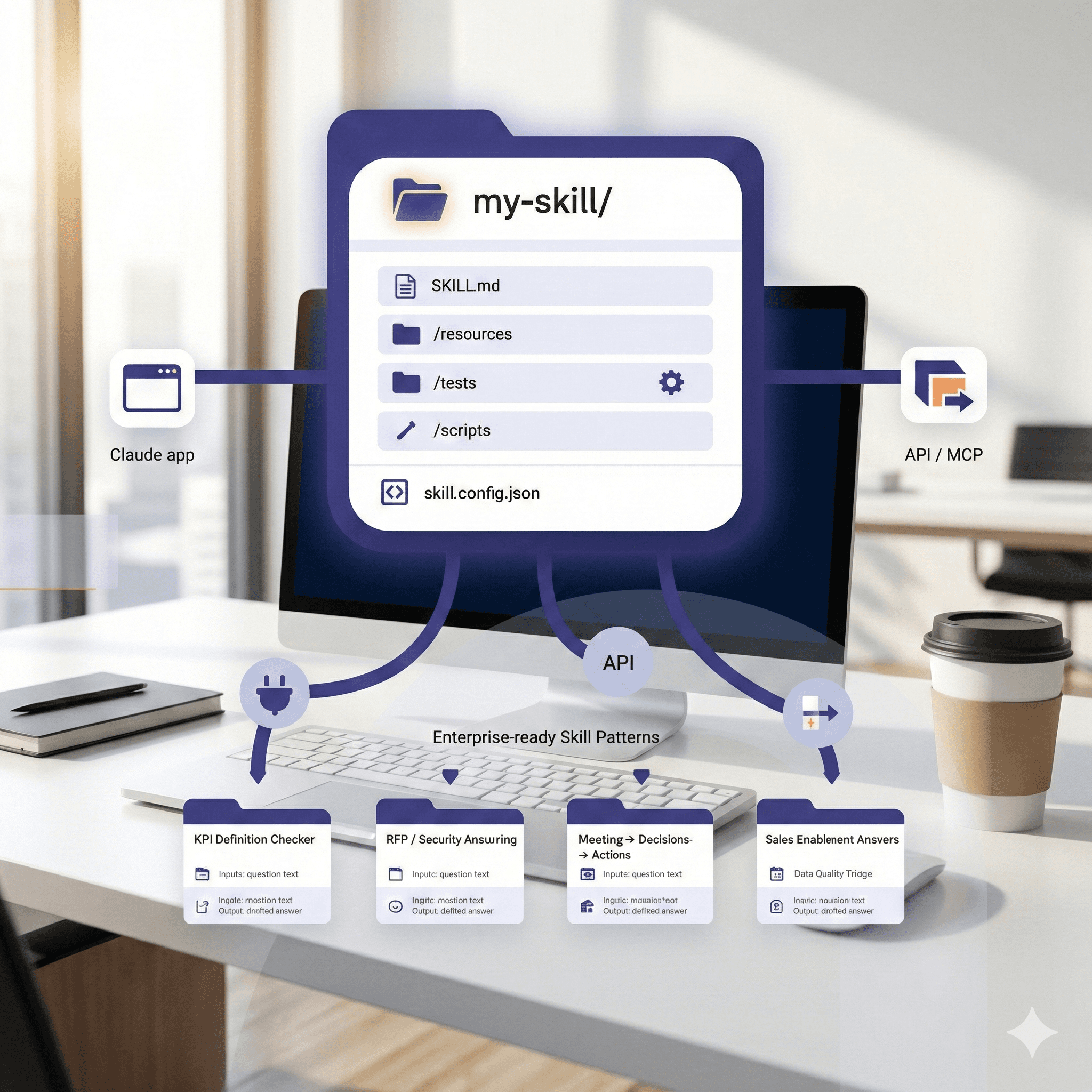
A Skill is a small, versioned package (a folder) that Claude can discover and load. At minimum, it includes:
SKILL.md— the authoritative behavior and usage instructions.Optional resources — examples, schemas, prompt snippets, reference docs.
Optional tools/scripts — invoked via code execution/API where safe.
Think of Skills as reusable playbooks Claude can follow, rather than one-off prompts buried in chats.
Skill anatomy (template)
SKILL.md starter
Setup paths (choose your lane)
Claude app (no code) — Enable Skills in Settings → Capabilities. Use Skill Creator to scaffold, test with sample inputs, then publish to your workspace/team.
API — Use Skills with the Claude API; keep code execution on for script-aware Skills; manage versions via Git and your CI.
MCP + Skills — Combine vendor-neutral tool adapters (MCP) with Skills packaging for context and behavior. Treat MCP as the infrastructure, Skills as the playbook.
Five enterprise-ready Skill patterns
KPI Definition Checker
Use when: numbers drift across teams.
Inputs: metric name, time window.
Output: definition, SQL/logic snippet, owner, freshness, caveats.
Guardrail: block if source freshness > threshold; require citation links.RFP / Security Answering
Use when: repetitive questionnaires occur.
Inputs: question text, product area, sensitivity.
Output: drafted answer + citations to approved snippets.
Guardrail: label as[AI-DRAFT]; route to reviewer before external send.Meeting → Decisions → Actions
Use when: outcomes get lost.
Inputs: notes/transcript, project key.
Output: decisions list, action items (owner, due date).
Guardrail: never assign externally; require human confirm.Data Quality Triage
Use when: incident noise overwhelms data teams.
Inputs: failed tests list; dataset lineage.
Output: prioritized triage with suspected root causes and owners.
Guardrail: read-only; link to runbooks; no destructive ops.Sales Enablement Answers
Use when: sales repeats tech explanations.
Inputs: question, vertical, product tier.
Output: 200-word answer + optional 1-slide Artifact draft.
Guardrail: stop words for pricing/legal; escalate to specialist.
Testing: make Skills trustworthy
Golden tests: put real inputs in
/testswith expected outputs. Run them after edits.Mutation tests: fuzz inputs (typos, missing fields) and assert safe failures.
Regression gates: block publish if any tests fail or outputs lose required fields/citations.
Human review: mandate at least one domain approver for risk-tier ≥ Medium.
Versioning & distribution
Semantic versions (
1.2.0), changelog inSKILL.md.Owners + backup owner in
skill.config.json.Publish channels: Team, Workspace, Org. Start small, then expand.
Deprecation policy: auto-warning in the Skill description; sunset date.
Governance & risk
Data minimization: keep PII out of inputs unless policy-approved.
Provenance: require citations to approved sources for factual outputs.
Execution safety: restrict scripts to helpers (format/validate). No external writes without explicit allow-list.
Observability: log usage, errors, and reviewer overrides to a central dashboard.
Licensing: ensure any embedded content is cleared for internal use.
Prompts you can paste
Author briefing
“You are a Skill architect. Create
SKILL.mdfor a {skill}. Define inputs/outputs precisely, list guardrails, and propose 5 examples with expected outputs.”
Test generator
“Given this
SKILL.md, generate golden tests for common and edge cases as JSON records to store under/tests.”
Risk review
“Assess this skill against our policy. Flag PII risks, external calls, and escalation points. Suggest guardrails and default refusals.”
Example: SKILL.md for “KPI Definition Checker”
Rollout plan (14 days)
Days 1–2: pick three skills (low/medium risk) and owners.
Days 3–5: author SKILL.md and resources; scaffold with Skill Creator.
Days 6–7: write golden + mutation tests.
Days 8–10: pilot with 10 users; capture issues.
Days 11–12: add guardrails and version 1.0.0.
Days 13–14: publish to the Team channel; create a simple usage dashboard.
FAQs
Are Skills available to all plans?
Yes—Skills are available broadly in Claude (with code execution enabled); API users can use Skills via the platform docs. Check tenant controls for enterprise rollout.
Skills vs MCP vs Artifacts?
Skills package behavior + resources.
MCP provides tool adapters (infrastructure).
Artifacts are outputs you can open/edit (docs, apps). Use Skills to create consistent Artifacts.
How do we prevent drift?
Keep Skills in Git, with owners and tests. Treat SKILL.md as a mini-spec; changes require review.
Can Skills call external systems?
Only via approved connectors and within your guardrails; prefer read-only and human-confirmed writes.
Next Steps
Want a Skills starter pack for your organization?
We’ll co-author three production-ready Skills with tests and guardrails, wire them to your stack, and train your team to maintain them.
Receive weekly AI news and advice straight to your inbox
By subscribing, you agree to allow Generation Digital to store and process your information according to our privacy policy. You can review the full policy at gend.co/privacy.



Generation
Digital

Canadian Office
33 Queen St,
Toronto
M5H 2N2
Canada
Canadian Office
1 University Ave,
Toronto,
ON M5J 1T1,
Canada
NAMER Office
77 Sands St,
Brooklyn,
NY 11201,
USA
Head Office
Charlemont St, Saint Kevin's, Dublin,
D02 VN88,
Ireland
Middle East Office
6994 Alsharq 3890,
An Narjis,
Riyadh 13343,
Saudi Arabia







Business Number: 256 9431 77 | Copyright 2026 | Terms and Conditions | Privacy Policy