Knowledge Worker Starter Packs in Notion (2026 Guide)

Knowledge Worker Starter Packs in Notion (2026 Guide)

Conceptual

Feb 24, 2026

A diverse group of professionals in a modern office setting is engaged in a collaborative discussion, with one person presenting a digital project management board on a large screen, while others reference notes on a laptop and tablet, illustrating teamwork and digital organization, relevant to "Knowledge Worker Starter Packs in Notion (2026 Guide)".

Uncertain about how to get started with AI?
Evaluate your readiness, potential risks, and key priorities in less than an hour.

Uncertain about how to get started with AI?
Evaluate your readiness, potential risks, and key priorities in less than an hour.

➔ Download Our Free AI Preparedness Pack

Knowledge worker starter packs are pre-built workspace templates that help teams start fast and stay consistent. In Notion, starter packs typically include a project hub, meeting notes, a knowledge base, onboarding, and a weekly update workflow. With Notion AI and Agents, teams can summarise, search, and automate repeatable work inside the same workspace.

Most teams waste time rebuilding the same systems: a place for projects, somewhere to capture meeting decisions, a “where is that doc?” problem, and a muddled onboarding experience.

Starter packs solve that. They give knowledge workers a standard foundation that’s easy to adopt, easy to maintain, and flexible enough to evolve.

Notion already provides starter packs and templates designed to organise work for individuals and teams. (notion.com) And with Notion AI, Enterprise Search, and custom Agents, those packs can become active systems—not just pages and databases. (notion.com)

Who these starter packs are for

These packs are designed for:

  • teams who want a simple “work operating system” without adding more tools

  • organisations rolling out Notion at scale and needing consistency

  • managers who want repeatable rhythms for 1:1s, updates, and delivery

  • knowledge-heavy teams (ops, product, marketing, professional services, internal comms)

If you’re adopting Notion in an enterprise setting, Generation Digital positions this as a governance-and-adoption exercise as much as a template exercise—permissions, structure, and training matter. (gend.co)

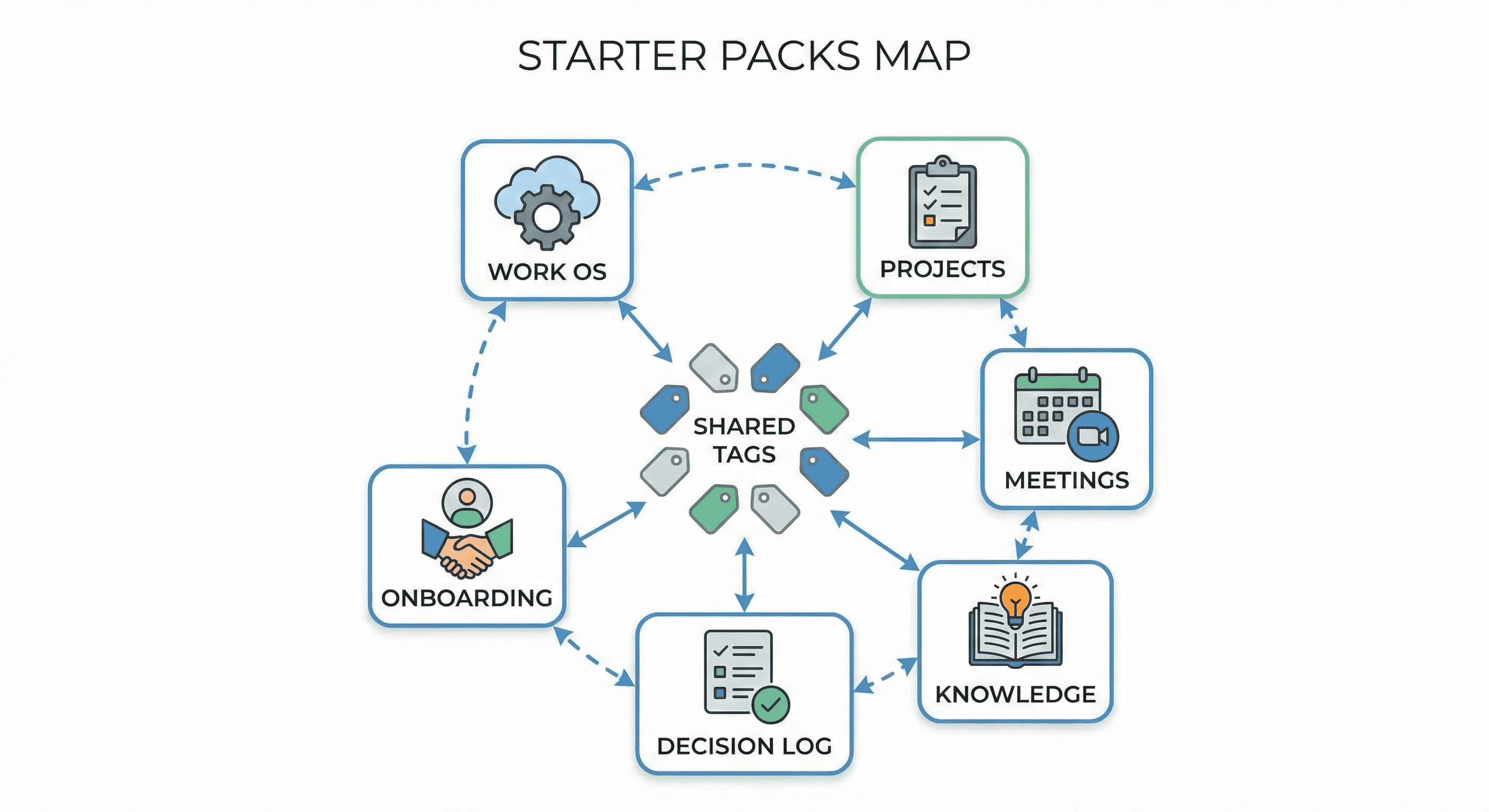
The five starter packs every knowledge worker needs

You can start with thousands of templates. Or you can start with five systems you’ll use every week.
1) Personal Work OS

A simple system for tasks, priorities, and outcomes—without the chaos.

What’s inside
A task database, weekly plan, goals/OKRs (lightweight), and an “accomplishments” log.

Why it works
It turns “busy” into something measurable: what matters this week, what’s blocked, and what shipped.

Notion’s template collections include work-focused starter packs designed for this sort of personal organisation. (notion.com)

2) Project Hub

A shared home for active work: plans, stakeholders, milestones, decisions, and status.

What’s inside
Projects database, linked tasks, risks/issues, and a lightweight RACI-style roles section.

Why it works
It reduces the status-chasing loop. People know where the truth lives, and updates become a habit.

3) Meeting Notes and Decisions

If you only standardise one thing, standardise this.

What’s inside
Agenda template, notes structure, action items, and a decision log linked to projects.

How AI helps
Notion AI is positioned to take notes, summarise, and produce action items right where the meeting artefact lives. (notion.com)

4) Knowledge Hub (Wiki + Playbooks)

A well-structured knowledge hub saves hours because it prevents rework.

What’s inside
Team wiki, playbooks, “how we do things” docs, and a single tagging/taxonomy scheme.

How AI helps
Notion’s guidance on AI-powered knowledge hubs centres on making knowledge accessible through Q&A—so people can ask for answers instead of searching folders. (notion.com)

5) Onboarding Pack

Onboarding is where you feel the cost of poor documentation.

What’s inside
Role-based onboarding checklist, tools and access, “first week” learning path, and links to core playbooks.

Notion provides onboarding templates that can be adapted for teams. (notion.com)

The “Manager Pack” add-on (high impact)

Once the basics are in place, managers usually ask for the same thing: a reliable rhythm.

A Manager Pack typically includes:

  • 1:1 templates with a rolling agenda

  • performance and growth notes

  • team goals and quarterly priorities

  • weekly updates that feed an exec-friendly view

This is where consistency becomes culture.

Adding AI safely: copilots vs agents

A useful way to avoid over-building is to separate two modes:

Copilot workflows (assist a person)
Drafting, summarising, rewriting, extracting action items, and answering questions from known sources.

Agent workflows (complete multi-step work)
Creating and updating pages, generating weekly updates, assembling onboarding packs, or building research briefs—especially when this work repeats.

Notion’s product messaging for AI highlights custom Agents that automate repeat work, plus Enterprise Search across apps. (notion.com)

Generation Digital also notes Agents in Notion can complete multi-step tasks in the workspace, making them suitable for repeatable workflows like onboarding packs, research briefs, and weekly status updates. (gend.co)

Rollout playbook: how to implement starter packs without chaos

Step 1: Decide your “source of truth” rules
Pick which artefacts live in Notion and which stay elsewhere. The goal is fewer duplicates.

Step 2: Build one taxonomy
One tagging approach beats ten inconsistent ones. Use it across projects, docs, and decisions.

Step 3: Permissions before scale
Design who can see what before you roll out widely. This is foundational for trust.

Step 4: Train using real work
Avoid generic training. Teach people how to run their weekly rhythm with the packs.

Step 5: Measure and iterate
Track adoption and outcomes: reduced time to find info, faster onboarding, fewer status meetings.

For organisations under pressure to deliver responsible AI impact, Generation Digital frames this as a structured programme: readiness, prioritisation, design, implementation, then adoption and optimisation. (gend.co)

What to include in each starter pack (a simple checklist)

Each pack should include:

  • a clear “how to use this” page

  • a small number of databases (avoid database sprawl)

  • a naming convention and tags

  • templates for repeatable pages (briefs, notes, updates)

  • example content so it doesn’t feel empty

Common pitfalls (and how to avoid them)

Pitfall: Too many templates on day one
Start with the five packs, then expand only when demand is proven.

Pitfall: Wiki becomes a dumping ground
Assign ownership, review cycles, and a simple structure.

Pitfall: AI is added without guardrails
Define what content is safe for AI use, set review rules, and standardise good prompting.

The UK government’s AI labour market survey highlights widespread skills gaps—reinforcing why enablement and training matter, not just tooling. (gov.uk)

Next steps

If you want to move quickly, start with one team and one rhythm.

  1. Build the Project Hub + Meeting Notes pack first.

  2. Add a Knowledge Hub once project work is flowing.

  3. Create an Onboarding Pack so new starters land well.

  4. Layer in Notion AI copilots, then graduate to Agents for repeat workflows.

If you want help designing these packs for scale—architecture, permissions, governance, and adoption—Generation Digital’s Notion partner services cover setup, workflows, templates, training, and AI integration. (gend.co)

FAQ

1) What is a knowledge worker starter pack?
A starter pack is a ready-to-use set of templates and databases that cover common work patterns—projects, meetings, docs, onboarding, and weekly updates—so teams don’t start from scratch.

2) Do Notion starter packs work for teams or just individuals?
Both. Notion provides starter packs aimed at individuals and teams, and they’re designed to be adapted into a shared workspace with consistent templates. (notion.com)

3) What’s the difference between Notion AI and Notion Agents?
Notion AI supports assistance tasks like summarising and writing. Agents are designed to automate repeat workflows and take actions in your workspace. (notion.com)

4) What should we build first in Notion?
Start with a Project Hub and Meeting Notes. Those create immediate value and reduce coordination overhead.

5) How do we roll starter packs out safely in an enterprise?
Define source-of-truth rules, permissions, and a shared taxonomy before scaling. Then train people using real workflows.

Knowledge worker starter packs are pre-built workspace templates that help teams start fast and stay consistent. In Notion, starter packs typically include a project hub, meeting notes, a knowledge base, onboarding, and a weekly update workflow. With Notion AI and Agents, teams can summarise, search, and automate repeatable work inside the same workspace.

Most teams waste time rebuilding the same systems: a place for projects, somewhere to capture meeting decisions, a “where is that doc?” problem, and a muddled onboarding experience.

Starter packs solve that. They give knowledge workers a standard foundation that’s easy to adopt, easy to maintain, and flexible enough to evolve.

Notion already provides starter packs and templates designed to organise work for individuals and teams. (notion.com) And with Notion AI, Enterprise Search, and custom Agents, those packs can become active systems—not just pages and databases. (notion.com)

Who these starter packs are for

These packs are designed for:

  • teams who want a simple “work operating system” without adding more tools

  • organisations rolling out Notion at scale and needing consistency

  • managers who want repeatable rhythms for 1:1s, updates, and delivery

  • knowledge-heavy teams (ops, product, marketing, professional services, internal comms)

If you’re adopting Notion in an enterprise setting, Generation Digital positions this as a governance-and-adoption exercise as much as a template exercise—permissions, structure, and training matter. (gend.co)

The five starter packs every knowledge worker needs

You can start with thousands of templates. Or you can start with five systems you’ll use every week.

1) Personal Work OS

A simple system for tasks, priorities, and outcomes—without the chaos.

What’s inside
A task database, weekly plan, goals/OKRs (lightweight), and an “accomplishments” log.

Why it works
It turns “busy” into something measurable: what matters this week, what’s blocked, and what shipped.

Notion’s template collections include work-focused starter packs designed for this sort of personal organisation. (notion.com)

2) Project Hub

A shared home for active work: plans, stakeholders, milestones, decisions, and status.

What’s inside
Projects database, linked tasks, risks/issues, and a lightweight RACI-style roles section.

Why it works
It reduces the status-chasing loop. People know where the truth lives, and updates become a habit.

3) Meeting Notes and Decisions

If you only standardise one thing, standardise this.

What’s inside
Agenda template, notes structure, action items, and a decision log linked to projects.

How AI helps
Notion AI is positioned to take notes, summarise, and produce action items right where the meeting artefact lives. (notion.com)

4) Knowledge Hub (Wiki + Playbooks)

A well-structured knowledge hub saves hours because it prevents rework.

What’s inside
Team wiki, playbooks, “how we do things” docs, and a single tagging/taxonomy scheme.

How AI helps
Notion’s guidance on AI-powered knowledge hubs centres on making knowledge accessible through Q&A—so people can ask for answers instead of searching folders. (notion.com)

5) Onboarding Pack

Onboarding is where you feel the cost of poor documentation.

What’s inside
Role-based onboarding checklist, tools and access, “first week” learning path, and links to core playbooks.

Notion provides onboarding templates that can be adapted for teams. (notion.com)

The “Manager Pack” add-on (high impact)

Once the basics are in place, managers usually ask for the same thing: a reliable rhythm.

A Manager Pack typically includes:

  • 1:1 templates with a rolling agenda

  • performance and growth notes

  • team goals and quarterly priorities

  • weekly updates that feed an exec-friendly view

This is where consistency becomes culture.

Adding AI safely: copilots vs agents

A useful way to avoid over-building is to separate two modes:

Copilot workflows (assist a person)
Drafting, summarising, rewriting, extracting action items, and answering questions from known sources.

Agent workflows (complete multi-step work)
Creating and updating pages, generating weekly updates, assembling onboarding packs, or building research briefs—especially when this work repeats.

Notion’s product messaging for AI highlights custom Agents that automate repeat work, plus Enterprise Search across apps. (notion.com)

Generation Digital also notes Agents in Notion can complete multi-step tasks in the workspace, making them suitable for repeatable workflows like onboarding packs, research briefs, and weekly status updates. (gend.co)

Rollout playbook: how to implement starter packs without chaos

Step 1: Decide your “source of truth” rules
Pick which artefacts live in Notion and which stay elsewhere. The goal is fewer duplicates.

Step 2: Build one taxonomy
One tagging approach beats ten inconsistent ones. Use it across projects, docs, and decisions.

Step 3: Permissions before scale
Design who can see what before you roll out widely. This is foundational for trust.

Step 4: Train using real work
Avoid generic training. Teach people how to run their weekly rhythm with the packs.

Step 5: Measure and iterate
Track adoption and outcomes: reduced time to find info, faster onboarding, fewer status meetings.

For organisations under pressure to deliver responsible AI impact, Generation Digital frames this as a structured programme: readiness, prioritisation, design, implementation, then adoption and optimisation. (gend.co)

What to include in each starter pack (a simple checklist)

Each pack should include:

  • a clear “how to use this” page

  • a small number of databases (avoid database sprawl)

  • a naming convention and tags

  • templates for repeatable pages (briefs, notes, updates)

  • example content so it doesn’t feel empty

Common pitfalls (and how to avoid them)

Pitfall: Too many templates on day one
Start with the five packs, then expand only when demand is proven.

Pitfall: Wiki becomes a dumping ground
Assign ownership, review cycles, and a simple structure.

Pitfall: AI is added without guardrails
Define what content is safe for AI use, set review rules, and standardise good prompting.

The UK government’s AI labour market survey highlights widespread skills gaps—reinforcing why enablement and training matter, not just tooling. (gov.uk)

Next steps

If you want to move quickly, start with one team and one rhythm.

  1. Build the Project Hub + Meeting Notes pack first.

  2. Add a Knowledge Hub once project work is flowing.

  3. Create an Onboarding Pack so new starters land well.

  4. Layer in Notion AI copilots, then graduate to Agents for repeat workflows.

If you want help designing these packs for scale—architecture, permissions, governance, and adoption—Generation Digital’s Notion partner services cover setup, workflows, templates, training, and AI integration. (gend.co)

FAQ

1) What is a knowledge worker starter pack?
A starter pack is a ready-to-use set of templates and databases that cover common work patterns—projects, meetings, docs, onboarding, and weekly updates—so teams don’t start from scratch.

2) Do Notion starter packs work for teams or just individuals?
Both. Notion provides starter packs aimed at individuals and teams, and they’re designed to be adapted into a shared workspace with consistent templates. (notion.com)

3) What’s the difference between Notion AI and Notion Agents?
Notion AI supports assistance tasks like summarising and writing. Agents are designed to automate repeat workflows and take actions in your workspace. (notion.com)

4) What should we build first in Notion?
Start with a Project Hub and Meeting Notes. Those create immediate value and reduce coordination overhead.

5) How do we roll starter packs out safely in an enterprise?
Define source-of-truth rules, permissions, and a shared taxonomy before scaling. Then train people using real workflows.

Receive weekly AI news and advice straight to your inbox

By subscribing, you agree to allow Generation Digital to store and process your information according to our privacy policy. You can review the full policy at gend.co/privacy.


Upcoming Workshops and Webinars

A diverse group of professionals collaborating around a table in a bright, modern office setting.

Streamlined Operations for Canadian Businesses - Asana

Virtual Webinar
Wednesday, February 25, 2026
Online

A diverse group of professionals collaborating around a table in a bright, modern office setting.

Collaborate with AI Team Members - Asana

In-Person Workshop
Thursday, February 26, 2026
Toronto, Canada

A diverse group of professionals collaborating around a table in a bright, modern office setting.

From Concept to Prototype - AI in Miro

Online Webinar
Wednesday, February 18, 2026
Online

Generation
Digital

Canadian Office
33 Queen St,
Toronto
M5H 2N2
Canada

Canadian Office
1 University Ave,
Toronto,
ON M5J 1T1,
Canada

NAMER Office
77 Sands St,
Brooklyn,
NY 11201,
USA

Head Office
Charlemont St, Saint Kevin's, Dublin,
D02 VN88,
Ireland

Middle East Office
6994 Alsharq 3890,
An Narjis,
Riyadh 13343,
Saudi Arabia

UK Fast Growth Index UBS Logo
Financial Times FT 1000 Logo
Febe Growth 100 Logo (Background Removed)

Business Number: 256 9431 77 | Copyright 2026 | Terms and Conditions | Privacy Policy

Generation
Digital

Canadian Office
33 Queen St,
Toronto
M5H 2N2
Canada

Canadian Office
1 University Ave,
Toronto,
ON M5J 1T1,
Canada

NAMER Office
77 Sands St,
Brooklyn,
NY 11201,
USA

Head Office
Charlemont St, Saint Kevin's, Dublin,
D02 VN88,
Ireland

Middle East Office
6994 Alsharq 3890,
An Narjis,
Riyadh 13343,
Saudi Arabia

UK Fast Growth Index UBS Logo
Financial Times FT 1000 Logo
Febe Growth 100 Logo (Background Removed)


Business No: 256 9431 77
Terms and Conditions
Privacy Policy
© 2026





