Miro AI Prototypes: Speed up your prototyping in Canada by 2026
Miro
Uncertain about how to get started with AI?Evaluate your readiness, potential risks, and key priorities in less than an hour.
➔ Download Our Free AI Preparedness Pack
Why Miro Prototypes Are Important Now
Product teams are under pressure to deliver outcomes faster while minimizing tool switching. Miro Prototypes brings ideation, wireframing, and clickable user flows into the same space where discovery already happens—your Miro board—enabling you to test concepts days earlier.
What Are Miro Prototypes?
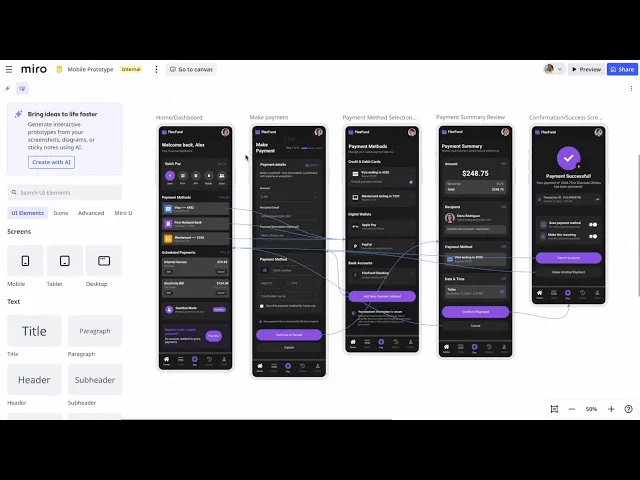
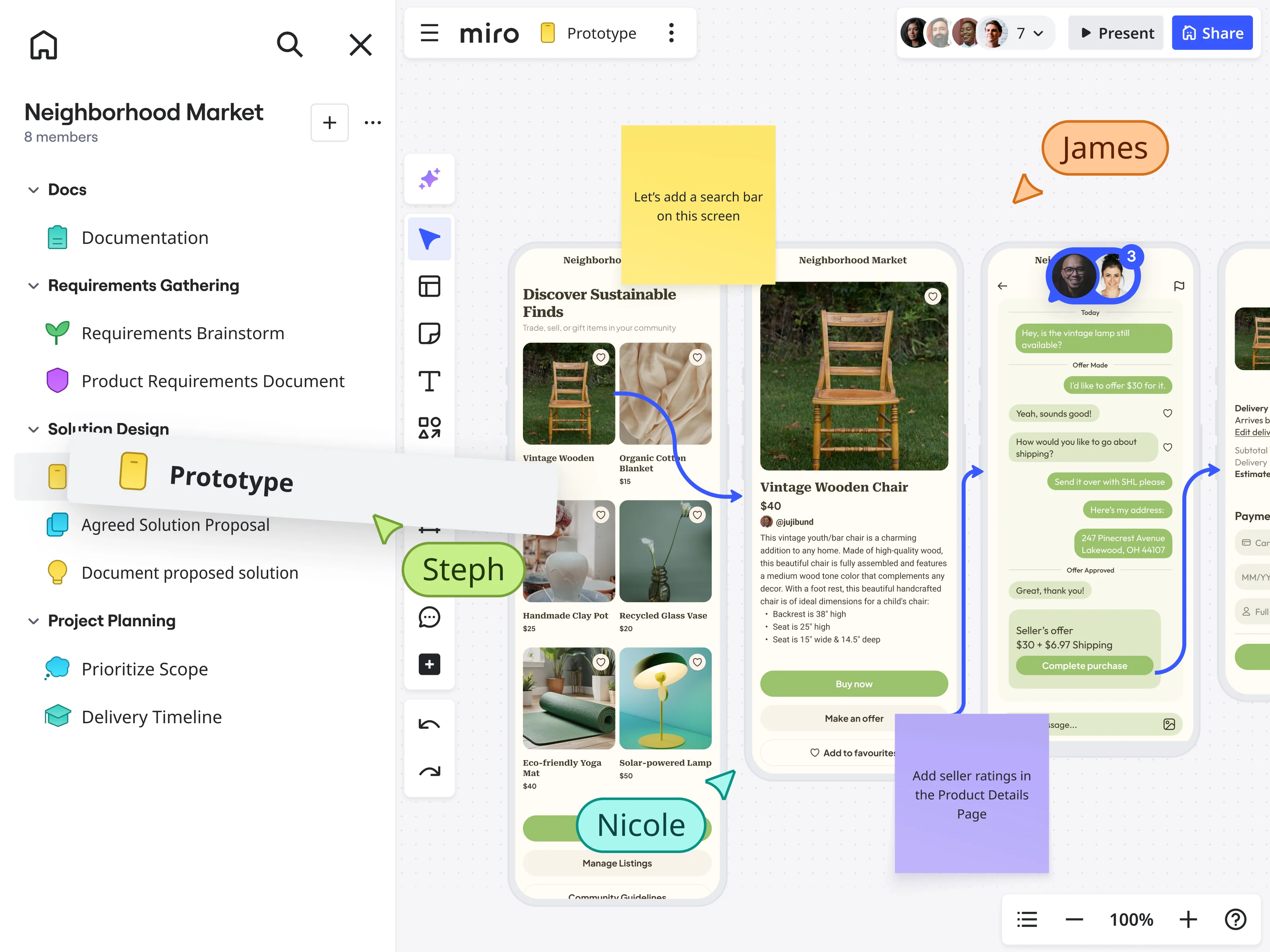
Miro Prototypes is a canvas-native prototyping add-on. It features a Format container and Focus editing mode, allows you to connect screens with hotspots, and offers an interactive Preview for stakeholders to experience flows—no need for external hand-offs.
Plans and Availability
As of October 2025, Miro offers Prototypes for Starter, Business, and Enterprise plans, with access managed through the Prototypes add-on. Verify your plan's entitlement before implementing it.
Key Capabilities (at a Glance)
Create with AI
Transform sticky notes, screenshots, or prompts into editable screens and multi-screen flows. Speed up initial versions and keep momentum in workshops.
Drag-and-Drop Editing
Use editable UI components to quickly sketch flows; connect screens with lines and hotspots to simulate navigation.
Preview Mode
Share a clickable prototype directly from the board so stakeholders can experience the flow in context.
Format & Focus
Organize screens within a Format container and switch to Focus mode for distraction-free editing and sharing.
AI Feedback & Automation
Ask AI to check usability basics or automate workflows (e.g., translations) to keep specs and documents in sync.
Typical Use Cases
Discovery Workshops — generate an initial click-through from sticky clusters in minutes, then iterate with the group.
Early Usability Checks — preview flows with users and capture observations on the same board using ready-made testing templates.
Stakeholder Alignment — replace static slides with interactive demos and reduce moments of miscommunication between design and product.
Concept Validation — transform paper sketches or screenshots into editable wireframes; link screens to validate the path before investing in high-fidelity work.
Miro Prototypes vs. Conventional Prototyping Tools
Traditional tools excel at high-fidelity design and developer handoff. Miro Prototypes excels earlier—at zero-to-one exploration, workshop facilitation, and rapid iteration—so teams can validate direction before committing to detailed designs. Many teams will still finish in their dedicated design systems; Prototypes helps them start smarter.
Rollout Guide (Low-Friction Deployment)
Enable the Add-On for a Pilot Squad
Start with one cross-functional team (PM, Designer, Engineer, Researcher) and a real initiative. Confirm plan entitlement and add-on access.Seed Templates and Guardrails
Add a set of prototyping and testing templates to your Miro project (usability tests, feedback boards, testing plans). This prevents one-off formats and accelerates adoption.Prototype Where Ideas Begin
In discovery workshops, generate your first flow from notes/screenshots using AI, then refine screens together. Keep decisions visible on the board.Preview Early, Test Often
Use Preview to click through journeys and log findings next to the prototype. Promote a weekly “10-minute click-through” with stakeholders.Handoff or Evolve
When validated, either continue in Miro for low-fi iterations or export artifacts and move to hi-fi tools. Keep your testing history alongside discovery notes for auditability.
Adoption Tips for Canadian Organizations
Map prototype stages to your discovery/alpha/beta/live framework.
For public sector or regulated teams, keep user-testing notes and assumptions on the same board for clearer governance.
What Changed Since the Beta?
Miro introduced Prototyping in beta and subsequently documented the add-on model with Format, Preview, and AI features. If you tried the beta in early 2025, revisit capabilities now—they’ve expanded and are centrally managed.
Quick Evaluation Checklist
Do you need to create interactive flows during workshops (not just post-workshop)?
Will AI generation accelerate your first version from sticky notes or screenshots?
Do stakeholders benefit from Preview instead of static decks?
Do you have testing templates ready to capture feedback next to the prototype?
Bottom Line
Miro Prototypes shorten the gap between idea and insight. By keeping creation, iteration, and testing on one canvas—with AI and instant Preview—you reduce tool switching, capture better context, and align faster.
FAQ
Is It Included in My Plan?
Prototypes is available on Starter, Business, and Enterprise plans; access is controlled via the Prototypes add-on. Check your admin/tenant settings.
What Can AI Actually Generate?
Miro can create single- or multi-screen flows from prompts, sticky notes, screenshots, or diagrams, and assist with styling and editing.
How Do Stakeholders Try It?
Share the board and use Preview for a clickable demo—no external file or app required.
Can I Run User Tests in Miro?
Yes—pair your prototype with Miroverse templates for usability testing, feedback capture, and analysis on the same board.
Receive weekly AI news and advice straight to your inbox
By subscribing, you agree to allow Generation Digital to store and process your information according to our privacy policy. You can review the full policy at gend.co/privacy.



Generation
Digital

Canadian Office
33 Queen St,
Toronto
M5H 2N2
Canada
Canadian Office
1 University Ave,
Toronto,
ON M5J 1T1,
Canada
NAMER Office
77 Sands St,
Brooklyn,
NY 11201,
USA
Head Office
Charlemont St, Saint Kevin's, Dublin,
D02 VN88,
Ireland
Middle East Office
6994 Alsharq 3890,
An Narjis,
Riyadh 13343,
Saudi Arabia






Business Number: 256 9431 77 | Copyright 2026 | Terms and Conditions | Privacy Policy