Des silos d'IA aux systèmes : Des flux de travail Miro évolutifs
Miro
Pas sûr de quoi faire ensuite avec l'IA?Évaluez la préparation, les risques et les priorités en moins d'une heure.
➔ Téléchargez notre kit de préparation à l'IA gratuit
Les succès de l'IA ne se cumulent pas lorsque le travail est cloisonné dans des outils en silo, des fichiers ad hoc et des prototypes ponctuels. Les leaders de produits consolident les expériences en flux de travail au niveau système : des canevas partagés, des artéfacts standard et des Sidekicks Miro AI intégrés dans les rituels. Le résultat est un alignement plus rapide, moins d'échecs de transmission, des pistes d'audit visibles et une livraison mesurable. Ce guide montre exactement comment implémenter le modèle dans Miro, avec des modèles, une gouvernance, des métriques et des étapes de déploiement.
Pourquoi les systèmes surpassent les silos (et pourquoi Miro)
Les pilotes d'IA en silo créent des succès locaux, puis stagnent lors des transmissions. Les exigences dérivent, l'intention se perd et les équipes dupliquent le travail. Miro offre une surface d'opération visuelle unique pour la découverte → la conception → la livraison, avec des Sidekicks pour automatiser les résumés, esquisser des flux et réviser des listes de contrôle. Artéfacts standard + canevas partagés + métriques = alignement reproductible.
Modèle Opérationnel : l'Espace d'Accélération Produit
Créez un espace nommé et de marque dans Miro avec quatre tableaux liés (ou un tableau maître avec des cadres) :
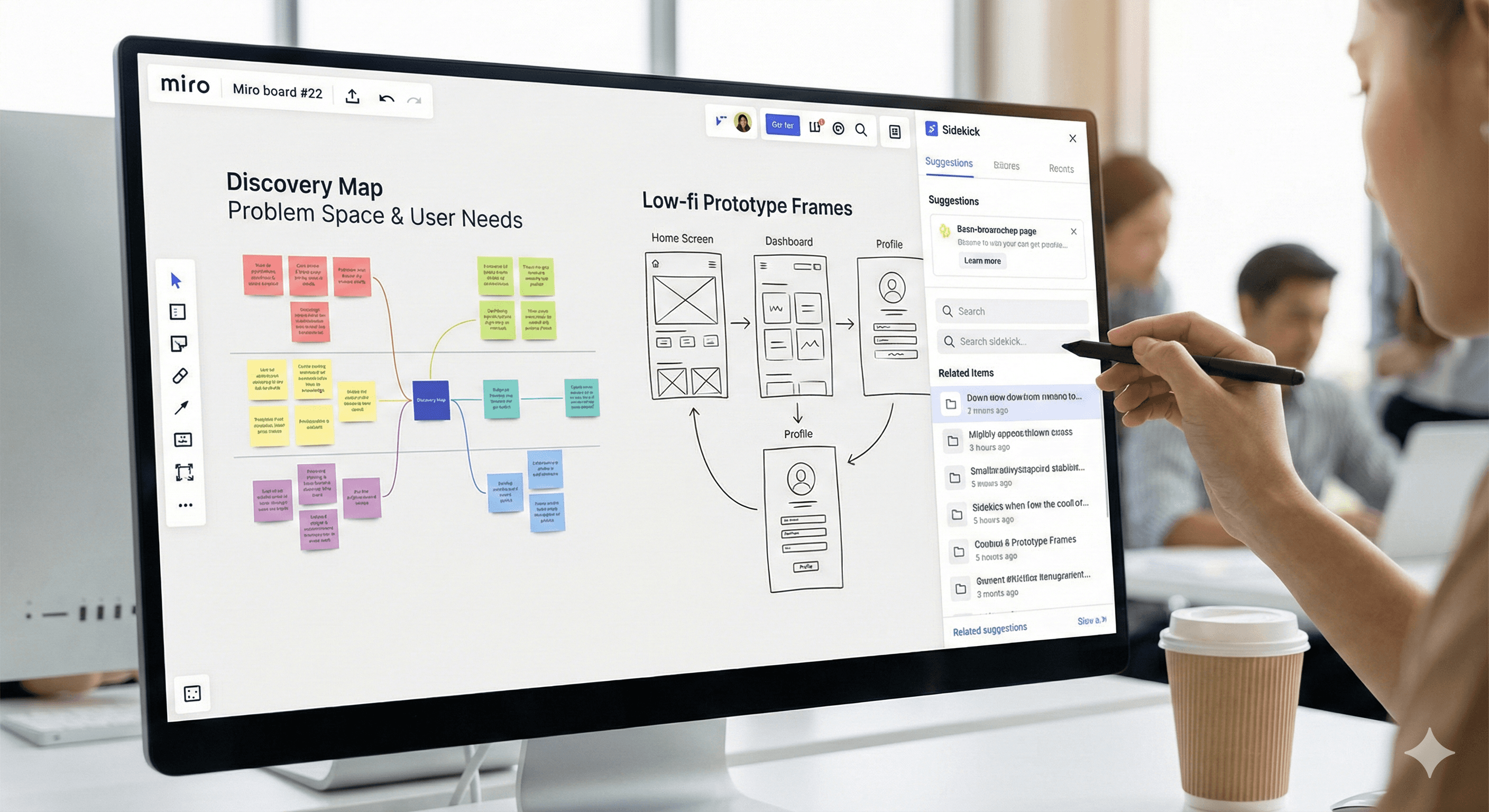
Carte de Découverte
Objectif : transformer les recherches brutes en définitions de problèmes et en zones d'opportunité.
Artéfacts de base : Digest de recherche, déclarations de problèmes (Jobs-to-Be-Done), parcours utilisateur, dimensionnement des opportunités.
Prompts Sidekick : "Résumer ces 6 interviews en 5 insights et 3 risques." / "Extraire les JTBD des notes et regrouper par thème."
Gouvernance : Balises de source (interne, client, marché), date, propriétaire de la recherche.
Prototypes Low-Fi
Objectif : s'aligner rapidement sur une direction avec des cadres cliquables.
Artéfacts de base : Wireframes, croquis de flux, notes heuristiques, principes de conception.
Prompts Sidekick : "Proposez 2 flux alternatifs pour l'intégration avec." / "Listez les risques d'accessibilité pour ce flux."
Règle de transmission : Pas de spécifications avant qu'un problème client ne soit avéré sur la Carte de Découverte.
Espace de Spécifications
Objectif : rédiger des spécifications claires et testables liées à la découverte et aux prototypes.
Modèle de spécification (champs prêts à copier) :
Nom de l'épopée / fonctionnalité
Problème (insights liés de la Découverte)
Résultat & métriques (ce qui doit changer)
Histoires utilisateur (Étant donné/Quand/Alors)
Contraintes (technologiques, données, réglementaires)
Risques & hypothèses
Questions ouvertes
Critères d'acceptation (testable; numéroté)
Définition de Prêt / Terminé
Liens (cadres de prototype, modèles de données, tickets Jira)
Prompts Sidekick : "Convertissez ces histoires utilisateur en critères d'acceptation (numérotés, testables)." / "Identifiez les cas limites manquants de ce flux."
Tableau de Livraison
Objectif : rendre les transmissions explicites et mesurables.
Lignes de natation : Prêt pour la révision technique → En construction → En test → En révision → Prêt à expédier → Expédié.
Prompts Sidekick : "Résumer les demandes de changement depuis la dernière révision." / "Générez des notes de version à partir des spécifications approuvées et des titres de PR."
Intégrations : Jira (tickets), GitHub (PRs), Figma (interface utilisateur finale), Confluence/Notion (politiques).
Conseil : Utilisez un tableau maître unique avec des cadres codés par couleur (Découverte/Prototype/Spécification/Livraison) et un index de tableau. Ajoutez des widgets de création rapide pour les nouvelles spécifications et listes de contrôle.
Artéfacts Standard (avec barres d'acceptation)
A) Digest de Recherche (Découverte)
Barre minimale : 3+ sources indépendantes; insight tagué; niveau de confiance.
Champs : Source, Date, Persona/Segment, Insight, Lien vers l'évidence, Confiance (Élevée/Moyenne/Faible).
B) Flux Utilisateur (Prototype)
Barre minimale : états de départ/fin, gestion des erreurs, note d'accessibilité.
Champs : Propriétaire, Version, États, Cas limites, Risques, Lien vers la spécification.
C) Spécification (Espace de Spécifications)
Barre minimale : résultat défini, cinq critères d'acceptation, budget de performance, risques.
Champs : comme ci-dessus; liste de contrôle générée par Sidekick présente.
D) Paquet de Transmission (Livraison)
Barre minimale : spécification signée, prototype lié, liste de dépendances, plan de test.
Champs : Lien vers la spécification, Lien vers le prototype, Dépendances, Plan de test, Propriétaire, Date de sortie cible.
Verrouillez les cadres d'artéfacts avec un en-tête clair et une petite légende expliquant à quoi ressemble la qualité.
Sidekicks Intégrés dans les Rituels
Réunion Quotidienne
Entrée : tickets ouverts, derniers commentaires.
Sidekick : "Résumer les obstacles par ligne; proposer la prochaine action pour chaque obstacle."
Sortie : section du tableau annotée avec propriétaire + date.
Élaboration du Backlog
Entrée : épopées, insights, demandes.
Sidekick : "Regrouper les éléments par thème et suggérer la priorité basée sur l'impact et les notes d'effort."
Révision des Spécifications
Entrée : brouillon de spécification.
Sidekick : "Générer une liste de contrôle de révision à partir des critères d'acceptation et des contraintes." / "Flager les termes ambiguës ou les contrats de données manquants."
Planification des Relâcher
Entrée : spécifications marquées Prêtes à Expédier.
Sidekick : "Produire des notes de version et un résumé pour les clients en 150 mots."
Ajoutez un petit cadre ‘Rituels’ avec des prompts préécrits pour que les équipes les réutilisent de manière cohérente.
Métriques Importantes (avec formules)
Suivez-les sur un cadre visible Product Analytics. Commencez la base à la semaine 0; révisez chaque semaine.
Temps pour l'Alignement (TTA) : premier accord de travail depuis le début de la découverte.
Formule :TTA = date(Première Spécification Alignée) − date(Début de la Découverte)
Objectif : ↓ 30–50% en 2 sprints.Indice de Complétude des Spécifications (ICS) : % de spécifications rencontrant la barre minimale.
Formule :ICS = (# spécifications avec résultat + ≥5 CA + risques + budget de performance) ÷ (total des spécifications)
Objectif : ≥ 80% d'ici Sprint 3.Temps de Transmission : spécification approuvée → travail commencé.
Formule :Transmission = date(“En Construction”) − date(“Approuvé”)
Objectif : ≤ 3 jours ouvrables.Taux de Révision : éléments réouverts après Révision/Test.
Formule :Révision = tickets réouverts ÷ total des tickets expédiés (4 dernières semaines)
Objectif : ≤ 10%.Temps de Cycle pour Première Sortie (TCPS) : début de la découverte → premier GA/drapeau de fonctionnalité.
Objectif : adapté par équipe; tendance en baisse > 20%.Satisfaction des Parties Prenantes : impulsion après révision/expédition (1–5).
Objectif : ≥ 4.2 de moyenne avec ≥ 60% de taux de réponse.
Visualisez les tendances sous forme de simples graphiques en ligne sur le tableau et annotez les changements avec des notes "ce qui a changé" après chaque cérémonie.
Gouvernance & Garde-fous
Modèles de marque : verrouiller les en-têtes, les jetons de couleur, et les légendes afin que les artéfacts restent reconnaissables à travers les équipes.
Conventions de nommage :
ÉPOPÉE_CLÉ – Titre Court Sous Forme de Verbe – v1.2etSPÉC_<Équipe>_<Fonctionnalité>_<Date>.Journaux de changements : un petit cadre notant ce qui a changé, pourquoi, qui a approuvé; conserver les versions précédentes sous forme de cadres réduits.
Sources approuvées : maintenez un petit cadre de “Politique de Preuve” : analyses internes, référentiel de recherche, données de support, études publiques; marquer les revendications des fournisseurs comme fournies par le fournisseur.
Barrière à la publication : tout ce qui est externe (presse, présentations clients) passe par un seul cadre “Révision Externe” avec des cases à cocher pour la confidentialité, les revendications et la marque.
Équipes réglementées : règles de refus et ensembles de données sans PHI; prompts Sidekick qui évitent les données sensibles; liens de pistes de vérification vers Jira/Confluence.
Plan de Déploiement (4 semaines)
Semaine 1 : Fondation
Mettez en place le tableau d'Accélération Produit; installez les modèles; connectez Jira/Figma.
Formez une escouade pilote (PM, Designer, Lead Technique, QA, Analyste).
Métriques de base (TTA, ICS, Transmission, Révision).
Semaine 2 : Rituels + Sidekicks
Intégrez les prompts Sidekick dans les réunions quotidiennes, élaboration du backlog, et révisions des spécifications.
Imposez des barres minimales sur les artéfacts; expédiez les deux premières spécifications.
Semaine 3 : Expansion
Ajoutez une deuxième escouade; réutilisez le même modèle de tableau.
Commencez l'examen hebdomadaire des métriques sur le tableau; publiez une courte note “ce qui a changé”.
Semaine 4 : Codification
Verrouillez les modèles; publiez des conventions de nommage; ouvrez un Conseil sur les Modèles léger (15 minutes par semaine) pour gérer les changements.
Comparez les métriques à la Semaine 0; capturez des visuels avant/après.
Anti‑patterns (et correctifs)
Dispersion des canevas : trop de tableaux. → Utilisez un maître avec des cadres et un index; archivez par trimestre.
Spécifications sans résultats : travail occupé, peu clair. → Bloquez le développement jusqu'à ce que le résultat et les métriques existent.
Prompts d'IA sans limites : sorties hallucinées. → Fournissez une bibliothèque de prompts vérifiés; exigez une barrière de révision manuelle.
Dérive des rituels : Les réunions deviennent du théâtre de statut. → Le Sidekick produit une liste des obstacles; réunion se termine lorsque chaque obstacle a une prochaine étape.
Révision de conformité tardive : surprises à l'approche de la version. → Ajoutez une “Liste de Contrôle Réglementaire” au modèle de spécification et révisez à l'étape du brouillon.
Intégrations importantes
Jira : liens bidirectionnels vers les épopées/histoires; mises à jour de statut automatique sur les lignes de nage de Livraison.
Figma : intégrez des cadres près des spécifications; verrouillez l'ID du cadre “source de vérité”.
GitHub/GitLab : tirez les titres de PR pour la génération de notes de version.
Miro Cartes / Réunions Intelligentes : réalisez des révisions sur le tableau avec minuterie et liste des participants.
Calendriers : liez les cérémonies aux cadres pertinents (liens profonds).
FAQ
Comment commençons-nous?
Commencez par une escouade interfonctionnelle pilote; après deux sprints, déployez les modèles à l'échelle de l'organisation. Mesurez les métriques de base d'abord pour montrer les différences.
Et concernant les équipes réglementées?
Incorporez des règles de refus, utilisez des ensembles de données sans PHI, ajoutez un cadre d'audit et publiez une Liste de Contrôle Réglementaire dans le modèle de spécification.
Avons-nous besoin d'outils séparés pour les analyses?
Pas initialement. Suivez les six métriques sur le tableau; exportez vers BI plus tard si vous avez besoin de tendances plus profondes.
Comment gardons-nous le tableau en ordre?
Archivez trimestriellement, appliquez des conventions de nommage et un Conseil sur les Modèles de 15 minutes pour approuver les changements.
Qu'est-ce qui prouve que cela fonctionne?
Un Temps pour l'Alignement réduit, une Spécification plus Complète, un Temps de Transmission et un Taux de Révision réduits – visibles semaine par semaine sur le même tableau.
Vous voulez le tableau Miro Accélération Produit préconstruit – avec les cadres Découverte, Prototype, Spécification et Livraison; la bibliothèque de prompts Sidekick; et les widgets KPI? Nous pouvons le personnaliser et le déployer pour deux escouades en moins de deux semaines. Contactez notre équipe pour commencer.
Recevez chaque semaine des nouvelles et des conseils sur l'IA directement dans votre boîte de réception
En vous abonnant, vous consentez à ce que Génération Numérique stocke et traite vos informations conformément à notre politique de confidentialité. Vous pouvez lire la politique complète sur gend.co/privacy.



Génération
Numérique

Bureau du Royaume-Uni
Génération Numérique Ltée
33 rue Queen,
Londres
EC4R 1AP
Royaume-Uni
Bureau au Canada
Génération Numérique Amériques Inc
181 rue Bay, Suite 1800
Toronto, ON, M5J 2T9
Canada
Bureau aux États-Unis
Generation Digital Americas Inc
77 Sands St,
Brooklyn, NY 11201,
États-Unis
Bureau de l'UE
Génération de logiciels numériques
Bâtiment Elgee
Dundalk
A91 X2R3
Irlande
Bureau du Moyen-Orient
6994 Alsharq 3890,
An Narjis,
Riyad 13343,
Arabie Saoudite






Numéro d'entreprise : 256 9431 77 | Droits d'auteur 2026 | Conditions générales | Politique de confidentialité