Perplexity Computer for Enterprise: 20‑Model AI Orchestration
Pérplexité

Pas sûr de quoi faire ensuite avec l'IA?Évaluez la préparation, les risques et les priorités en moins d'une heure.
➔ Téléchargez notre kit de préparation à l'IA gratuit
Perplexity Computer for Enterprise is an enterprise-grade AI agent system that runs multi-step workflows by routing tasks across roughly 20 advanced models and connecting to hundreds of business apps. It’s designed to help teams research, analyse, create, code and ship work faster—while keeping governance, access control, and auditability in place.
Enterprise Computer: Orchestrate Projects with 20 Models
Most AI tools stop at answers. Enterprises need systems that can complete work across multiple steps—without turning governance into an afterthought.
Perplexity Computer for Enterprise is built for that reality. It’s a multi-model, multi-tool agent that can take a goal, break it down into tasks, and route each task to the best model or sub-agent—then push results into the applications your teams already use.
What is Perplexity Computer for Enterprise?
Computer for Enterprise is an agentic workflow system built on Perplexity’s enterprise platform. The headline capability is orchestration:
It routes tasks across ~20 specialised models (rather than relying on a single model for everything).
It can run multi-step projects across research, analysis, creation, design, coding, and delivery.
It connects into your work ecosystem through hundreds of application connectors and collaboration surfaces (including Slack).
The practical outcome is a single system that can move from “find the facts” to “produce the artefact” to “ship it to the right place”—with enterprise controls layered on top.
Why multi-model orchestration matters
One model can be excellent at reasoning, another at fast summarisation, another at code quality, and another at creative assets. Orchestration turns that diversity into a reliable workflow.
Instead of asking teams to choose the “perfect” model up front, Computer can:
match subtasks to strengths (research vs coding vs design)
keep work flowing across steps
reduce tool-switching and copy/paste operations
For enterprise leaders, this is an important shift: you’re buying a workflow layer, not just a chatbot.
How it works?
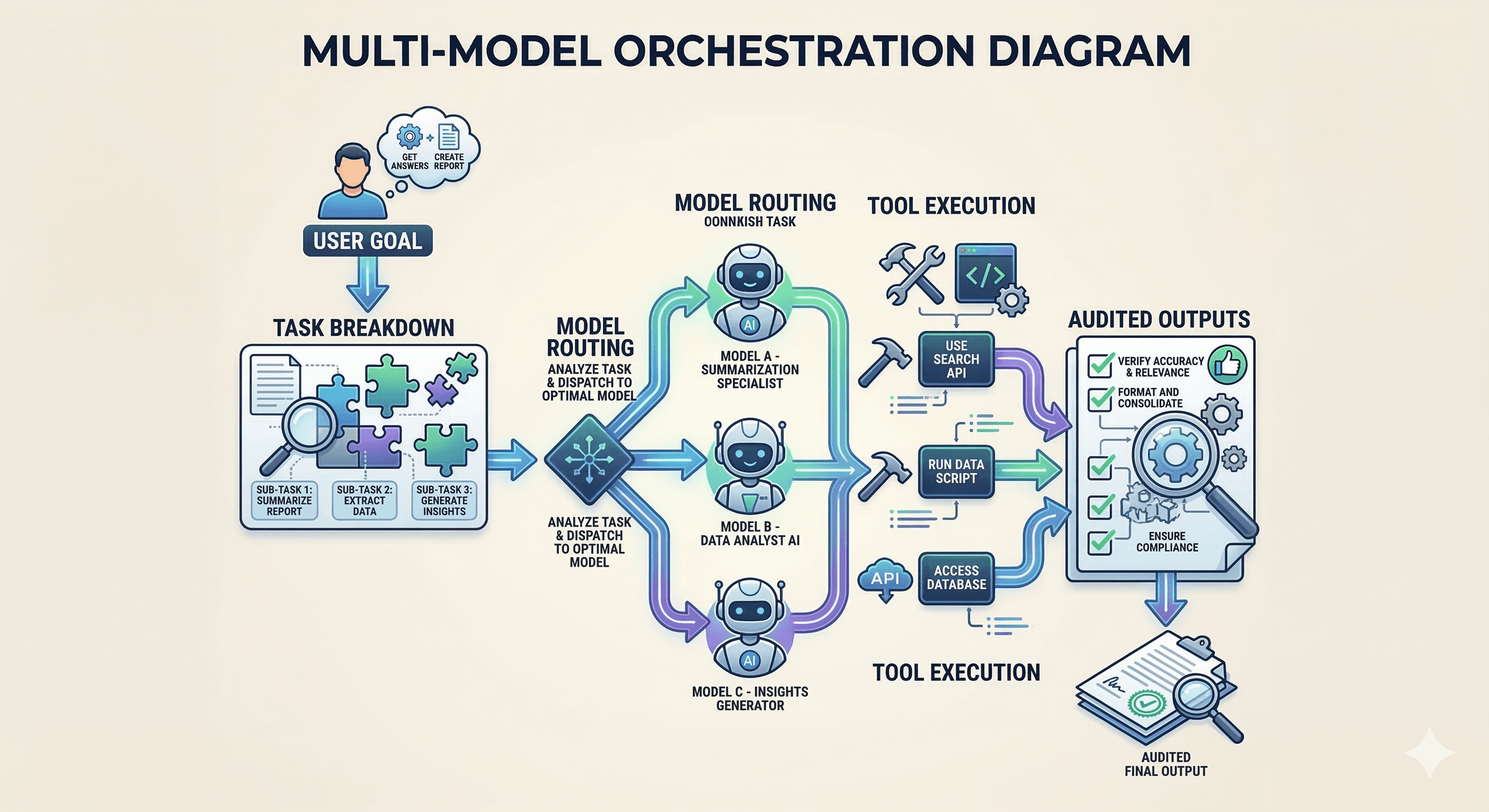
Computer is easiest to understand as a pipeline:
You give it a goal (e.g., “Prepare a board-ready competitive briefing and create a launch plan”).
It breaks the goal into tasks (research, analysis, drafting, visuals, review notes, output packaging).
It routes each task to the most appropriate model/sub-agent.
It uses connectors to pull inputs (documents, tickets, data) and push outputs (docs, slides, tickets, messages).
It supports controls: governance, access boundaries, and supervision so actions happen safely.
Where Computer fits in a business stack
Computer is most valuable when it sits alongside systems you already run:
Knowledge & content: Notion, Confluence, Google Drive, SharePoint
Work management: Asana, Jira, ServiceNow
Collaboration: Slack, Microsoft Teams
Data: BI tools, internal dashboards, structured exports
The differentiator is that it doesn’t just read these sources—it can help you do the next step: create, update, escalate, and deliver.
Practical examples: multi-step projects it can run
Below are realistic “thin-slice” workflows that show what orchestration looks like.
1) Competitive briefing → exec pack
Pull latest competitor moves and citations
Compare positioning and pricing
Draft an exec summary + risk/opportunity list
Generate a slide-ready structure and key visuals
Deliver to a shared workspace and notify stakeholders
2) Product launch coordination
Create a launch plan (milestones, dependencies)
Produce first-draft assets (FAQs, release notes, enablement)
Create tasks in Asana/Jira with owners and dates
Track progress and generate weekly updates
3) Security and IT operations support
Summarise incidents from tickets + timelines
Identify missing evidence and suggested next checks
Draft comms and post-incident actions
Log work back into your ITSM tool
Enterprise governance: what to check before deployment
Agents become risky when they can act broadly. For enterprise use, focus on five control areas.
1) Identity and access control
SSO + MFA
role-based access to tools and connectors
separation of duties for sensitive operations
2) Data boundaries
least-privilege connector scopes
clearly defined “allowed” repositories and folders
policy on regulated data (PII, health, finance)
3) Human-in-the-loop checkpoints
Use approvals for:
sending external comms
making changes in production systems
publishing or filing official documents
4) Auditability and monitoring
You need:
logs you can search
alerting for unusual behaviour
revocation and “kill switch” processes
5) Cost controls
Multi-model orchestration can add spend if unmanaged. Look for:
spending caps
usage reporting by team/workflow
controls for premium model selection
A rollout plan that avoids “pilot purgatory”
Step 1: Pick one workflow with measurable outcomes
Examples: weekly exec briefings, launch packs, ticket summarisation, proposal drafting.
Step 2: Define success metrics
Time saved, reduced rework, fewer handoffs, faster cycle time, lower cost per deliverable.
Step 3: Lock down connectors and permissions
Start with minimal scopes. Expand only after review.
Step 4: Instrument and review
access reviews
quality checks
security review of tool permissions
Step 5: Scale to adjacent workflows
Once one workflow is stable, expand across teams.
Summary
Perplexity Computer for Enterprise is best understood as a governed workflow engine: it routes work across ~20 models and connects into your app ecosystem to run multi-step projects end-to-end.
For enterprise teams, the opportunity is clear: fewer handoffs, less tool-switching, and faster delivery—provided you implement strong identity, connector scopes, approvals, and auditability.
Next steps (with Generation Digital)
If you’re evaluating Computer for Enterprise, Generation Digital can help you:
identify the highest-ROI workflows to automate first
design connector scopes and governance (least privilege + approvals)
build evaluation harnesses to measure quality and ROI
run a secure pilot and scale into production adoption
FAQs
Q1: How does Computer for Enterprise enhance productivity?
It automates multi-step work by breaking projects into tasks and routing those tasks across specialised models and tools, reducing manual handoffs and rework.
Q2: What types of projects benefit most?
Projects with repeatable steps and many handoffs—research-to-deck briefs, launch planning, operational reporting, IT ticket workflows, and knowledge synthesis.
Q3: Is it easy to integrate with existing infrastructure?
It’s designed to connect to common enterprise applications via connectors and collaboration surfaces. The real work is governance: scoping access and approvals correctly.
Q4: Can it be customised for specific business needs?
Yes. The most effective customisation is workflow design: defining which tasks the agent runs, what tools it can use, and where human approvals are required.
Q5: What support is available for implementation?
Most enterprise deployments pair platform configuration with enablement: workflow design, governance setup, training, and measurement of business outcomes.
Recevez chaque semaine des nouvelles et des conseils sur l'IA directement dans votre boîte de réception
En vous abonnant, vous consentez à ce que Génération Numérique stocke et traite vos informations conformément à notre politique de confidentialité. Vous pouvez lire la politique complète sur gend.co/privacy.



Génération
Numérique

Bureau du Royaume-Uni
Génération Numérique Ltée
33 rue Queen,
Londres
EC4R 1AP
Royaume-Uni
Bureau au Canada
Génération Numérique Amériques Inc
181 rue Bay, Suite 1800
Toronto, ON, M5J 2T9
Canada
Bureau aux États-Unis
Generation Digital Americas Inc
77 Sands St,
Brooklyn, NY 11201,
États-Unis
Bureau de l'UE
Génération de logiciels numériques
Bâtiment Elgee
Dundalk
A91 X2R3
Irlande
Bureau du Moyen-Orient
6994 Alsharq 3890,
An Narjis,
Riyad 13343,
Arabie Saoudite







Numéro d'entreprise : 256 9431 77 | Droits d'auteur 2026 | Conditions générales | Politique de confidentialité