Notion vs Monday.com: Connected AI Workspace Comparison (2026)
Notion

¿No sabes por dónde empezar con la IA?Evalúa preparación, riesgos y prioridades en menos de una hora.
➔ Descarga nuestro paquete gratuito de preparación para IA
Notion and Monday.com both support project delivery, but they’re built for different outcomes. Monday.com is a project-focused tool that often needs separate apps for documentation, wikis, and advanced AI. Notion is a connected AI workspace that unifies knowledge, projects, and collaboration—with enterprise search and agents built into the same platform.
Monday.com is a strong visual project management tool. If your needs begin and end with board-based delivery, it can do the job.
But many teams don’t just manage projects—they manage knowledge, decisions, documentation, onboarding, and an increasing number of AI-enabled workflows.
That’s where the comparison gets interesting.
The core argument is simple: Monday.com often creates fragmentation because organisations add other tools for documentation, wikis, and AI capabilities—while Notion brings it together as a unified AI-powered workspace.
This post breaks down what that means in practice and how to evaluate both tools like a buyer, not a brochure.
The real decision: project tool or connected workspace?
A useful way to frame the choice is scope.
Monday.com is positioned as a project-focused tool that can require separate solutions for documentation, knowledge management, and AI.
Notion is positioned as a connected workspace that unifies company knowledge, team projects, and collaboration—with AI integrated throughout.
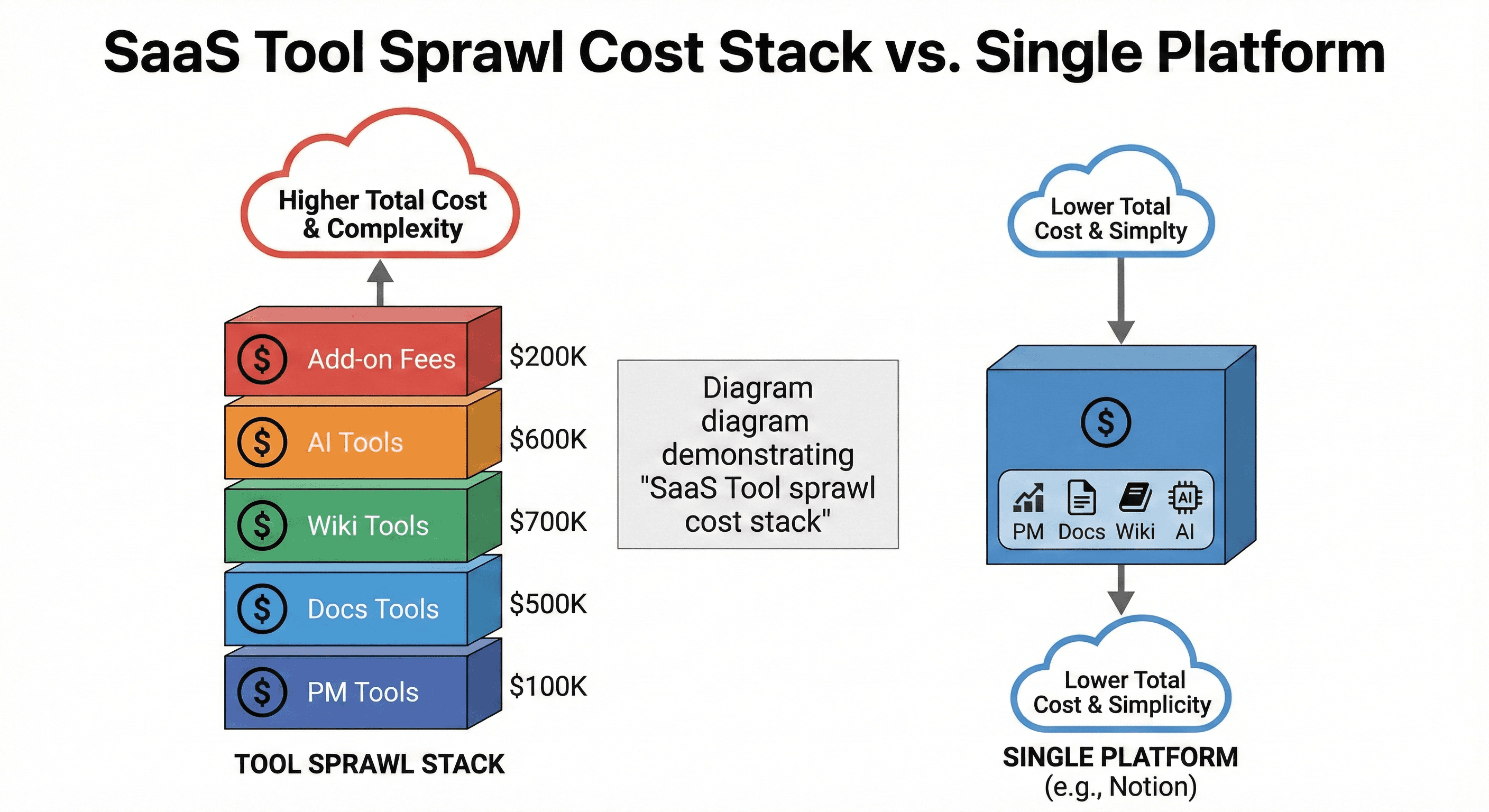
If you’re already paying for multiple apps to make project work “complete”, the total cost and complexity quickly become the real problem.
Side-by-side: where each platform tends to win
AI capabilities
There's a big difference here with Notion’s AI layer (enterprise search across apps, AI agents, automated meeting notes, and research mode) with Monday.com’s “basic workflow automation” and limited AI features that often require additional tools.
Documentation and knowledge
Notion is described as strong on rich docs, wikis, and databases that are integrated with project management and searchable by AI. Monday.com is described as weaker for documentation, typically requiring separate tools such as Confluence or Google Docs.
Customisation and flexibility
Notion is positioned around “infinite building blocks” that adapt to different team workflows. Monday.com is positioned as visually strong for PM, but more rigid outside project management use cases.
Tool consolidation and cost
Notion claims customers can save up to 83% tool cost per employee by consolidating multiple tools into Notion, whereas Monday.com often results in additional tool purchases for documentation, AI, and knowledge management. A practical comparison table
What matters to you | Notion | Monday.com |
|---|---|---|
Work model | Connected workspace (knowledge + projects + collaboration) | Project-focused tool |
Docs & wikis | Built in, integrated with projects and AI-searchable | Typically needs separate docs/wiki tools |
AI depth | Enterprise search across apps, agents, meeting notes, research mode | Basic automation + limited AI features |
Knowledge management | Central knowledge hub with AI-powered search across connected apps | Limited beyond project documentation |
Flexibility | Building blocks adapt across teams | Strong PM visuals, but more rigid outside PM |
Consolidation | Replace PM + docs + wiki + AI tools in one platform | Likely to add tools for full coverage |
What “connected AI workspace” looks like day to day
When a workspace is connected, you stop doing “status by spreadsheet” and “knowledge by Slack”. Instead:
Project plans link directly to the docs and decisions that explain why they exist.
Meeting notes turn into action items without copy/paste.
AI can answer questions and draft outputs with context from your workspace, not just from a single project board.
Notion’s playbook frames this as enabling AI to work effectively because it has access to connected knowledge and enterprise search across apps, rather than isolated project data.
What to ask in a buying conversation
If you’re evaluating Notion vs Monday.com, ask questions that reveal whether you’re really choosing a project tool—or designing a work system.
Where does documentation live today? If it’s separate from project delivery, you’re already in fragmentation.
How do people find the latest answer? If search is limited to project data, teams will keep creating duplicates.
What does AI need to do in 12 months? If it’s just drafting, most tools can help. If it’s agents, enterprise search, and workflow automation with context, you’ll want AI embedded where work lives.
What’s the real cost? Include the extra apps you need for wikis, docs, and AI—plus the adoption cost of maintaining multiple systems.
Customer examples from the source
The playbook includes examples of organisations that replaced Monday.com alongside other tools:
Planful consolidated multiple tools (including Monday.com) into Notion, reporting reduced onboarding time, faster documentation creation, and over 90% employee adoption.
Lyka consolidated Monday.com and Confluence into Notion, saving over $75k annually and improving cross-functional collaboration.
Viva replaced Monday.com and other tools with Notion to improve onboarding, collaboration, and client workflows.
(As always: validate against your own baseline, scope, and rollout approach.)
Migration notes: how to move from Monday.com without breaking delivery
If you’re considering a move, the fastest wins tend to come from a phased approach:
Start with knowledge: build a wiki / playbook structure and migrate the docs people rely on most.
Pick one workflow: replicate one delivery workflow end-to-end (projects → meetings → decisions → updates).
Standardise templates: project briefs, meeting notes, decision logs, weekly updates.
Then migrate boards: move project tracking once teams trust the new “source of truth”.
The playbook also notes a Monday.com importer available in beta, plus professional services to support migration.
Next steps
If Monday.com is working for project boards but the rest of the work is scattered, the question isn’t “which PM tool is better?” It’s:
Do we want a project tool, or a connected AI workspace?
A sensible next step is to map your current stack (PM + docs + wiki + AI), identify overlap, and pilot one team’s workflow in a connected workspace model.
FAQs
Is Monday.com a competitor to Notion?
They overlap in project delivery, but Notion is positioned as a connected workspace that also includes documentation, knowledge management, and AI capabilities—areas where Monday.com often needs additional tools.
What’s the biggest difference between Notion and Monday.com?
Scope. Monday.com is primarily project-focused. Notion is designed to unify knowledge, projects and collaboration in one platform with AI integrated across workflows.
Does Notion replace Confluence and Google Docs?
Notion’s documentation and wiki capabilities as strong enough that teams don’t need separate tools, and Monday.com commonly requires separate documentation apps.
What AI features does Notion include?
Enterprise search across apps, AI agents, automated meeting notes, and research mode as core capabilities.
What’s the most common migration approach?
Start with knowledge and templates first, pilot a single workflow, then migrate project tracking once the new structure is working.
Recibe noticias y consejos sobre IA cada semana en tu bandeja de entrada
Al suscribirte, das tu consentimiento para que Generation Digital almacene y procese tus datos de acuerdo con nuestra política de privacidad. Puedes leer la política completa en gend.co/privacy.



Generación
Digital

Oficina en Reino Unido
Generation Digital Ltd
33 Queen St,
Londres
EC4R 1AP
Reino Unido
Oficina en Canadá
Generation Digital Americas Inc
181 Bay St., Suite 1800
Toronto, ON, M5J 2T9
Canadá
Oficina en EE. UU.
Generation Digital Américas Inc
77 Sands St,
Brooklyn, NY 11201,
Estados Unidos
Oficina de la UE
Software Generación Digital
Edificio Elgee
Dundalk
A91 X2R3
Irlanda
Oficina en Medio Oriente
6994 Alsharq 3890,
An Narjis,
Riad 13343,
Arabia Saudita







Número de la empresa: 256 9431 77 | Derechos de autor 2026 | Términos y Condiciones | Política de Privacidad