Enhance Efficiency: Automate Coding Sessions with Claude in Slack for Canadian Teams

Enhance Efficiency: Automate Coding Sessions with Claude in Slack for Canadian Teams

Claude
Dec 8, 2025

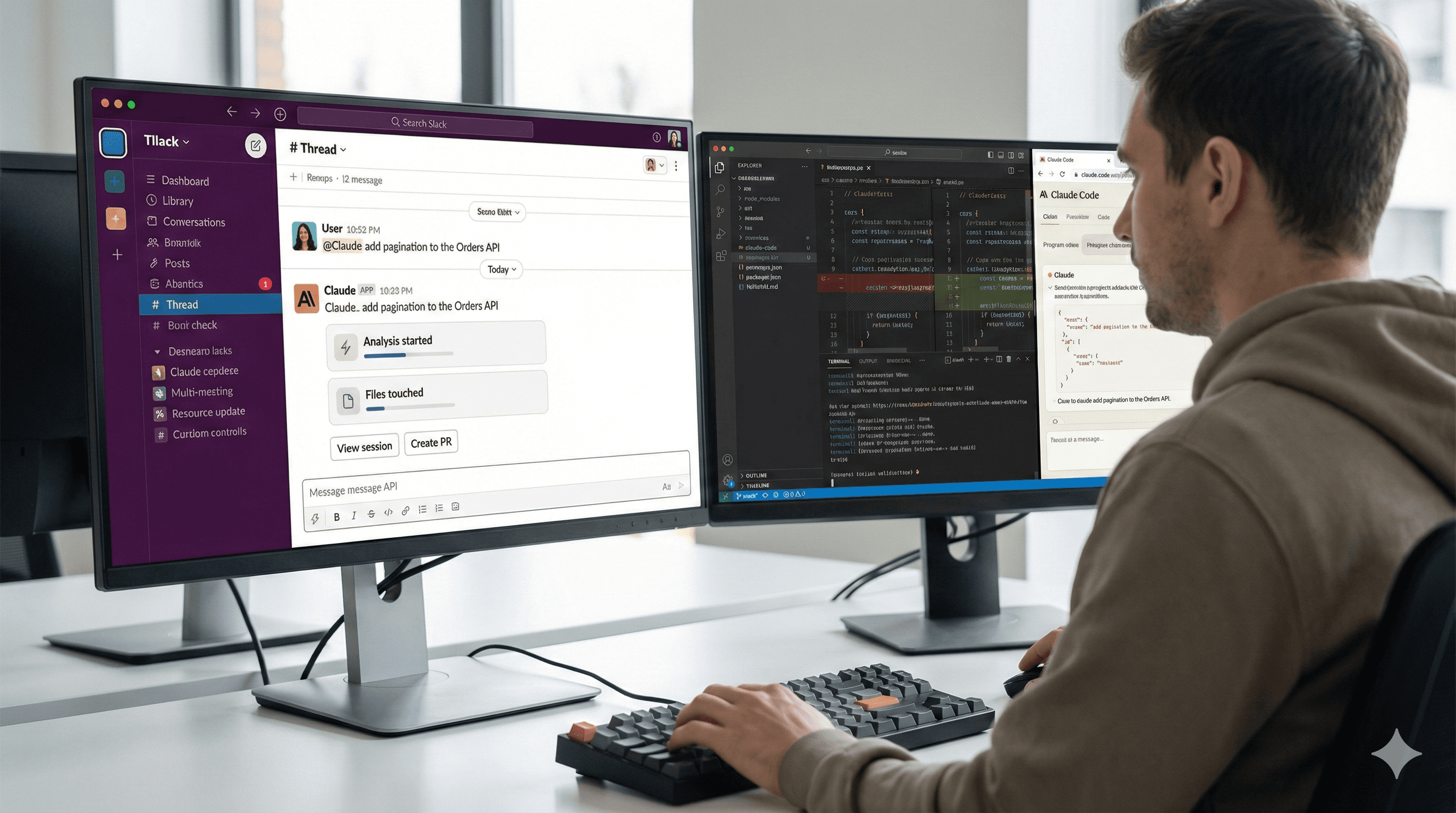
Someone is using Slack on a dual-monitor setup; one screen shows a chat with "Claude" discussing ways to automate coding sessions, while the other screen displays a code editor with programming code.

Not sure what to do next with AI?
Assess readiness, risk, and priorities in under an hour.

Not sure what to do next with AI?
Assess readiness, risk, and priorities in under an hour.

➔ Schedule a Consultation

Claude Code now works seamlessly with Slack. Mention @Claude in a code-related message, and it will start a Claude Code session using the context from your thread, run the task against the correct repository, and post updates back into Slack. When the work is complete, you'll receive links to review changes and open a pull request — all without leaving the conversation.

Why this matters

Most development teams discuss bugs and features in Slack and then copy details into an IDE or issue tracker. This integration eliminates that need. Because Claude can read the relevant thread (with your permission) and direct the task to Claude Code, it converts natural language requests — “investigate this stack trace”, “add pagination to Orders API”, “fix flaky test in checkout” — into concrete changes linked to your repositories. Fewer handoffs, quicker feedback.

How it works in practice

When you @Claude in a channel or thread, the Slack app checks if the request is a coding task. If it is, it starts a remote Claude Code session on the web, using messages from the conversation. Claude selects a repository you’ve already authenticated to Claude Code, performs the task, and posts status updates back to the same thread (such as: analysis started → files affected → tests run). From the Slack message, you can open the full session, create a PR from the changes, retry the request as code explicitly, or switch repositories if it selected the wrong one.

Getting started (quick setup)

  1. Install Claude for Slack in your workspace and make sure your engineering channels can mention the app.

  2. Connect repositories to Claude Code on the web and grant the GitHub app the necessary permissions (contents, issues, pull requests).

  3. In Slack, @Claude on a real bug/feature thread and ask it to handle it as a coding task (e.g., “@Claude fix the N+1 query in orders_controller.rb, add a unit test”).

  4. Review in Slack as status updates come in; click View session to audit differences and tests, or Create PR when satisfied.

Tip: If Claude responds as a chat assistant but you intended a coding run, click Retry as Code in the Slack message.

Examples

  • “@Claude diagnose the 500s in the checkout service; link any related Sentry issues and propose a fix.”

  • “@Claude add pagination to the Orders API (page size 50), update docs and client SDK.”

  • “@Claude refactor this function for clarity and create a PR with benchmarks.”

FAQs

How do I start a session?
Mention @Claude in a channel or thread and describe the coding task. Claude will create a Claude Code session if it detects a development request; you can also tell it to “process this as code”.

Can I manage pull requests from Slack?
You can create a PR from the session’s changes directly from the Slack message and navigate to your VCS to complete the review and merge.

What updates will I see?
Slack thread updates typically include task start, reasoning/plan, files affected, tests run, and links to the full session and PR.

What if the wrong repository is selected?
Use Change Repo from the Slack message to redirect the session to the correct repository.

Is this available to everyone?
You’ll need access to Claude Code on the web and have the Claude Slack app enabled by your workspace admins.

Summary

Slack is where work initiates; Claude Code is where changes happen. Connecting the two means fewer manual copy-pasting and quicker resolutions. If you’re rolling this out, start with a single engineering channel, connect a staging repository, and establish review rules before enabling PR creation.

Need help with setup, management, or prompts? Generation Digital can aid in enablement and change management for your engineering teams.

Claude Code now works seamlessly with Slack. Mention @Claude in a code-related message, and it will start a Claude Code session using the context from your thread, run the task against the correct repository, and post updates back into Slack. When the work is complete, you'll receive links to review changes and open a pull request — all without leaving the conversation.

Why this matters

Most development teams discuss bugs and features in Slack and then copy details into an IDE or issue tracker. This integration eliminates that need. Because Claude can read the relevant thread (with your permission) and direct the task to Claude Code, it converts natural language requests — “investigate this stack trace”, “add pagination to Orders API”, “fix flaky test in checkout” — into concrete changes linked to your repositories. Fewer handoffs, quicker feedback.

How it works in practice

When you @Claude in a channel or thread, the Slack app checks if the request is a coding task. If it is, it starts a remote Claude Code session on the web, using messages from the conversation. Claude selects a repository you’ve already authenticated to Claude Code, performs the task, and posts status updates back to the same thread (such as: analysis started → files affected → tests run). From the Slack message, you can open the full session, create a PR from the changes, retry the request as code explicitly, or switch repositories if it selected the wrong one.

Getting started (quick setup)

  1. Install Claude for Slack in your workspace and make sure your engineering channels can mention the app.

  2. Connect repositories to Claude Code on the web and grant the GitHub app the necessary permissions (contents, issues, pull requests).

  3. In Slack, @Claude on a real bug/feature thread and ask it to handle it as a coding task (e.g., “@Claude fix the N+1 query in orders_controller.rb, add a unit test”).

  4. Review in Slack as status updates come in; click View session to audit differences and tests, or Create PR when satisfied.

Tip: If Claude responds as a chat assistant but you intended a coding run, click Retry as Code in the Slack message.

Examples

  • “@Claude diagnose the 500s in the checkout service; link any related Sentry issues and propose a fix.”

  • “@Claude add pagination to the Orders API (page size 50), update docs and client SDK.”

  • “@Claude refactor this function for clarity and create a PR with benchmarks.”

FAQs

How do I start a session?
Mention @Claude in a channel or thread and describe the coding task. Claude will create a Claude Code session if it detects a development request; you can also tell it to “process this as code”.

Can I manage pull requests from Slack?
You can create a PR from the session’s changes directly from the Slack message and navigate to your VCS to complete the review and merge.

What updates will I see?
Slack thread updates typically include task start, reasoning/plan, files affected, tests run, and links to the full session and PR.

What if the wrong repository is selected?
Use Change Repo from the Slack message to redirect the session to the correct repository.

Is this available to everyone?
You’ll need access to Claude Code on the web and have the Claude Slack app enabled by your workspace admins.

Summary

Slack is where work initiates; Claude Code is where changes happen. Connecting the two means fewer manual copy-pasting and quicker resolutions. If you’re rolling this out, start with a single engineering channel, connect a staging repository, and establish review rules before enabling PR creation.

Need help with setup, management, or prompts? Generation Digital can aid in enablement and change management for your engineering teams.

Receive practical advice directly in your inbox

By subscribing, you agree to allow Generation Digital to store and process your information according to our privacy policy. You can review the full policy at gend.co/privacy.


Are you ready to get the support your organization needs to successfully leverage AI?

Miro Solutions Partner
Asana Platinum Solutions Partner
Notion Platinum Solutions Partner
Glean Certified Partner

Ready to get the support your organization needs to successfully use AI?

Miro Solutions Partner
Asana Platinum Solutions Partner
Notion Platinum Solutions Partner
Glean Certified Partner

Generation
Digital

Canadian Office
33 Queen St,
Toronto
M5H 2N2
Canada

Canadian Office
1 University Ave,
Toronto,
ON M5J 1T1,
Canada

NAMER Office
77 Sands St,
Brooklyn,
NY 11201,
USA

Head Office
Charlemont St, Saint Kevin's, Dublin,
D02 VN88,
Ireland

Middle East Office
6994 Alsharq 3890,
An Narjis,
Riyadh 13343,
Saudi Arabia

UK Fast Growth Index UBS Logo
Financial Times FT 1000 Logo
Febe Growth 100 Logo (Background Removed)

Business Number: 256 9431 77 | Copyright 2026 | Terms and Conditions | Privacy Policy

Generation
Digital

Canadian Office
33 Queen St,
Toronto
M5H 2N2
Canada

Canadian Office
1 University Ave,
Toronto,
ON M5J 1T1,
Canada

NAMER Office
77 Sands St,
Brooklyn,
NY 11201,
USA

Head Office
Charlemont St, Saint Kevin's, Dublin,
D02 VN88,
Ireland

Middle East Office
6994 Alsharq 3890,
An Narjis,
Riyadh 13343,
Saudi Arabia

UK Fast Growth Index UBS Logo
Financial Times FT 1000 Logo
Febe Growth 100 Logo (Background Removed)


Business No: 256 9431 77
Terms and Conditions
Privacy Policy
© 2026





