DUMBO Method: Turn Sidekick Chats into Miro AI Flows

DUMBO Method: Turn Sidekick Chats into Miro AI Flows

Miro
Mar 5, 2026

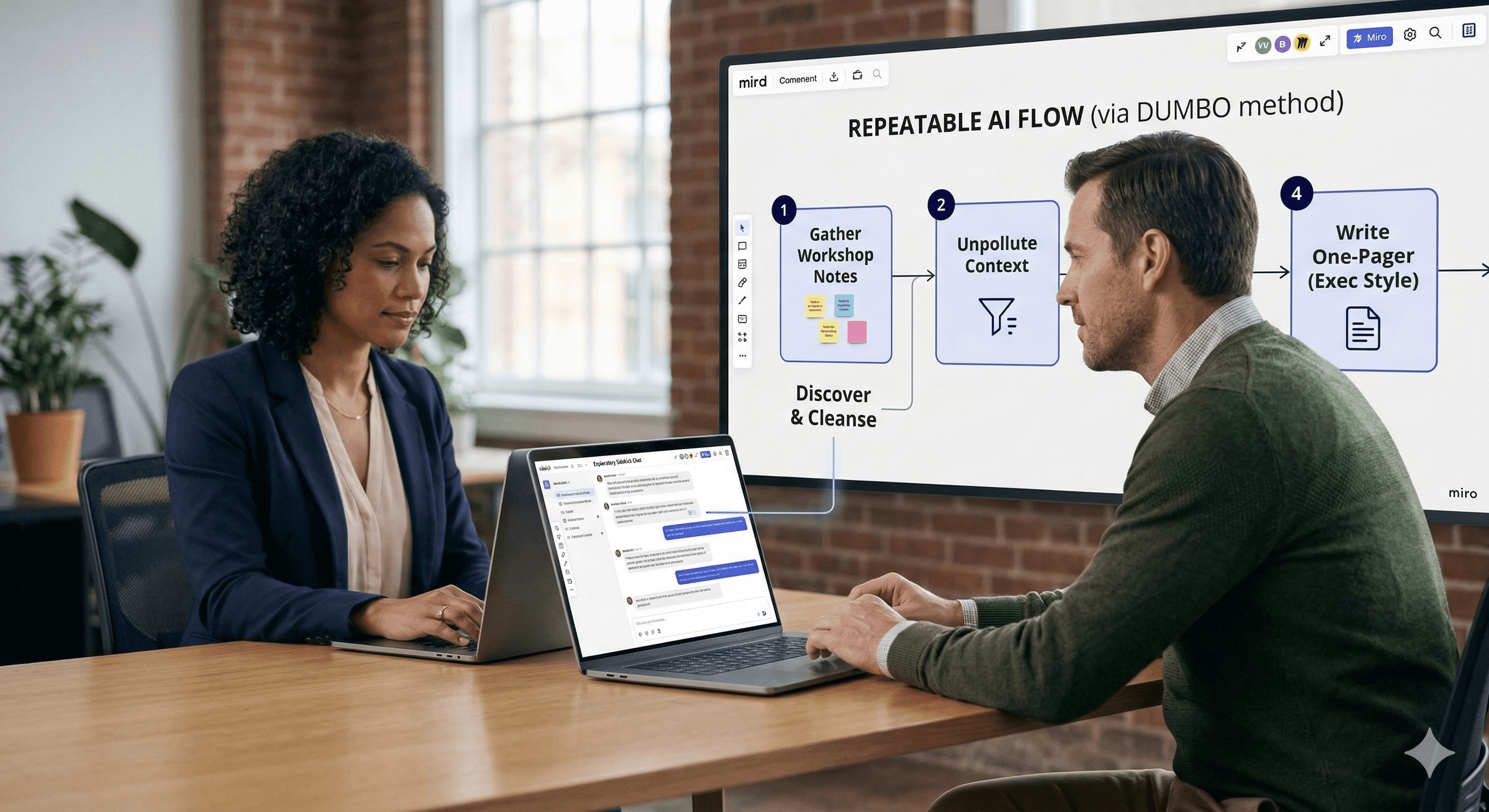
Two professionals in a modern office collaborate using laptops, engaging with a digital presentation titled "REPEATABLE AI FLOW (via DUMBO method)" on a large screen displaying steps to gather workshop notes and unpollute context.

Free AI at Work Playbook for managers using ChatGPT, Claude and Gemini.

Free AI at Work Playbook for managers using ChatGPT, Claude and Gemini.

➔ Download the Playbook

The DUMBO method is a simple way to turn exploratory Miro Sidekick conversations into reusable, multi‑step AI Flows. It works by discovering the real use case, resetting “polluted” chat context, modelling stable behaviour, building focused Flow nodes, and orchestrating them into a repeatable workflow your team can run, test, and improve.

AI chats are brilliant for exploring ideas — until the work needs to be repeatable.

Most teams have felt this pain already: someone has an amazing Sidekick conversation, copies the output into a document, and then… it disappears into a local chat history. Prompts lose context. Decisions lose provenance. And when the person who “knows the magic prompt” moves on, the workflow goes with them.

That’s the problem Seán Winters (a Platform Solutions Architect Lead) tackles in Miro’s March 2026 article introducing the DUMBO method: a practical path from messy Sidekick dialogue to a repeatable AI Flow you can share, debug, and reuse. (miro.com)

This guide breaks the method down so you can apply it in real teams — not just cloud architecture.

Quick refresher: Sidekicks vs Flows in Miro

Miro positions Sidekicks and Flows as complementary parts of its AI Workflows suite.

  • Sidekicks are conversational AI agents for exploratory work (pressure-testing options, drafting, clarifying). They act like a thought partner, using canvas context.

  • Flows are multi-step, visual AI workflows on the canvas: you chain steps so one output becomes the next input, turning a repeatable process into something your team can run again and again.

Put simply:

  • Use Sidekicks when you’re still figuring out what you want.

  • Promote the stable parts into Flows when you want the work to be reliable and repeatable.

Why turn chats into Flows at all?

Winters highlights three reasons that will resonate with anyone who has tried to “productionise” AI:

  1. Focused steps beat giant prompts

Large language models can only juggle so much context. Flows let you scope each step to exactly what it needs, improving accuracy and reducing hallucinations.

  1. Debugging becomes possible

When a chat goes wrong, you often can’t pinpoint why. In Flows, each node is inspectable: inputs, prompt, model, and output — which makes fixing issues far more straightforward.

  1. Less context pollution

Long chats drift. Earlier misunderstandings quietly bleed into later answers. Flows keep steps isolated so yesterday’s debate doesn’t corrupt today’s decision.

The DUMBO method (what each step means)

DUMBO is deliberately simple — and that’s why it works.

D — Discover your use case

Start in Sidekick. Your goal here is not “perfect output” — it’s clarity.

  • What is the real job to be done?

  • What decisions does the workflow need to make?

  • What inputs will it need, and what output format will downstream steps require?

In Winters’ example, the use case is an AWS compute recommendation helper. He uses Sidekick to outline the task, then structures source material into a table on the board so anyone can review and edit it — a transparent “knowledge base” living on the canvas.

Practical tip: If you can’t name the output format (table, checklist, brief, diagram), you’re not ready to build a Flow node yet.

U — Unpollute the context

Once you’ve explored, you’ve probably made wrong turns. That’s normal — but you don’t want those wrong turns embedded in the “memory” of your workflow.

Winters’ move is simple: start a fresh thread and ask Sidekick to summarise what you actually did, step-by-step — then turn only the useful parts into a clean system prompt to seed a new chat.

Why this matters: a prompt that only works because the model is leaning on hidden chat history will break the moment someone else tries it.

M — Model the node behaviour in Sidekicks

Now you validate stability.

Paste your refined system prompt into a fresh Sidekick conversation with zero history and run the same test inputs. If the output quality and structure hold up, you’ve got something worth promoting into Flow.

Practical tip: Treat this like a lightweight test harness. Use 3–5 representative input examples — including edge cases.

B — Build the individual AI Flow nodes

With stable behaviour proven, you move into Flows.

Winters recommends generating and testing prompts one node at a time, rather than asking for the entire Flow prompt set in one go. Then wire each node to the right inputs and test the node’s output format before moving on.

Practical tip: Design nodes as composable components you can reuse in other Flows (e.g., a “summarise requirements” node that feeds many workflows).

O — Orchestrate in Flows

Finally, chain your nodes into an end‑to‑end workflow.

In the AWS example, separate nodes recommend compute, storage, database, and networking — then a final node merges outputs into a single recommendation artefact.

Practical tip: Orchestration is where you add guardrails: format checks, convergence steps, and “review before publish” gates.

A simple example you can copy (non-cloud)

To make DUMBO feel real, here’s a repeatable pattern for a common scenario: turn workshop notes into an executive-ready one‑pager.

  1. Discover: In Sidekick, define the one‑pager structure (context, decision, risks, next steps). Select your stickies and ask Sidekick what inputs it needs to do this reliably.

  2. Unpollute: Ask Sidekick to summarise the winning approach and turn it into a system prompt for a fresh thread.

  3. Model: In a clean thread, run three workshop sets (small / messy / very large) and refine the prompt until the format is stable.

  4. Build: Create Flow nodes: (a) clean and cluster notes, (b) extract decisions + assumptions, (c) write the one‑pager in your house style.

  5. Orchestrate: Chain nodes and add a final “QA pass” node that checks for missing decisions, unclear owners, and ambiguous dates.

This is exactly the shift Winters describes: moving from “interesting chat” to a codified workflow your team can run and improve together.

Benefits (the ones that actually show up in teams)

Efficiency

You stop redoing the same thinking in new chat threads. Once a Flow exists, it becomes a repeatable execution path that saves time across projects.

Reusability

Flows are built from focused nodes, which means you can reuse components across many workflows — accelerating delivery without increasing complexity.

Verifiability

Because the workflow lives on the canvas, teams can see what inputs were used and how outputs were produced — far better than copying text out of a private chat window.

Next steps (what to do this week)

If you want to implement DUMBO quickly:

  • Pick one workflow that repeats every month (reporting, sprint planning, risk reviews).

  • Run DUMBO once end-to-end and build a first Flow with 2–4 nodes.

  • Save a “golden test set” of inputs on the board so you can re-test after prompt changes.

If you want support with governance, templates, training, or rollout, Generation Digital can help you deploy Miro AI (including Sidekicks and Flows) in a way that teams actually adopt.

FAQs

What is the DUMBO method?
The DUMBO method is a structured approach for converting exploratory Sidekick conversations into reusable AI Flows: Discover, Unpollute, Model, Build, and Orchestrate.

Who created the DUMBO method?
The method is described by Seán Winters in Miro’s March 2026 article on turning Sidekick chats into repeatable Flows.

What’s the difference between Sidekicks and Flows?
Sidekicks are conversational agents for exploratory work, while Flows are multi-step, visual AI workflows on the canvas designed to make outcomes repeatable.

Why does “unpolluting” matter?
Long chat histories can drift and include failed attempts. Starting fresh helps ensure your prompt works without relying on hidden conversation context, making it reliable for others to reuse.

What’s a good first workflow to turn into a Flow?
Meeting notes → action plan, workshop stickies → executive summary, and sprint planning → backlog draft are strong starting points because inputs are clear and outputs are easy to validate.

The DUMBO method is a simple way to turn exploratory Miro Sidekick conversations into reusable, multi‑step AI Flows. It works by discovering the real use case, resetting “polluted” chat context, modelling stable behaviour, building focused Flow nodes, and orchestrating them into a repeatable workflow your team can run, test, and improve.

AI chats are brilliant for exploring ideas — until the work needs to be repeatable.

Most teams have felt this pain already: someone has an amazing Sidekick conversation, copies the output into a document, and then… it disappears into a local chat history. Prompts lose context. Decisions lose provenance. And when the person who “knows the magic prompt” moves on, the workflow goes with them.

That’s the problem Seán Winters (a Platform Solutions Architect Lead) tackles in Miro’s March 2026 article introducing the DUMBO method: a practical path from messy Sidekick dialogue to a repeatable AI Flow you can share, debug, and reuse. (miro.com)

This guide breaks the method down so you can apply it in real teams — not just cloud architecture.

Quick refresher: Sidekicks vs Flows in Miro

Miro positions Sidekicks and Flows as complementary parts of its AI Workflows suite.

  • Sidekicks are conversational AI agents for exploratory work (pressure-testing options, drafting, clarifying). They act like a thought partner, using canvas context.

  • Flows are multi-step, visual AI workflows on the canvas: you chain steps so one output becomes the next input, turning a repeatable process into something your team can run again and again.

Put simply:

  • Use Sidekicks when you’re still figuring out what you want.

  • Promote the stable parts into Flows when you want the work to be reliable and repeatable.

Why turn chats into Flows at all?

Winters highlights three reasons that will resonate with anyone who has tried to “productionise” AI:

  1. Focused steps beat giant prompts

Large language models can only juggle so much context. Flows let you scope each step to exactly what it needs, improving accuracy and reducing hallucinations.

  1. Debugging becomes possible

When a chat goes wrong, you often can’t pinpoint why. In Flows, each node is inspectable: inputs, prompt, model, and output — which makes fixing issues far more straightforward.

  1. Less context pollution

Long chats drift. Earlier misunderstandings quietly bleed into later answers. Flows keep steps isolated so yesterday’s debate doesn’t corrupt today’s decision.

The DUMBO method (what each step means)

DUMBO is deliberately simple — and that’s why it works.

D — Discover your use case

Start in Sidekick. Your goal here is not “perfect output” — it’s clarity.

  • What is the real job to be done?

  • What decisions does the workflow need to make?

  • What inputs will it need, and what output format will downstream steps require?

In Winters’ example, the use case is an AWS compute recommendation helper. He uses Sidekick to outline the task, then structures source material into a table on the board so anyone can review and edit it — a transparent “knowledge base” living on the canvas.

Practical tip: If you can’t name the output format (table, checklist, brief, diagram), you’re not ready to build a Flow node yet.

U — Unpollute the context

Once you’ve explored, you’ve probably made wrong turns. That’s normal — but you don’t want those wrong turns embedded in the “memory” of your workflow.

Winters’ move is simple: start a fresh thread and ask Sidekick to summarise what you actually did, step-by-step — then turn only the useful parts into a clean system prompt to seed a new chat.

Why this matters: a prompt that only works because the model is leaning on hidden chat history will break the moment someone else tries it.

M — Model the node behaviour in Sidekicks

Now you validate stability.

Paste your refined system prompt into a fresh Sidekick conversation with zero history and run the same test inputs. If the output quality and structure hold up, you’ve got something worth promoting into Flow.

Practical tip: Treat this like a lightweight test harness. Use 3–5 representative input examples — including edge cases.

B — Build the individual AI Flow nodes

With stable behaviour proven, you move into Flows.

Winters recommends generating and testing prompts one node at a time, rather than asking for the entire Flow prompt set in one go. Then wire each node to the right inputs and test the node’s output format before moving on.

Practical tip: Design nodes as composable components you can reuse in other Flows (e.g., a “summarise requirements” node that feeds many workflows).

O — Orchestrate in Flows

Finally, chain your nodes into an end‑to‑end workflow.

In the AWS example, separate nodes recommend compute, storage, database, and networking — then a final node merges outputs into a single recommendation artefact.

Practical tip: Orchestration is where you add guardrails: format checks, convergence steps, and “review before publish” gates.

A simple example you can copy (non-cloud)

To make DUMBO feel real, here’s a repeatable pattern for a common scenario: turn workshop notes into an executive-ready one‑pager.

  1. Discover: In Sidekick, define the one‑pager structure (context, decision, risks, next steps). Select your stickies and ask Sidekick what inputs it needs to do this reliably.

  2. Unpollute: Ask Sidekick to summarise the winning approach and turn it into a system prompt for a fresh thread.

  3. Model: In a clean thread, run three workshop sets (small / messy / very large) and refine the prompt until the format is stable.

  4. Build: Create Flow nodes: (a) clean and cluster notes, (b) extract decisions + assumptions, (c) write the one‑pager in your house style.

  5. Orchestrate: Chain nodes and add a final “QA pass” node that checks for missing decisions, unclear owners, and ambiguous dates.

This is exactly the shift Winters describes: moving from “interesting chat” to a codified workflow your team can run and improve together.

Benefits (the ones that actually show up in teams)

Efficiency

You stop redoing the same thinking in new chat threads. Once a Flow exists, it becomes a repeatable execution path that saves time across projects.

Reusability

Flows are built from focused nodes, which means you can reuse components across many workflows — accelerating delivery without increasing complexity.

Verifiability

Because the workflow lives on the canvas, teams can see what inputs were used and how outputs were produced — far better than copying text out of a private chat window.

Next steps (what to do this week)

If you want to implement DUMBO quickly:

  • Pick one workflow that repeats every month (reporting, sprint planning, risk reviews).

  • Run DUMBO once end-to-end and build a first Flow with 2–4 nodes.

  • Save a “golden test set” of inputs on the board so you can re-test after prompt changes.

If you want support with governance, templates, training, or rollout, Generation Digital can help you deploy Miro AI (including Sidekicks and Flows) in a way that teams actually adopt.

FAQs

What is the DUMBO method?
The DUMBO method is a structured approach for converting exploratory Sidekick conversations into reusable AI Flows: Discover, Unpollute, Model, Build, and Orchestrate.

Who created the DUMBO method?
The method is described by Seán Winters in Miro’s March 2026 article on turning Sidekick chats into repeatable Flows.

What’s the difference between Sidekicks and Flows?
Sidekicks are conversational agents for exploratory work, while Flows are multi-step, visual AI workflows on the canvas designed to make outcomes repeatable.

Why does “unpolluting” matter?
Long chat histories can drift and include failed attempts. Starting fresh helps ensure your prompt works without relying on hidden conversation context, making it reliable for others to reuse.

What’s a good first workflow to turn into a Flow?
Meeting notes → action plan, workshop stickies → executive summary, and sprint planning → backlog draft are strong starting points because inputs are clear and outputs are easy to validate.

Get weekly AI news and advice delivered to your inbox

By subscribing you consent to Generation Digital storing and processing your details in line with our privacy policy. You can read the full policy at gend.co/privacy.


Generation
Digital

UK Office

Generation Digital Ltd
33 Queen St,
London
EC4R 1AP
United Kingdom

Canada Office

Generation Digital Americas Inc
181 Bay St., Suite 1800
Toronto, ON, M5J 2T9
Canada

USA Office

Generation Digital Americas Inc
77 Sands St,
Brooklyn, NY 11201,
United States

EU Office

Generation Digital Software
Elgee Building
Dundalk
A91 X2R3
Ireland

Middle East Office

6994 Alsharq 3890,
An Narjis,
Riyadh 13343,
Saudi Arabia

UK Fast Growth Index UBS Logo
Financial Times FT 1000 Logo
Febe Growth 100 Logo (Background Removed)

Company No: 256 9431 77 | Copyright 2026 | Terms and Conditions | Privacy Policy

Generation
Digital

UK Office

Generation Digital Ltd
33 Queen St,
London
EC4R 1AP
United Kingdom

Canada Office

Generation Digital Americas Inc
181 Bay St., Suite 1800
Toronto, ON, M5J 2T9
Canada

USA Office

Generation Digital Americas Inc
77 Sands St,
Brooklyn, NY 11201,
United States

EU Office

Generation Digital Software
Elgee Building
Dundalk
A91 X2R3
Ireland

Middle East Office

6994 Alsharq 3890,
An Narjis,
Riyadh 13343,
Saudi Arabia

UK Fast Growth Index UBS Logo
Financial Times FT 1000 Logo
Febe Growth 100 Logo (Background Removed)


Company No: 256 9431 77
Terms and Conditions
Privacy Policy
Copyright 2026




