Notion MCP vs Notion AI: What to Use and Why (2026)
Notion

Pas sûr de quoi faire ensuite avec l'IA?Évaluez la préparation, les risques et les priorités en moins d'une heure.
➔ Téléchargez notre kit de préparation à l'IA gratuit
Notion MCP (Model Context Protocol) connects external AI tools to Notion so users can read and write information without switching apps. Notion AI is the native AI layer inside Notion, designed for collaborative knowledge work, enterprise search, and database-centric workflows. In short: MCP extends reach; Notion AI enables reliable, in-workspace execution.
If you’ve heard, “Why do we need Notion AI when we have MCP?” you’re not alone. MCP is genuinely useful—but it’s often misunderstood.
Here’s the clean way to understand it:
MCP is a bridge, not a replacement for native AI. MCP connects AI tools you already use to Notion. Notion AI is where knowledge work happens inside Notion—collaboratively, at scale, and with database-native workflows.
This post explains what each is for, where the overlap is, and how to help customers choose the right combination.
What is Notion MCP?
Notion MCP (Model Context Protocol) connects AI-powered tools across your workflow to Notion, keeping Notion at the centre of your connected workspace. It allows users to read and write to Notion directly from external tools—for example coding, design, automation, and CRM workflows—without switching context.
It also follows enterprise expectations:
It respects existing permissions.
It logs actions as the end user in page history and audit logs.
It aligns to common security standards such as SOC2, GDPR and ISO27001.
The guide lists supported tool categories including AI assistants (e.g., ChatGPT, Claude, Mistral, Perplexity), coding tools (e.g., Cursor/VSCode), design tools (Figma), CRMs (HubSpot) and automation platforms (Make, Zapier).
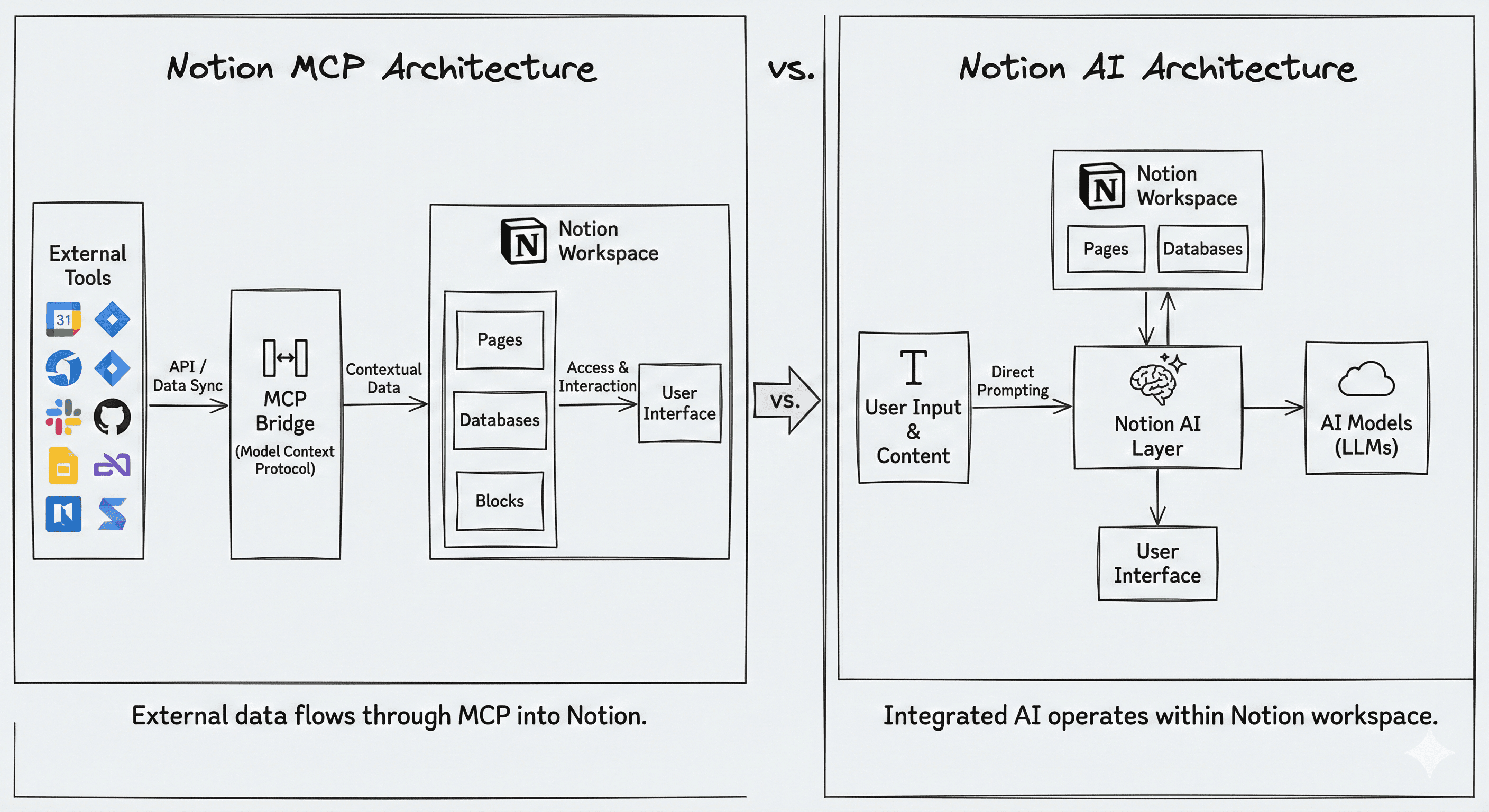
The simplest way to explain the difference
The confusion comes from the fact that MCP can connect to assistants that use similar underlying models. But the model is only part of the story.
The real difference is where and how work happens:
Notion AI is built for knowledge work inside your workspace: collaboration, sharing, visualisation, permissions, and databases are all native.
MCP is designed to extend Notion’s reach from external tools—great for staying in flow, but not a substitute for the full in-Notion experience.
Put plainly: MCP would often require separate UIs for each workflow, whereas Notion AI already has the interface, permissions model, and database tooling in place.
Core capability comparison
So what are the differences between Notion AI, Claude + MCP, and ChatGPT + MCP. Key takeaways:
Model access: Notion AI can access both OpenAI and Anthropic models and auto-select the best model for the job. Claude + MCP is Anthropic-only; ChatGPT + MCP is OpenAI-only.
Read/write: Notion AI and Claude + MCP can read and write; ChatGPT + MCP is described as read-only for Notion.
Database operations: Notion AI can create databases, update properties, and—crucially—query, filter and analyse across databases. MCP implementations are described as unable to query/filter/aggregate databases.
Automated workflows: Notion AI can be triggered externally or run on recurring schedules (e.g., weekly reports). Claude/ChatGPT via MCP cannot be triggered or scheduled.
Scale and limits: Notion AI is positioned as “unlimited” rate limits; MCP is described as 3 requests per second per user/connection, with caps more likely for Free/Plus.
Quick table for software buyers
What you’re trying to do | MCP is great for | Notion AI is better for |
|---|---|---|
Stay in flow in another tool | Quick read/write updates from Cursor, Claude, etc. | — |
Turn a chat into team documentation | Claude + MCP can save structured docs | Notion AI can do this and optimise in-workspace collaboration |
Manage project delivery in databases | Basic create/update operations | Querying, filtering, analysing, planning sprints across databases |
Run weekly reporting automatically | — | Scheduled/recurring agent workflows |
Search across workspace + connected tools | — | Enterprise Search built in |
When to use each?
ChatGPT + MCP: best for read-only research and synthesis
The guide frames ChatGPT + MCP as the most limited option, best for:
researching across multiple pages and summarising findings
quick lookups (“What does the kickoff doc say?”)
finding relevant documents via search
But it’s not suitable for capturing knowledge back into the workspace, task management, or scheduled reporting.
Claude + MCP: good for turning conversations into Notion artefacts
Claude + MCP can do everything ChatGPT can, plus:
extract a troubleshooting discussion into a structured how-to
generate meeting pre-reads and agendas using Notion context
break feature specs into tasks and write them into Notion
However, it still can’t do database querying, CRM-style filtering/forecasting, or scheduled workflows.
Notion AI: built for database-centric work and scale
Notion AI is positioned as the most comprehensive option, especially when work is database-driven:
plan sprints and assign tasks by querying and updating databases
update blocked tasks, identify dependencies, and notify owners
research across databases and generate comprehensive summaries
It also supports heavy usage without the same rate-limit concerns and is optimised for Notion workflows—but needs to be used inside Notion rather than in external tools.
Notion AI exclusive features customers often miss
Here are the native capabilities that MCP-connected assistants can’t replicate:
AI blocks embedded in pages with persistent context
AI autofill, AI formulas, and AI database creation
AI meeting notes (transcription and summaries)
In-page AI writer
Enterprise Search across the workspace and connected tools
Slack triggers, recurring agent workflows, and shared AI agents for teams.
This is usually the turning point in a buying conversation: MCP helps individuals stay in flow, while Notion AI helps organisations operationalise AI inside the system of work.
“Why do we need Notion AI if we have MCP?”
MCP extends Notion’s reach into external tools for quick updates and simple tasks. Notion AI is built for collaborative knowledge work in the workspace—database-centric planning, multi-step workflows, enterprise search, and automation on schedules. MCP complements this, but doesn’t replace it.
“I can do everything with MCP that I could do with Notion AI.”
MCP is excellent for staying in flow and making quick updates. But for autonomous, multi-step tasks, database-driven insights, and reliable scale, Notion AI provides capabilities MCP can’t match—especially where ChatGPT is limited to read-only access.
“How do we control what pages AI tools can access through MCP?”
MCP follows Notion’s permissions model: tools only see what the authenticated user can access. Actions appear in audit logs and page history as end-user actions for accountability.
Rate limits and expectations (the honest bit)
The guide suggests positioning MCP as best-effort connectivity, and Notion AI as the reliable path for scale and integrated features.
MCP is described as 3 requests per second per user/connection today.
Business/Enterprise customers are positioned as having higher or unlimited MCP access.
Free/Plus users may see credit-style caps and usage pauses until reset.
Notion AI features (Enterprise Search, meeting notes, agents, etc.) are available with Business/Enterprise + Notion AI.
How to make a decision on purchasing Notion?
If you want a simple decision framework:
If your organisation wants to use AI inside Cursor/Claude/Figma and push notes back to Notion, start with MCP.
If your organisation needs enterprise search, shared agents, database-driven planning, and recurring automation, consider Notion AI.
If you want both, then MCP keeps Notion connected; Notion AI makes Notion the place the work gets done.
Next steps
Ask where work actually happens (inside Notion, or across external tools?).
Map one database-heavy workflow (project planning, pipeline, weekly reporting).
Research the “exclusive” capabilities: enterprise search, AI meeting notes, shared agents, scheduled workflows.
FAQs
Is MCP replacing Notion AI?
No. MCP is positioned as a secure bridge that complements Notion. Notion AI remains the native, most comprehensive way to do knowledge work inside the workspace.
Does MCP follow Notion permissions?
Yes. MCP respects existing permissions and logs actions in page history and audit logs as the end user.
Can ChatGPT write back to Notion via MCP?
ChatGPT + MCP is described as read-only for Notion, whereas Notion AI and Claude + MCP have full write access.
What can Notion AI do that MCP can’t?
Database querying/filtering/analysis, enterprise search, AI meeting notes, in-page AI writer, AI database tools (autofill/formulas/creator), and recurring/shared agent workflows.
Are there rate limits?
MCP as 3 requests per second per user/connection with caps more likely for Free/Plus, while Notion AI is positioned as unlimited for subscribers.
Recevez chaque semaine des nouvelles et des conseils sur l'IA directement dans votre boîte de réception
En vous abonnant, vous consentez à ce que Génération Numérique stocke et traite vos informations conformément à notre politique de confidentialité. Vous pouvez lire la politique complète sur gend.co/privacy.



Génération
Numérique

Bureau du Royaume-Uni
Génération Numérique Ltée
33 rue Queen,
Londres
EC4R 1AP
Royaume-Uni
Bureau au Canada
Génération Numérique Amériques Inc
181 rue Bay, Suite 1800
Toronto, ON, M5J 2T9
Canada
Bureau aux États-Unis
Generation Digital Americas Inc
77 Sands St,
Brooklyn, NY 11201,
États-Unis
Bureau de l'UE
Génération de logiciels numériques
Bâtiment Elgee
Dundalk
A91 X2R3
Irlande
Bureau du Moyen-Orient
6994 Alsharq 3890,
An Narjis,
Riyad 13343,
Arabie Saoudite







Numéro d'entreprise : 256 9431 77 | Droits d'auteur 2026 | Conditions générales | Politique de confidentialité