How Small Teams Win with ChatGPT: 6 Workflows (2026)

How Small Teams Win with ChatGPT: 6 Workflows (2026)

ChatGPT

Feb 24, 2026

A small team of professionals collaborates in a modern office with exposed brick walls, using a laptop displaying a chart to discuss strategies for optimization, highlighting the efficiency of workflow management.

Not sure where to start with AI?
Assess readiness, risk, and priorities in under an hour.

Not sure where to start with AI?
Assess readiness, risk, and priorities in under an hour.

➔ Download Our Free AI Readiness Pack

Small teams win with ChatGPT by focusing on repeatable workflows: analysing spreadsheets, drafting marketing assets, preparing meetings, building budgets, and evaluating vendors. Use ChatGPT Business for secure use, connect the tools you already rely on (like Drive/OneDrive and CRMs), and standardise prompts so output quality improves over time.

Small teams don’t have the luxury of specialists for every task. They need leverage: faster analysis, quicker writing, fewer admin loops, and better decisions with the same headcount.

OpenAI’s guide positions ChatGPT Business as a simple and secure way for small and midsize businesses to put frontier AI to work. It also highlights how its newest model (in the guide) supports day-to-day work: thinking through complexity, higher accuracy, writing in any format, and grounding answers by connecting to your tools. (cdn.openai.com)

This post distils the guide into a practical set of workflows and prompts you can run this week.
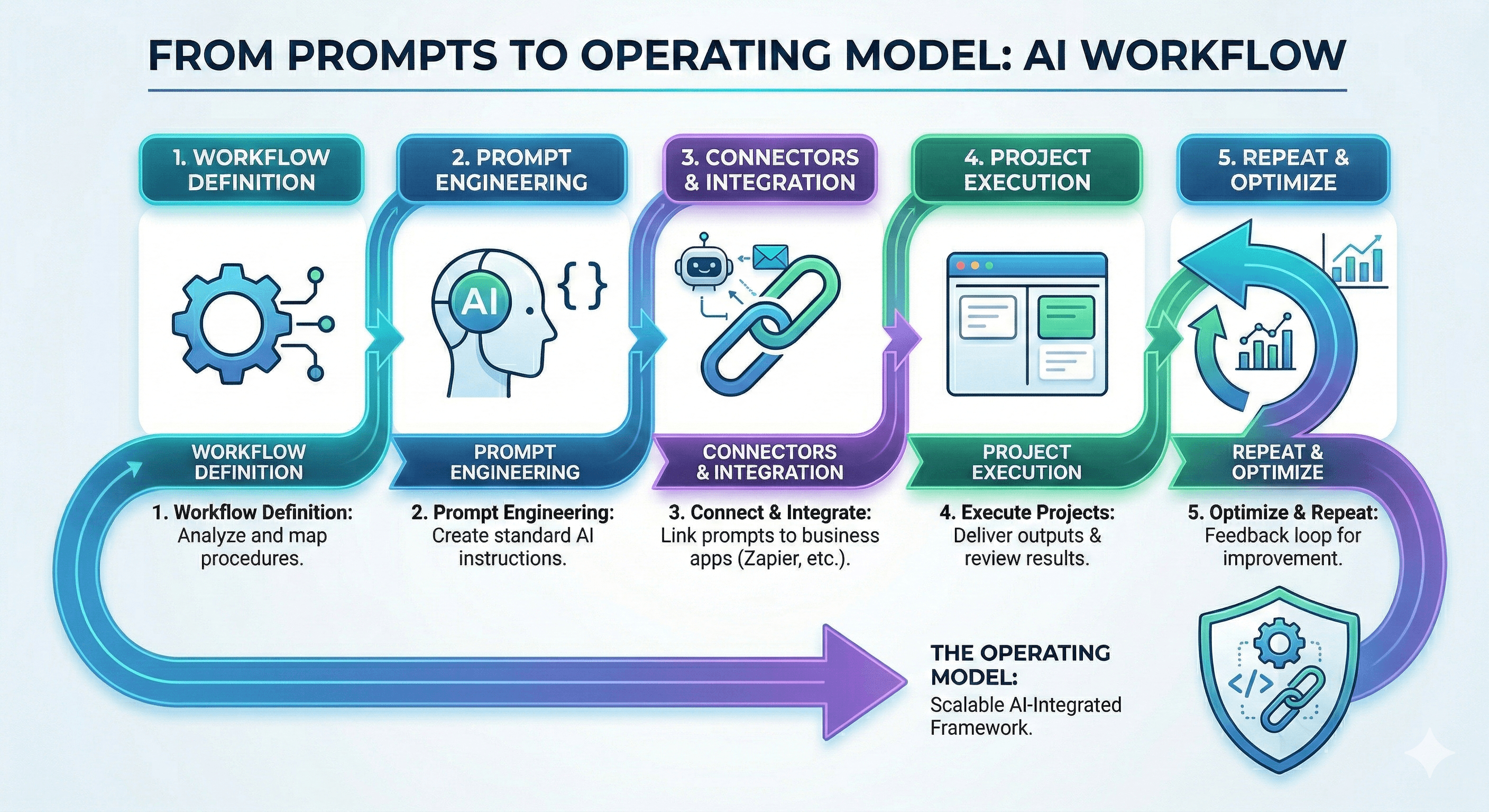
This image illustrates a five-step AI workflow process from prompts to an operating model, including workflow definition, prompt engineering, connectors and integration, project execution, and repeat and optimize, designed for scalable AI-integrated frameworks.

Why ChatGPT can be a multiplier for small teams

The guide frames the “small team advantage” as speed: with the right tools, lean teams can move faster and take on bigger opportunities confidently.

It also makes a clear privacy point: chats and files are private, encrypted, and not used to train models.

1) Analyse data in seconds (without a dedicated data team)

If your finance or ops work lives in spreadsheets, this is one of the fastest wins.

The guide’s example workflow is:

  • upload your latest financial spreadsheets

  • ask ChatGPT to explain top cost drivers, highlight savings opportunities, and produce a chart and executive summary

Try it yourself prompt
Explain the top cost drivers in this spend data, highlight areas to reduce costs, and show the results in a bar chart with an executive summary.

Pro tip: connect Google Drive or OneDrive so ChatGPT can work from your latest files.

2) Ship polished marketing materials that match your brand voice

Small teams often lose time rewriting the same message across channels.

The guide suggests using ChatGPT to turn product or event details into a full “campaign kit”: announcement email, landing page copy, and social posts—aligned to brand voice by pulling context from internal docs via connectors.

Try it yourself prompt
Create a campaign kit for [name of your launch]. Include: (1) an announcement email, (2) landing page copy, (3) LinkedIn post, (4) Instagram post, and (5) a short internal sales brief.

Pro tip: use Canva with ChatGPT to format copy into visuals quickly.

3) Build and maintain a budget (and catch issues early)

Budgeting becomes painful when numbers live in different sheets and formats.

The guide shows ChatGPT normalising spreadsheet data, comparing budget vs actuals, flagging variances, and explaining what’s driving them—so teams can act earlier.

Try it yourself prompt
Compare each department’s budget vs. actual spend. Highlight the biggest differences and explain what’s causing them.

Pro tip: save your analysis in a Project to track changes month by month.

4) Prepare and run productive meetings (with pre-reads and decisions)

Meetings are where small teams bleed time—especially when notes are messy and actions get lost.

The guide recommends using ChatGPT to turn transcripts or chat threads into clear agendas, pre-reads, and decision summaries, and to carry forward action items into future conversations.

Try it yourself prompt
Create a one-hour meeting agenda for [topic]. Add an impact vs. effort chart for our options, highlight items needing a decision, and note follow-ups.

Pro tip: use ChatGPT record in the macOS desktop app to capture meetings, generate a transcript, and produce action items.

5) Evaluate and select the right vendor (fast, with structure)

Vendor decisions are hard because information is scattered across sites and PDFs.

The guide’s workflow uses Deep research to research and compare options side-by-side, producing a structured report and comparison table (features, pricing, integrations, pros/cons).

Try it yourself prompt
Research and compare top [tool/service] options for a small business in [your industry]. Include features, pricing, integrations, and pros/cons.

Pro tip: save comparisons in a Project so you can refresh them as new data arrives.

6) Five quick wins you can try today

If you want immediate momentum, start here:

  1. Rewrite website copy in a warmer tone and suggest a better headline.

  2. Use CRM data (connect HubSpot or upload exports) to identify deals most likely to close and define next actions.

  3. Compare your product to a competitor using internal docs plus public web sources.

  4. Scan code via GitHub connector for security risks and quick fixes.

  5. Turn meeting notes into a polished proposal email for a client.

What makes this work in real teams

Most teams don’t need “more prompts”. They need a simple operating model:

  • pick 3–5 workflows that happen every week

  • standardise prompts and formats (exec summary, risks, next actions)

  • connect the tools that hold your source-of-truth data (Drive/OneDrive, CRM)

  • save work in Projects so outputs improve over time

Next steps

If you’re trying to scale ChatGPT use in a small team, start narrow and make it stick:

  1. Choose one workflow (budget variance, meeting pre-reads, campaign kits, or vendor evaluation).

  2. Create one shared prompt template.

  3. Run it five times, review quality, and refine.

  4. Then expand to the next workflow.

FAQs

Is ChatGPT Business suitable for small teams?
Yes. The guide describes it as a simple, secure way for companies to put frontier AI to work. (cdn.openai.com)

What are the best first use cases for small teams?
OpenAI’s guide highlights common wins: analysing spreadsheets, shipping marketing assets, preparing meetings, building budgets, and evaluating vendors using deep research. (cdn.openai.com)

How do we keep outputs grounded in our business context?
Connect the tools you already use (for example, Google Drive or OneDrive) and feed ChatGPT high-quality internal examples (templates, best-performing copy, approved documents). (cdn.openai.com)

Can we reuse work and keep it up to date?
Yes. The guide suggests saving analyses and comparisons in a Project so you can refresh them over time. (cdn.openai.com)

What about privacy and security?
The guide states chats and files are private, encrypted, and not used to train models. It also mentions SSO and usage tracking for secure, scalable use. (cdn.openai.com)

Image/diagram prompts

  1. “6 workflows where small teams win with ChatGPT” (icons + short labels).

  2. “From prompts to operating model”: workflow → standard prompt → connectors → project → repeat.

  3. “Quick wins checklist”: the five quick wins as a visual card.

Small teams win with ChatGPT by focusing on repeatable workflows: analysing spreadsheets, drafting marketing assets, preparing meetings, building budgets, and evaluating vendors. Use ChatGPT Business for secure use, connect the tools you already rely on (like Drive/OneDrive and CRMs), and standardise prompts so output quality improves over time.

Small teams don’t have the luxury of specialists for every task. They need leverage: faster analysis, quicker writing, fewer admin loops, and better decisions with the same headcount.

OpenAI’s guide positions ChatGPT Business as a simple and secure way for small and midsize businesses to put frontier AI to work. It also highlights how its newest model (in the guide) supports day-to-day work: thinking through complexity, higher accuracy, writing in any format, and grounding answers by connecting to your tools. (cdn.openai.com)

This post distils the guide into a practical set of workflows and prompts you can run this week.

This image illustrates a five-step AI workflow process from prompts to an operating model, including workflow definition, prompt engineering, connectors and integration, project execution, and repeat and optimize, designed for scalable AI-integrated frameworks.

Why ChatGPT can be a multiplier for small teams

The guide frames the “small team advantage” as speed: with the right tools, lean teams can move faster and take on bigger opportunities confidently.

It also makes a clear privacy point: chats and files are private, encrypted, and not used to train models.

1) Analyse data in seconds (without a dedicated data team)

If your finance or ops work lives in spreadsheets, this is one of the fastest wins.

The guide’s example workflow is:

  • upload your latest financial spreadsheets

  • ask ChatGPT to explain top cost drivers, highlight savings opportunities, and produce a chart and executive summary

Try it yourself prompt
Explain the top cost drivers in this spend data, highlight areas to reduce costs, and show the results in a bar chart with an executive summary.

Pro tip: connect Google Drive or OneDrive so ChatGPT can work from your latest files.

2) Ship polished marketing materials that match your brand voice

Small teams often lose time rewriting the same message across channels.

The guide suggests using ChatGPT to turn product or event details into a full “campaign kit”: announcement email, landing page copy, and social posts—aligned to brand voice by pulling context from internal docs via connectors.

Try it yourself prompt
Create a campaign kit for [name of your launch]. Include: (1) an announcement email, (2) landing page copy, (3) LinkedIn post, (4) Instagram post, and (5) a short internal sales brief.

Pro tip: use Canva with ChatGPT to format copy into visuals quickly.

3) Build and maintain a budget (and catch issues early)

Budgeting becomes painful when numbers live in different sheets and formats.

The guide shows ChatGPT normalising spreadsheet data, comparing budget vs actuals, flagging variances, and explaining what’s driving them—so teams can act earlier.

Try it yourself prompt
Compare each department’s budget vs. actual spend. Highlight the biggest differences and explain what’s causing them.

Pro tip: save your analysis in a Project to track changes month by month.

4) Prepare and run productive meetings (with pre-reads and decisions)

Meetings are where small teams bleed time—especially when notes are messy and actions get lost.

The guide recommends using ChatGPT to turn transcripts or chat threads into clear agendas, pre-reads, and decision summaries, and to carry forward action items into future conversations.

Try it yourself prompt
Create a one-hour meeting agenda for [topic]. Add an impact vs. effort chart for our options, highlight items needing a decision, and note follow-ups.

Pro tip: use ChatGPT record in the macOS desktop app to capture meetings, generate a transcript, and produce action items.

5) Evaluate and select the right vendor (fast, with structure)

Vendor decisions are hard because information is scattered across sites and PDFs.

The guide’s workflow uses Deep research to research and compare options side-by-side, producing a structured report and comparison table (features, pricing, integrations, pros/cons).

Try it yourself prompt
Research and compare top [tool/service] options for a small business in [your industry]. Include features, pricing, integrations, and pros/cons.

Pro tip: save comparisons in a Project so you can refresh them as new data arrives.

6) Five quick wins you can try today

If you want immediate momentum, start here:

  1. Rewrite website copy in a warmer tone and suggest a better headline.

  2. Use CRM data (connect HubSpot or upload exports) to identify deals most likely to close and define next actions.

  3. Compare your product to a competitor using internal docs plus public web sources.

  4. Scan code via GitHub connector for security risks and quick fixes.

  5. Turn meeting notes into a polished proposal email for a client.

What makes this work in real teams

Most teams don’t need “more prompts”. They need a simple operating model:

  • pick 3–5 workflows that happen every week

  • standardise prompts and formats (exec summary, risks, next actions)

  • connect the tools that hold your source-of-truth data (Drive/OneDrive, CRM)

  • save work in Projects so outputs improve over time

Next steps

If you’re trying to scale ChatGPT use in a small team, start narrow and make it stick:

  1. Choose one workflow (budget variance, meeting pre-reads, campaign kits, or vendor evaluation).

  2. Create one shared prompt template.

  3. Run it five times, review quality, and refine.

  4. Then expand to the next workflow.

FAQs

Is ChatGPT Business suitable for small teams?
Yes. The guide describes it as a simple, secure way for companies to put frontier AI to work. (cdn.openai.com)

What are the best first use cases for small teams?
OpenAI’s guide highlights common wins: analysing spreadsheets, shipping marketing assets, preparing meetings, building budgets, and evaluating vendors using deep research. (cdn.openai.com)

How do we keep outputs grounded in our business context?
Connect the tools you already use (for example, Google Drive or OneDrive) and feed ChatGPT high-quality internal examples (templates, best-performing copy, approved documents). (cdn.openai.com)

Can we reuse work and keep it up to date?
Yes. The guide suggests saving analyses and comparisons in a Project so you can refresh them over time. (cdn.openai.com)

What about privacy and security?
The guide states chats and files are private, encrypted, and not used to train models. It also mentions SSO and usage tracking for secure, scalable use. (cdn.openai.com)

Image/diagram prompts

  1. “6 workflows where small teams win with ChatGPT” (icons + short labels).

  2. “From prompts to operating model”: workflow → standard prompt → connectors → project → repeat.

  3. “Quick wins checklist”: the five quick wins as a visual card.

Get weekly AI news and advice delivered to your inbox

By subscribing you consent to Generation Digital storing and processing your details in line with our privacy policy. You can read the full policy at gend.co/privacy.


Upcoming Workshops and Webinars

A diverse group of professionals collaborating around a table in a bright, modern office setting.

Operational Clarity at Scale - Asana

Virtual Webinar
Weds 25th February 2026
Online

A diverse group of professionals collaborating around a table in a bright, modern office setting.

Work With AI Teammates - Asana

In-Person Workshop
Thurs 26th February 2026
London, UK

A diverse group of professionals collaborating around a table in a bright, modern office setting.

From Idea to Prototype - AI in Miro

Virtual Webinar
Weds 18th February 2026
Online

Generation
Digital

UK Office

Generation Digital Ltd
33 Queen St,
London
EC4R 1AP
United Kingdom

Canada Office

Generation Digital Americas Inc
181 Bay St., Suite 1800
Toronto, ON, M5J 2T9
Canada

USA Office

Generation Digital Americas Inc
77 Sands St,
Brooklyn, NY 11201,
United States

EU Office

Generation Digital Software
Elgee Building
Dundalk
A91 X2R3
Ireland

Middle East Office

6994 Alsharq 3890,
An Narjis,
Riyadh 13343,
Saudi Arabia

UK Fast Growth Index UBS Logo
Financial Times FT 1000 Logo
Febe Growth 100 Logo (Background Removed)

Company No: 256 9431 77 | Copyright 2026 | Terms and Conditions | Privacy Policy

Generation
Digital

UK Office

Generation Digital Ltd
33 Queen St,
London
EC4R 1AP
United Kingdom

Canada Office

Generation Digital Americas Inc
181 Bay St., Suite 1800
Toronto, ON, M5J 2T9
Canada

USA Office

Generation Digital Americas Inc
77 Sands St,
Brooklyn, NY 11201,
United States

EU Office

Generation Digital Software
Elgee Building
Dundalk
A91 X2R3
Ireland

Middle East Office

6994 Alsharq 3890,
An Narjis,
Riyadh 13343,
Saudi Arabia

UK Fast Growth Index UBS Logo
Financial Times FT 1000 Logo
Febe Growth 100 Logo (Background Removed)


Company No: 256 9431 77
Terms and Conditions
Privacy Policy
Copyright 2026





