ChatGPT Deep Research: How It Works and When to Use It
ChatGPT

Feb 24, 2026

Not sure where to start with AI?
Assess readiness, risk, and priorities in under an hour.
Not sure where to start with AI?
Assess readiness, risk, and priorities in under an hour.
➔ Download Our Free AI Readiness Pack
ChatGPT Deep Research is a research mode that turns complex questions into structured, cited reports. You choose the sources it can use—public web, specific sites, uploaded files, and connected apps—then review a proposed plan before it runs. It’s best for multi-step research, synthesis, and verification-ready outputs you can reuse.
Most people don’t need “more AI answers”. They need research they can trust, with sources they can check.
That’s the promise of Deep Research in ChatGPT: instead of a quick response, it creates a documented report by reading and synthesising multiple sources—while letting you control where the information comes from and how the scope evolves.
This guide explains what Deep Research is, how to use it well, and how to roll it out safely in a business setting.
What is Deep Research in ChatGPT?
Deep Research is a research workflow inside ChatGPT that:
proposes a research plan based on your goal
reads across multiple sources (websites, specific domains, uploaded files, and connected apps)
lets you follow progress and redirect mid-run
produces a structured report with citations/source links for verification
It’s designed for multi-step questions where you want more depth and traceability than a normal chat response.
Search vs Deep Research vs Agent mode (simple comparison)
When teams get confused, it’s usually because they’re mixing three different experiences.
Mode | Best for | Output style | Control over sources |
|---|---|---|---|
Search (web) | Quick facts, recent updates, fast browsing | Short summary + links | Limited (general web) |
Deep Research | Multi-step research + synthesis | Structured, cited report | High: sites, files, connected apps |
Agent mode | Tasks that combine research + actions (and, in some setups, a visual browser) | Longer workflows and tool use | Varies by configuration |
As a rule of thumb:
use Search when you just need a quick answer and a few links;
use Deep Research when you need a report you can share or build on;
use Agent mode when the task includes multiple steps and tool use beyond research.
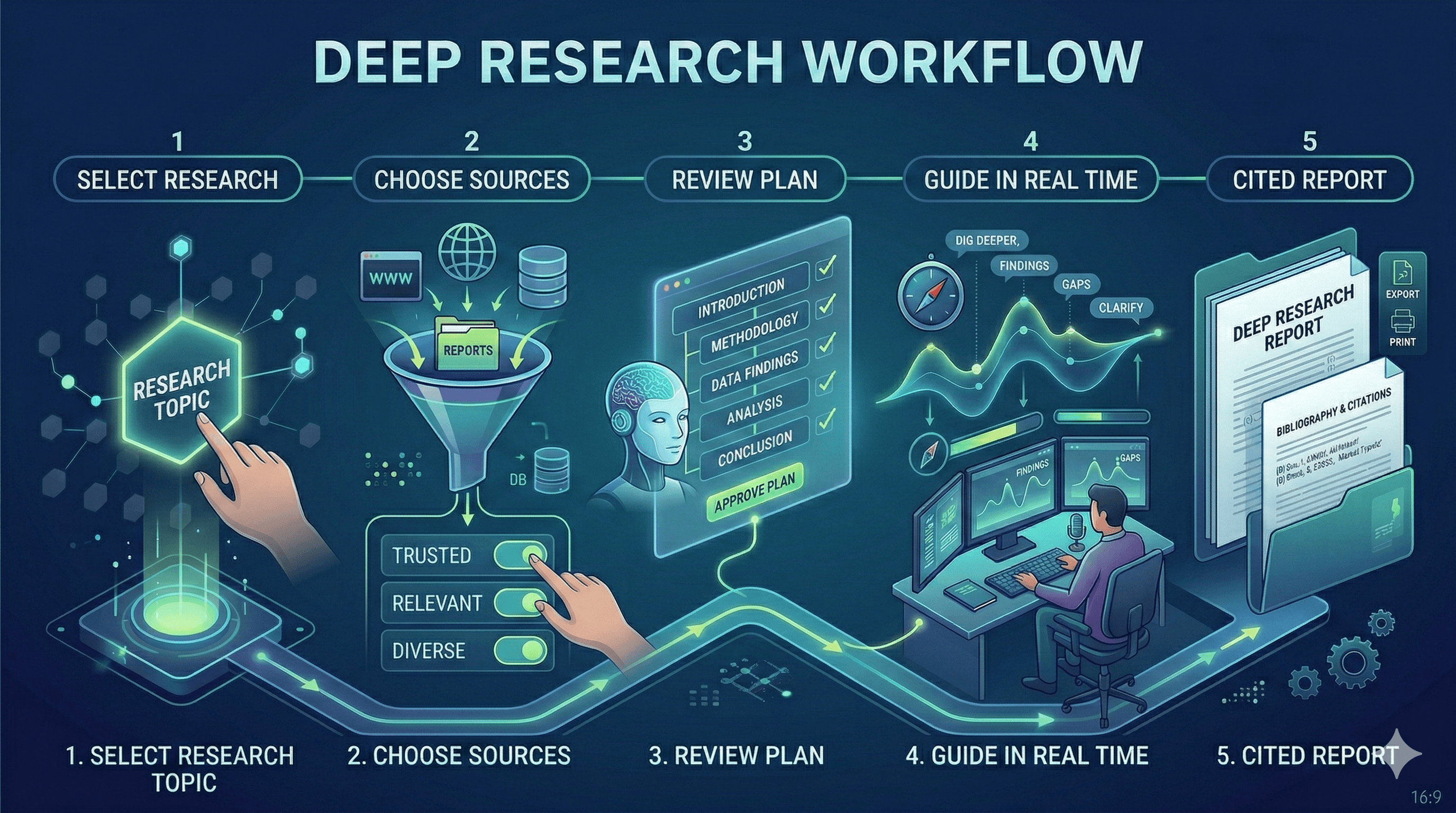
How Deep Research works (step by step)
1) Select Deep Research
In ChatGPT, open the tools menu (“+”) and choose Deep Research. You can also start it via shortcut commands (depending on your interface and plan).
2) Add your sources
You can let Deep Research use the public web, but the real value is in curated sources:
add a set of URLs you trust
restrict the task to specific sites/domains
attach files (PDFs, docs, spreadsheets)
connect apps (e.g., document stores) for authenticated context
Deep Research prioritises the sources you provide over general web results.
3) Review the proposed plan
Before it starts, ChatGPT creates a proposed research plan. Review it like you would a brief:
is the scope right?
are the constraints clear?
is anything missing (markets, competitors, date ranges, definitions)?
4) Guide the work in real time
As it runs, you can:
refine the scope
add constraints
update sources
interrupt and redirect the research
5) Review and download the report
Deep Research outputs are designed for reuse:
table of contents for navigation
sources used for reference checking
activity history to see progress
You can export reports in formats like Markdown, Word, and PDF.
What to use Deep Research for (high-value use cases)
Deep Research works best when the output is a work product.
Market and competitor research
competitor positioning and feature comparisons
market landscape summaries
pricing and packaging research (with citations)
Policy and regulatory scanning
summary of regulatory requirements by region
comparison of guidance across authorities
evidence-backed recommendations (with source trail)
Procurement and vendor assessment
vendor shortlists based on defined criteria
security/compliance documentation review
“pros/cons + risks” reports with links to primary sources
Research briefs for product and comms teams
write a PRD background section with citations
build a structured briefing for leadership
assemble “what changed since last quarter” updates
How to write prompts that get better research
A good Deep Research prompt looks more like a brief than a question.
Include:
the decision you’re trying to make
the audience (exec, technical, customer)
scope boundaries (region, timeframe, industry)
required format (table, SWOT, narrative, checklist)
preferred sources (or sites to exclude)
Example prompt
“Create a cited report comparing three AI note-taking tools for UK professional services teams. Include: pricing, data handling, security certifications, meeting transcription capability, and admin controls. Prioritise vendor documentation and reputable third-party reviews. Summarise recommendations for a CIO and include a decision matrix.”
Governance and safe rollout for teams
Deep Research is most powerful when it becomes repeatable—and that requires a few guardrails.
Source control and traceability
Teach teams to:
prioritise primary sources (vendor docs, regulators, standards bodies)
restrict research to trusted domains when accuracy matters
treat citations as part of the deliverable, not an afterthought
Data privacy basics
Deep Research follows the same data handling settings as standard ChatGPT conversations (including retention and training preferences configured in your data controls). For enterprise environments, admins can control access through role-based controls and can reference activity via admin APIs.
A simple operating model
If you’re rolling out Deep Research across a business:
define approved use cases (and prohibited ones)
publish “trusted source packs” by function (e.g., HR, finance, legal)
standardise prompts and report templates
train people on verification and citation hygiene
set review rules for high-risk outputs
Next steps
If you want to get value quickly:
Pick one workflow where research is already routine (vendor evaluation, market scans, policy reviews).
Build a small set of trusted sources and a standard prompt.
Run five Deep Research tasks, review the outputs, and refine the template.
Scale to the next workflow once quality is consistent.
FAQs
What’s the difference between Search and Deep Research?
Search is for quick lookups and recent updates. Deep Research reads and analyses many sources to produce a structured, documented report you can verify.
Can I choose which websites Deep Research uses?
Yes. You can prioritise specific sites or restrict research to only the domains you specify.
Can Deep Research use my private documents?
Yes. You can upload files, and—depending on your plan—connect apps like document stores so Deep Research can pull from authenticated sources you already have access to.
Can it write back to connected apps?
Deep Research uses read actions from connected apps for research. It does not use app write actions as part of the research workflow.
How do I share results with stakeholders?
Deep Research reports open in a fullscreen view designed for review, and you can export them in formats like Markdown, Word, or PDF.
ChatGPT Deep Research is a research mode that turns complex questions into structured, cited reports. You choose the sources it can use—public web, specific sites, uploaded files, and connected apps—then review a proposed plan before it runs. It’s best for multi-step research, synthesis, and verification-ready outputs you can reuse.
Most people don’t need “more AI answers”. They need research they can trust, with sources they can check.
That’s the promise of Deep Research in ChatGPT: instead of a quick response, it creates a documented report by reading and synthesising multiple sources—while letting you control where the information comes from and how the scope evolves.
This guide explains what Deep Research is, how to use it well, and how to roll it out safely in a business setting.
What is Deep Research in ChatGPT?
Deep Research is a research workflow inside ChatGPT that:
proposes a research plan based on your goal
reads across multiple sources (websites, specific domains, uploaded files, and connected apps)
lets you follow progress and redirect mid-run
produces a structured report with citations/source links for verification
It’s designed for multi-step questions where you want more depth and traceability than a normal chat response.

Search vs Deep Research vs Agent mode (simple comparison)
When teams get confused, it’s usually because they’re mixing three different experiences.
Mode | Best for | Output style | Control over sources |
|---|---|---|---|
Search (web) | Quick facts, recent updates, fast browsing | Short summary + links | Limited (general web) |
Deep Research | Multi-step research + synthesis | Structured, cited report | High: sites, files, connected apps |
Agent mode | Tasks that combine research + actions (and, in some setups, a visual browser) | Longer workflows and tool use | Varies by configuration |
As a rule of thumb:
use Search when you just need a quick answer and a few links;
use Deep Research when you need a report you can share or build on;
use Agent mode when the task includes multiple steps and tool use beyond research.
How Deep Research works (step by step)
1) Select Deep Research
In ChatGPT, open the tools menu (“+”) and choose Deep Research. You can also start it via shortcut commands (depending on your interface and plan).
2) Add your sources
You can let Deep Research use the public web, but the real value is in curated sources:
add a set of URLs you trust
restrict the task to specific sites/domains
attach files (PDFs, docs, spreadsheets)
connect apps (e.g., document stores) for authenticated context
Deep Research prioritises the sources you provide over general web results.
3) Review the proposed plan
Before it starts, ChatGPT creates a proposed research plan. Review it like you would a brief:
is the scope right?
are the constraints clear?
is anything missing (markets, competitors, date ranges, definitions)?
4) Guide the work in real time
As it runs, you can:
refine the scope
add constraints
update sources
interrupt and redirect the research
5) Review and download the report
Deep Research outputs are designed for reuse:
table of contents for navigation
sources used for reference checking
activity history to see progress
You can export reports in formats like Markdown, Word, and PDF.
What to use Deep Research for (high-value use cases)
Deep Research works best when the output is a work product.
Market and competitor research
competitor positioning and feature comparisons
market landscape summaries
pricing and packaging research (with citations)
Policy and regulatory scanning
summary of regulatory requirements by region
comparison of guidance across authorities
evidence-backed recommendations (with source trail)
Procurement and vendor assessment
vendor shortlists based on defined criteria
security/compliance documentation review
“pros/cons + risks” reports with links to primary sources
Research briefs for product and comms teams
write a PRD background section with citations
build a structured briefing for leadership
assemble “what changed since last quarter” updates
How to write prompts that get better research
A good Deep Research prompt looks more like a brief than a question.
Include:
the decision you’re trying to make
the audience (exec, technical, customer)
scope boundaries (region, timeframe, industry)
required format (table, SWOT, narrative, checklist)
preferred sources (or sites to exclude)
Example prompt
“Create a cited report comparing three AI note-taking tools for UK professional services teams. Include: pricing, data handling, security certifications, meeting transcription capability, and admin controls. Prioritise vendor documentation and reputable third-party reviews. Summarise recommendations for a CIO and include a decision matrix.”
Governance and safe rollout for teams
Deep Research is most powerful when it becomes repeatable—and that requires a few guardrails.
Source control and traceability
Teach teams to:
prioritise primary sources (vendor docs, regulators, standards bodies)
restrict research to trusted domains when accuracy matters
treat citations as part of the deliverable, not an afterthought
Data privacy basics
Deep Research follows the same data handling settings as standard ChatGPT conversations (including retention and training preferences configured in your data controls). For enterprise environments, admins can control access through role-based controls and can reference activity via admin APIs.
A simple operating model
If you’re rolling out Deep Research across a business:
define approved use cases (and prohibited ones)
publish “trusted source packs” by function (e.g., HR, finance, legal)
standardise prompts and report templates
train people on verification and citation hygiene
set review rules for high-risk outputs
Next steps
If you want to get value quickly:
Pick one workflow where research is already routine (vendor evaluation, market scans, policy reviews).
Build a small set of trusted sources and a standard prompt.
Run five Deep Research tasks, review the outputs, and refine the template.
Scale to the next workflow once quality is consistent.
FAQs
What’s the difference between Search and Deep Research?
Search is for quick lookups and recent updates. Deep Research reads and analyses many sources to produce a structured, documented report you can verify.
Can I choose which websites Deep Research uses?
Yes. You can prioritise specific sites or restrict research to only the domains you specify.
Can Deep Research use my private documents?
Yes. You can upload files, and—depending on your plan—connect apps like document stores so Deep Research can pull from authenticated sources you already have access to.
Can it write back to connected apps?
Deep Research uses read actions from connected apps for research. It does not use app write actions as part of the research workflow.
How do I share results with stakeholders?
Deep Research reports open in a fullscreen view designed for review, and you can export them in formats like Markdown, Word, or PDF.
Get weekly AI news and advice delivered to your inbox
By subscribing you consent to Generation Digital storing and processing your details in line with our privacy policy. You can read the full policy at gend.co/privacy.

Upcoming Workshops and Webinars

Operational Clarity at Scale - Asana
Virtual Webinar
Weds 25th February 2026
Online

Work With AI Teammates - Asana
In-Person Workshop
Thurs 26th February 2026
London, UK

From Idea to Prototype - AI in Miro
Virtual Webinar
Weds 18th February 2026
Online
Generation
Digital

UK Office
Generation Digital Ltd
33 Queen St,
London
EC4R 1AP
United Kingdom
Canada Office
Generation Digital Americas Inc
181 Bay St., Suite 1800
Toronto, ON, M5J 2T9
Canada
USA Office
Generation Digital Americas Inc
77 Sands St,
Brooklyn, NY 11201,
United States
EU Office
Generation Digital Software
Elgee Building
Dundalk
A91 X2R3
Ireland
Middle East Office
6994 Alsharq 3890,
An Narjis,
Riyadh 13343,
Saudi Arabia

Company No: 256 9431 77 | Copyright 2026 | Terms and Conditions | Privacy Policy
Generation
Digital

UK Office
Generation Digital Ltd
33 Queen St,
London
EC4R 1AP
United Kingdom
Canada Office
Generation Digital Americas Inc
181 Bay St., Suite 1800
Toronto, ON, M5J 2T9
Canada
USA Office
Generation Digital Americas Inc
77 Sands St,
Brooklyn, NY 11201,
United States
EU Office
Generation Digital Software
Elgee Building
Dundalk
A91 X2R3
Ireland
Middle East Office
6994 Alsharq 3890,
An Narjis,
Riyadh 13343,
Saudi Arabia











