Perplexity Email Assistant: Gmail & Outlook Inbox Automation

Perplexity Email Assistant: Gmail & Outlook Inbox Automation

Confusion

Feb 16, 2026

A woman in a blue blazer works on a laptop displaying email automation software, with a screen showing charts in the background, embodying modern workplace efficiency and technology.

Uncertain about how to get started with AI?
Evaluate your readiness, potential risks, and key priorities in less than an hour.

Uncertain about how to get started with AI?
Evaluate your readiness, potential risks, and key priorities in less than an hour.

➔ Download Our Free AI Preparedness Pack

Perplexity’s Email Assistant connects to Gmail or Outlook to manage email triage and scheduling. It can draft replies in your voice, apply smart labels to organise your inbox, and propose or book meetings based on your availability. You control autonomy level, and Perplexity says email chains handled by the assistant are deleted after 14 days.

Email remains one of the biggest time sinks for knowledge workers: triage, follow-ups, and the endless scheduling loop. Perplexity’s new Email Assistant is designed to cut that admin by turning your inbox into an agentic workflow — one that can organise messages, draft replies, and coordinate meetings with minimal back-and-forth.

The feature connects directly to Gmail or Outlook and is currently offered to Perplexity Max and Enterprise Max users. Reports around launch put Max at $200/month, indicating Perplexity is targeting high-value, time-poor professionals and teams rather than casual consumers. (perplexity.ai) (venturebeat.com)

What the Email Assistant can do

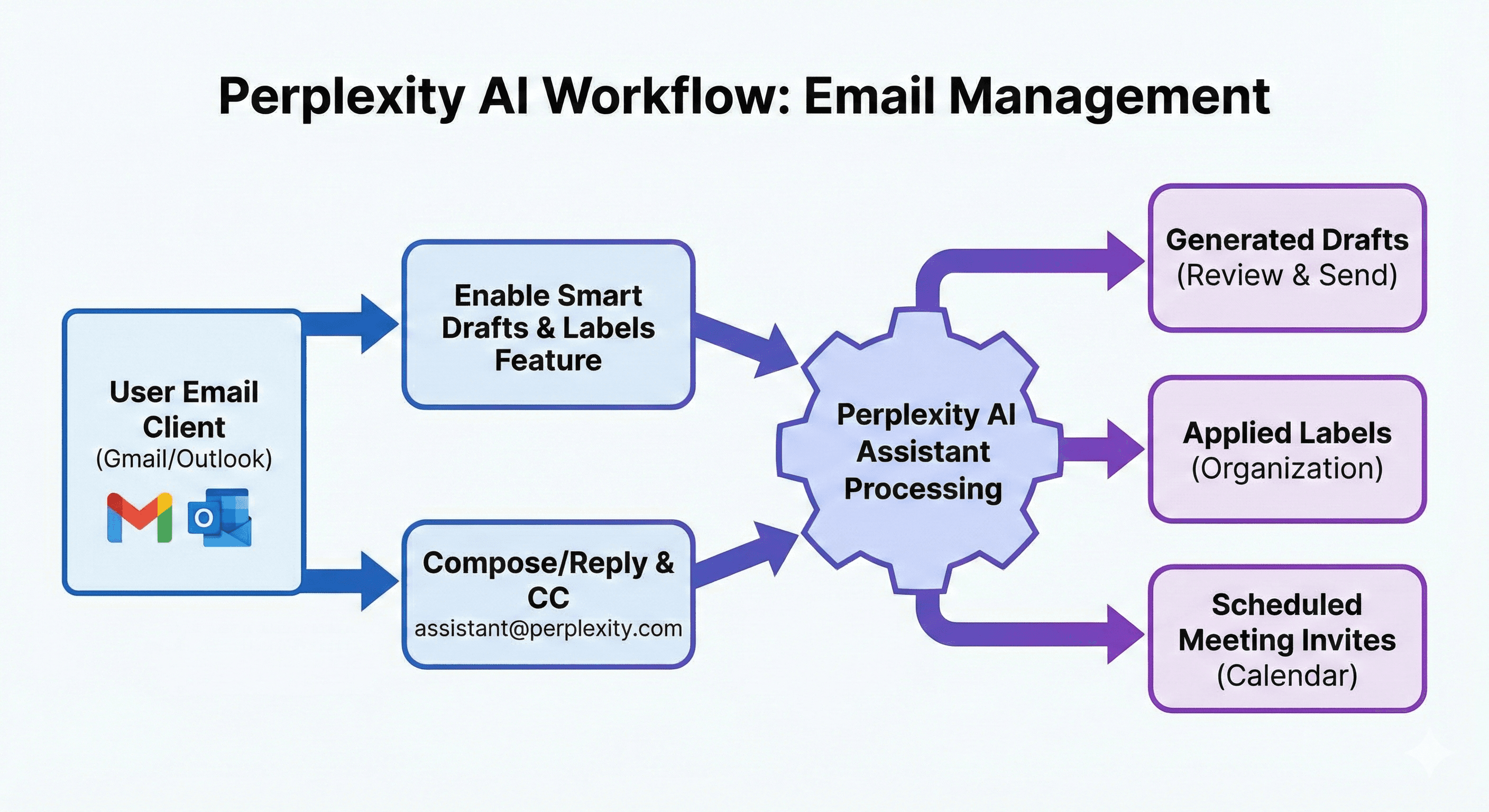
Perplexity’s own documentation describes three core capabilities:

1) Smart Drafts (tone-matched replies)

You can enable Smart Drafts to generate draft responses that match your voice and tone, helping you respond faster while keeping your writing style consistent.

2) Smart Labels (automatic organisation)

With Smart Labels, the assistant can categorise incoming emails and apply labels automatically — useful for reducing cognitive load and keeping an “inbox zero” discipline without manual tagging.

3) Scheduling (meeting coordination end-to-end)

When someone requests a meeting via email, the assistant can check connected calendars, suggest times, and send invites — including handling time zones and rescheduling if conflicts arise. You can set an autonomy level to determine how much it does without confirmation.

How it works (in practice)

The setup is straightforward and intentionally lightweight:

  1. Go to perplexity.ai/assistant and click Get Started.

  2. Connect Google or Outlook and grant the permissions required to read and manage the account.

  3. Enter your meeting availability (used for scheduling).

  4. Optionally enable Smart Labels and Smart Drafts.

  5. Start using it by emailing assistant@perplexity.com or CC’ing it on threads.

One important limitation today: Perplexity notes the Email Assistant currently works with one email address; if you connect both Google and Outlook, it will prioritise Google.
Security and data handling (what Perplexity claims)

Perplexity states that:

  • Email chains sent or received by the assistant are deleted after 14 days.

  • For Enterprise Max, email and calendar data is not used to train AI models, and Perplexity references compliance including GDPR and SOC 2, pointing organisations to its Trust Center. (perplexity.ai)

For most organisations, the practical takeaway is the same as any agent with inbox access: treat permissions, autonomy settings, and change control as seriously as you would with a human assistant.

Who it’s best for

Given the pricing and capability set, the Email Assistant is most likely to pay off for roles where email volume directly limits throughput:

  • executives and chiefs of staff

  • sales and account teams handling high-touch threads

  • operations leaders coordinating across time zones

  • recruiters and hiring teams with constant scheduling

If you’re in a low-email role, a lighter summarisation feature inside your existing suite may be “good enough” — and far cheaper.

Summary

Perplexity’s Email Assistant is a new step towards agentic productivity: connect Gmail or Outlook, enable smart drafts and labels, and let the assistant coordinate meetings with configurable autonomy. It’s positioned for Max/Enterprise Max users, with reported pricing at $200/month for Max — so the decision is less about novelty and more about whether the time saved justifies a premium tool with deep inbox access.

Next steps: Generation Digital can help you evaluate inbox agents safely — mapping permissions, defining autonomy guardrails, and setting governance so teams gain speed without introducing avoidable risk.

FAQs

Q1: What is Perplexity’s Email Assistant?
An inbox agent for Gmail and Outlook that can draft replies, apply smart labels, and coordinate meeting scheduling once you connect an account. (perplexity.ai)

Q2: Does it work with both Gmail and Outlook?
Yes. You can connect either Google or Outlook during setup. Perplexity notes it currently supports one email address; if both are connected, it prioritises Google. (perplexity.ai)

Q3: How do you use it day-to-day?
You can email assistant@perplexity.com or CC it on threads; it can then propose meeting times, send invites, and draft replies based on your settings. (perplexity.ai)

Q4: What about security and data retention?
Perplexity says email chains handled by the assistant are deleted after 14 days; Enterprise Max data is not used for training and includes enterprise privacy protections and compliance claims. (perplexity.ai)

Q5: How much does it cost?
Perplexity markets Email Assistant for Max and Enterprise Max; multiple outlets reported $200/month for the Max tier at launch. (venturebeat.com)

Perplexity’s Email Assistant connects to Gmail or Outlook to manage email triage and scheduling. It can draft replies in your voice, apply smart labels to organise your inbox, and propose or book meetings based on your availability. You control autonomy level, and Perplexity says email chains handled by the assistant are deleted after 14 days.

Email remains one of the biggest time sinks for knowledge workers: triage, follow-ups, and the endless scheduling loop. Perplexity’s new Email Assistant is designed to cut that admin by turning your inbox into an agentic workflow — one that can organise messages, draft replies, and coordinate meetings with minimal back-and-forth.

The feature connects directly to Gmail or Outlook and is currently offered to Perplexity Max and Enterprise Max users. Reports around launch put Max at $200/month, indicating Perplexity is targeting high-value, time-poor professionals and teams rather than casual consumers. (perplexity.ai) (venturebeat.com)

What the Email Assistant can do

Perplexity’s own documentation describes three core capabilities:

1) Smart Drafts (tone-matched replies)

You can enable Smart Drafts to generate draft responses that match your voice and tone, helping you respond faster while keeping your writing style consistent.

2) Smart Labels (automatic organisation)

With Smart Labels, the assistant can categorise incoming emails and apply labels automatically — useful for reducing cognitive load and keeping an “inbox zero” discipline without manual tagging.

3) Scheduling (meeting coordination end-to-end)

When someone requests a meeting via email, the assistant can check connected calendars, suggest times, and send invites — including handling time zones and rescheduling if conflicts arise. You can set an autonomy level to determine how much it does without confirmation.

How it works (in practice)

The setup is straightforward and intentionally lightweight:

  1. Go to perplexity.ai/assistant and click Get Started.

  2. Connect Google or Outlook and grant the permissions required to read and manage the account.

  3. Enter your meeting availability (used for scheduling).

  4. Optionally enable Smart Labels and Smart Drafts.

  5. Start using it by emailing assistant@perplexity.com or CC’ing it on threads.

One important limitation today: Perplexity notes the Email Assistant currently works with one email address; if you connect both Google and Outlook, it will prioritise Google.

Security and data handling (what Perplexity claims)

Perplexity states that:

  • Email chains sent or received by the assistant are deleted after 14 days.

  • For Enterprise Max, email and calendar data is not used to train AI models, and Perplexity references compliance including GDPR and SOC 2, pointing organisations to its Trust Center. (perplexity.ai)

For most organisations, the practical takeaway is the same as any agent with inbox access: treat permissions, autonomy settings, and change control as seriously as you would with a human assistant.

Who it’s best for

Given the pricing and capability set, the Email Assistant is most likely to pay off for roles where email volume directly limits throughput:

  • executives and chiefs of staff

  • sales and account teams handling high-touch threads

  • operations leaders coordinating across time zones

  • recruiters and hiring teams with constant scheduling

If you’re in a low-email role, a lighter summarisation feature inside your existing suite may be “good enough” — and far cheaper.

Summary

Perplexity’s Email Assistant is a new step towards agentic productivity: connect Gmail or Outlook, enable smart drafts and labels, and let the assistant coordinate meetings with configurable autonomy. It’s positioned for Max/Enterprise Max users, with reported pricing at $200/month for Max — so the decision is less about novelty and more about whether the time saved justifies a premium tool with deep inbox access.

Next steps: Generation Digital can help you evaluate inbox agents safely — mapping permissions, defining autonomy guardrails, and setting governance so teams gain speed without introducing avoidable risk.

FAQs

Q1: What is Perplexity’s Email Assistant?
An inbox agent for Gmail and Outlook that can draft replies, apply smart labels, and coordinate meeting scheduling once you connect an account. (perplexity.ai)

Q2: Does it work with both Gmail and Outlook?
Yes. You can connect either Google or Outlook during setup. Perplexity notes it currently supports one email address; if both are connected, it prioritises Google. (perplexity.ai)

Q3: How do you use it day-to-day?
You can email assistant@perplexity.com or CC it on threads; it can then propose meeting times, send invites, and draft replies based on your settings. (perplexity.ai)

Q4: What about security and data retention?
Perplexity says email chains handled by the assistant are deleted after 14 days; Enterprise Max data is not used for training and includes enterprise privacy protections and compliance claims. (perplexity.ai)

Q5: How much does it cost?
Perplexity markets Email Assistant for Max and Enterprise Max; multiple outlets reported $200/month for the Max tier at launch. (venturebeat.com)

Receive weekly AI news and advice straight to your inbox

By subscribing, you agree to allow Generation Digital to store and process your information according to our privacy policy. You can review the full policy at gend.co/privacy.


Upcoming Workshops and Webinars

A diverse group of professionals collaborating around a table in a bright, modern office setting.

Streamlined Operations for Canadian Businesses - Asana

Virtual Webinar
Wednesday, February 25, 2026
Online

A diverse group of professionals collaborating around a table in a bright, modern office setting.

Collaborate with AI Team Members - Asana

In-Person Workshop
Thursday, February 26, 2026
Toronto, Canada

A diverse group of professionals collaborating around a table in a bright, modern office setting.

From Concept to Prototype - AI in Miro

Online Webinar
Wednesday, February 18, 2026
Online

Generation
Digital

Canadian Office
33 Queen St,
Toronto
M5H 2N2
Canada

Canadian Office
1 University Ave,
Toronto,
ON M5J 1T1,
Canada

NAMER Office
77 Sands St,
Brooklyn,
NY 11201,
USA

Head Office
Charlemont St, Saint Kevin's, Dublin,
D02 VN88,
Ireland

Middle East Office
6994 Alsharq 3890,
An Narjis,
Riyadh 13343,
Saudi Arabia

UK Fast Growth Index UBS Logo
Financial Times FT 1000 Logo
Febe Growth 100 Logo (Background Removed)

Business Number: 256 9431 77 | Copyright 2026 | Terms and Conditions | Privacy Policy

Generation
Digital

Canadian Office
33 Queen St,
Toronto
M5H 2N2
Canada

Canadian Office
1 University Ave,
Toronto,
ON M5J 1T1,
Canada

NAMER Office
77 Sands St,
Brooklyn,
NY 11201,
USA

Head Office
Charlemont St, Saint Kevin's, Dublin,
D02 VN88,
Ireland

Middle East Office
6994 Alsharq 3890,
An Narjis,
Riyadh 13343,
Saudi Arabia

UK Fast Growth Index UBS Logo
Financial Times FT 1000 Logo
Febe Growth 100 Logo (Background Removed)


Business No: 256 9431 77
Terms and Conditions
Privacy Policy
© 2026





