Codex + Figma: Seamless Code-to-Design Workflow (2026)
OpenAI
Feb 23, 2026

Not sure where to start with AI?
Assess readiness, risk, and priorities in under an hour.
Not sure where to start with AI?
Assess readiness, risk, and priorities in under an hour.
➔ Download Our Free AI Readiness Pack
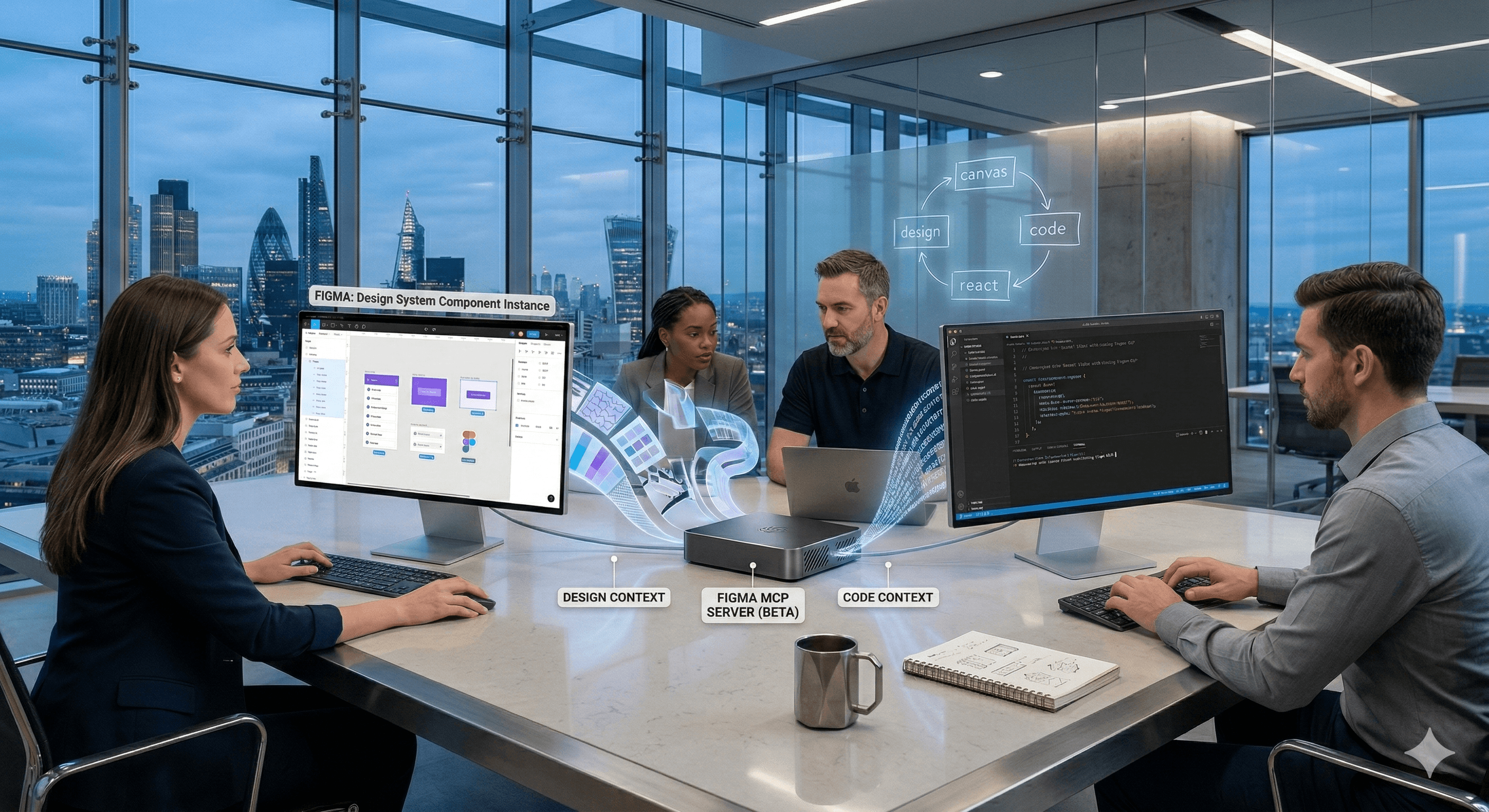
The OpenAI Codex and Figma integration connects code and design through Figma’s MCP server, letting teams move seamlessly between a working UI and the Figma canvas. Developers can use Codex with Figma context for design-informed implementation, while teams can bring running interfaces into Figma to refine and ship faster.
Design-to-code handoff is where product teams lose time. Not because people aren’t talented—but because translation is expensive. Designers describe intent, engineers rebuild it, and the first implementation rarely matches the second (or third) iteration.
On 26 February 2026, OpenAI and Figma announced an integration designed to reduce that gap. Using the Figma MCP (Model Context Protocol) Server, Codex can access design context in a structured way—and teams can move more fluidly between running code and the Figma canvas.
Instead of treating design and code as separate artefacts, the integration aims to make them part of the same iteration loop.
What’s new: Codex ↔ Figma via the MCP server
1) A direct bridge between developer workflows and the Figma canvas
Figma’s MCP server brings Figma into the developer workflow so LLMs can generate more design-informed code. OpenAI’s Codex can use that connection to reference the structure and details inside Figma (not just screenshots), reducing guesswork.
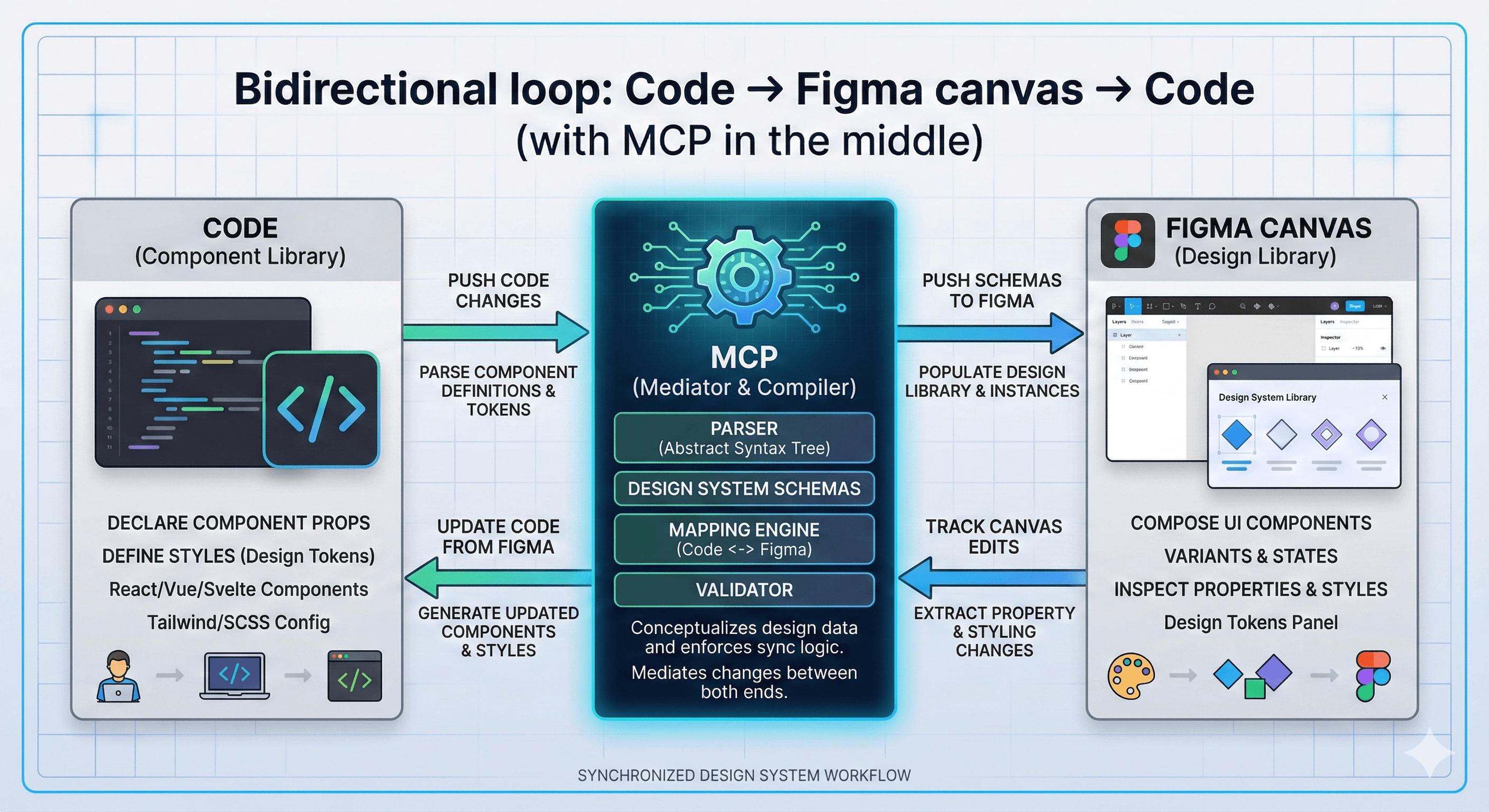
2) Bidirectional iteration: bring running UI into Figma and back again
OpenAI’s guidance frames the workflow as bidirectional:
Bring real, running interfaces into Figma, refine them on the canvas
Bring changes back to Codex to implement and iterate
This supports a practical reality: most teams iterate in cycles. The faster you can complete one cycle, the faster you can reach a shippable outcome.
3) Wider partnership context
This integration builds on earlier collaboration, including the Figma app in ChatGPT and efforts to bring OpenAI models into Figma’s platform.
Why this matters for teams
Faster iteration without losing intent
When AI tools can reference design context directly, you spend less time re-explaining what a component is supposed to do. That can reduce:
“pixel-perfect” back-and-forth
rebuild work when designs change
misunderstandings around spacing, type, states, and component variants
Better collaboration between designers and engineers
A shared “code-to-canvas” loop gives both sides a more continuous view of progress.
Designers can see what’s real and running.
Engineers can implement with clearer design constraints.
Stronger design system consistency
For organisations with established design systems, this matters. The ability to reference structured design context helps teams stay aligned to tokens, components, and patterns—especially when speed increases.
Practical steps: how to start using Codex and Figma together
Step 1: Confirm prerequisites
Most teams start in Figma Dev Mode (where design details are structured for developers). You’ll also need access to Codex.
Step 2: Connect Codex to Figma via MCP
Figma’s MCP server is the connector layer. In practice, teams typically:
enable the Figma MCP server connection
authenticate Codex to access the relevant Figma resources
test on a single project (ideally a well-scoped UI flow)
Step 3: Choose a narrow pilot workflow
A strong first pilot is:
Take an existing UI in code
Bring it into Figma for refinement
Use Codex to implement the deltas, referencing Figma context
Validate against the design system and accessibility checks
Step 4: Add lightweight governance
If you want the workflow to scale:
decide which files/teams can be accessed via MCP
require review for generated changes
log and track changes (especially for shared components)
document “how we use Codex + Figma” as a team playbook
What to watch out for
“Faster” can also mean “more drift”
When iteration speed increases, design drift can increase too—especially without design system guardrails.
Put basic controls in place:
shared component libraries
token usage checks
code review rules for UI changes
Context quality still matters
AI-assisted workflows perform best when:
design files are structured well
components and naming are consistent
requirements are clear
How Generation Digital can help
If you want this integration to improve real delivery outcomes (not just produce demos), Generation Digital can help you:
design a repeatable code-to-canvas workflow
align it to your design system and governance
set up project tracking and approvals in Asana
document standards and playbooks in Notion
run cross-functional working sessions in Miro
Summary
The new OpenAI Codex and Figma integration connects code and design through Figma’s MCP server, enabling a smoother loop between running UI and the Figma canvas. For product teams, the value is faster iteration with less translation work—especially when paired with design system discipline and clear review processes.
Next steps: Pilot the integration on one UI flow, measure cycle time and quality, then scale with governance.
FAQs
Q1: How does the OpenAI Codex and Figma integration benefit teams?
It reduces handoff friction by letting teams iterate between working code and the Figma canvas with shared context. That can speed up UI changes, reduce rework, and improve collaboration.
Q2: What do I need to use the OpenAI and Figma integration?
You need access to both Codex and Figma, plus the ability to connect via the Figma MCP server (typically through Dev Mode and an authenticated connector).
Q3: Can this integration improve project timelines?
Yes—particularly for UI-heavy work—by reducing translation time between design and code and supporting faster iteration cycles.
Q4: Is this the same as “design-to-code” tools?
Not exactly. The focus here is a bidirectional workflow where AI can use design context to produce implementation, and teams can bring running UI back onto the canvas for refinement.
Q5: How should organisations roll this out safely?
Start with a pilot, keep human review mandatory, use design system guardrails, restrict access to approved files, and document the workflow so teams use it consistently.
The OpenAI Codex and Figma integration connects code and design through Figma’s MCP server, letting teams move seamlessly between a working UI and the Figma canvas. Developers can use Codex with Figma context for design-informed implementation, while teams can bring running interfaces into Figma to refine and ship faster.
Design-to-code handoff is where product teams lose time. Not because people aren’t talented—but because translation is expensive. Designers describe intent, engineers rebuild it, and the first implementation rarely matches the second (or third) iteration.
On 26 February 2026, OpenAI and Figma announced an integration designed to reduce that gap. Using the Figma MCP (Model Context Protocol) Server, Codex can access design context in a structured way—and teams can move more fluidly between running code and the Figma canvas.
Instead of treating design and code as separate artefacts, the integration aims to make them part of the same iteration loop.
What’s new: Codex ↔ Figma via the MCP server

1) A direct bridge between developer workflows and the Figma canvas
Figma’s MCP server brings Figma into the developer workflow so LLMs can generate more design-informed code. OpenAI’s Codex can use that connection to reference the structure and details inside Figma (not just screenshots), reducing guesswork.
2) Bidirectional iteration: bring running UI into Figma and back again
OpenAI’s guidance frames the workflow as bidirectional:
Bring real, running interfaces into Figma, refine them on the canvas
Bring changes back to Codex to implement and iterate
This supports a practical reality: most teams iterate in cycles. The faster you can complete one cycle, the faster you can reach a shippable outcome.
3) Wider partnership context
This integration builds on earlier collaboration, including the Figma app in ChatGPT and efforts to bring OpenAI models into Figma’s platform.
Why this matters for teams
Faster iteration without losing intent
When AI tools can reference design context directly, you spend less time re-explaining what a component is supposed to do. That can reduce:
“pixel-perfect” back-and-forth
rebuild work when designs change
misunderstandings around spacing, type, states, and component variants
Better collaboration between designers and engineers
A shared “code-to-canvas” loop gives both sides a more continuous view of progress.
Designers can see what’s real and running.
Engineers can implement with clearer design constraints.
Stronger design system consistency
For organisations with established design systems, this matters. The ability to reference structured design context helps teams stay aligned to tokens, components, and patterns—especially when speed increases.
Practical steps: how to start using Codex and Figma together
Step 1: Confirm prerequisites
Most teams start in Figma Dev Mode (where design details are structured for developers). You’ll also need access to Codex.
Step 2: Connect Codex to Figma via MCP
Figma’s MCP server is the connector layer. In practice, teams typically:
enable the Figma MCP server connection
authenticate Codex to access the relevant Figma resources
test on a single project (ideally a well-scoped UI flow)
Step 3: Choose a narrow pilot workflow
A strong first pilot is:
Take an existing UI in code
Bring it into Figma for refinement
Use Codex to implement the deltas, referencing Figma context
Validate against the design system and accessibility checks
Step 4: Add lightweight governance
If you want the workflow to scale:
decide which files/teams can be accessed via MCP
require review for generated changes
log and track changes (especially for shared components)
document “how we use Codex + Figma” as a team playbook
What to watch out for
“Faster” can also mean “more drift”
When iteration speed increases, design drift can increase too—especially without design system guardrails.
Put basic controls in place:
shared component libraries
token usage checks
code review rules for UI changes
Context quality still matters
AI-assisted workflows perform best when:
design files are structured well
components and naming are consistent
requirements are clear
How Generation Digital can help
If you want this integration to improve real delivery outcomes (not just produce demos), Generation Digital can help you:
design a repeatable code-to-canvas workflow
align it to your design system and governance
set up project tracking and approvals in Asana
document standards and playbooks in Notion
run cross-functional working sessions in Miro
Summary
The new OpenAI Codex and Figma integration connects code and design through Figma’s MCP server, enabling a smoother loop between running UI and the Figma canvas. For product teams, the value is faster iteration with less translation work—especially when paired with design system discipline and clear review processes.
Next steps: Pilot the integration on one UI flow, measure cycle time and quality, then scale with governance.
FAQs
Q1: How does the OpenAI Codex and Figma integration benefit teams?
It reduces handoff friction by letting teams iterate between working code and the Figma canvas with shared context. That can speed up UI changes, reduce rework, and improve collaboration.
Q2: What do I need to use the OpenAI and Figma integration?
You need access to both Codex and Figma, plus the ability to connect via the Figma MCP server (typically through Dev Mode and an authenticated connector).
Q3: Can this integration improve project timelines?
Yes—particularly for UI-heavy work—by reducing translation time between design and code and supporting faster iteration cycles.
Q4: Is this the same as “design-to-code” tools?
Not exactly. The focus here is a bidirectional workflow where AI can use design context to produce implementation, and teams can bring running UI back onto the canvas for refinement.
Q5: How should organisations roll this out safely?
Start with a pilot, keep human review mandatory, use design system guardrails, restrict access to approved files, and document the workflow so teams use it consistently.
Get weekly AI news and advice delivered to your inbox
By subscribing you consent to Generation Digital storing and processing your details in line with our privacy policy. You can read the full policy at gend.co/privacy.

Upcoming Workshops and Webinars

Operational Clarity at Scale - Asana
Virtual Webinar
Weds 25th February 2026
Online

Work With AI Teammates - Asana
In-Person Workshop
Thurs 26th February 2026
London, UK

From Idea to Prototype - AI in Miro
Virtual Webinar
Weds 18th February 2026
Online
Generation
Digital

UK Office
Generation Digital Ltd
33 Queen St,
London
EC4R 1AP
United Kingdom
Canada Office
Generation Digital Americas Inc
181 Bay St., Suite 1800
Toronto, ON, M5J 2T9
Canada
USA Office
Generation Digital Americas Inc
77 Sands St,
Brooklyn, NY 11201,
United States
EU Office
Generation Digital Software
Elgee Building
Dundalk
A91 X2R3
Ireland
Middle East Office
6994 Alsharq 3890,
An Narjis,
Riyadh 13343,
Saudi Arabia

Company No: 256 9431 77 | Copyright 2026 | Terms and Conditions | Privacy Policy
Generation
Digital

UK Office
Generation Digital Ltd
33 Queen St,
London
EC4R 1AP
United Kingdom
Canada Office
Generation Digital Americas Inc
181 Bay St., Suite 1800
Toronto, ON, M5J 2T9
Canada
USA Office
Generation Digital Americas Inc
77 Sands St,
Brooklyn, NY 11201,
United States
EU Office
Generation Digital Software
Elgee Building
Dundalk
A91 X2R3
Ireland
Middle East Office
6994 Alsharq 3890,
An Narjis,
Riyadh 13343,
Saudi Arabia










