Gemini Study Tools: Quizzes, Flashcards & Guided Learning
Gemini
Uncertain about how to get started with AI?Evaluate your readiness, potential risks, and key priorities in less than an hour.
➔ Download Our Free AI Preparedness Pack
Gemini for Students helps you study smarter by turning your own notes and course materials into practice quizzes, flashcards and study guides. It also offers Guided Learning, which explains topics step-by-step to build understanding (not just answers). Some exam-prep tools have age and product availability limits, so check what’s enabled for your account.
Studying isn’t just about reading more — it’s about revising in the right way. Most students lose time reformatting notes, building revision plans, and figuring out what they don’t understand until it’s too late.
Gemini for Students is Google’s AI-powered study support designed to make that workflow faster. The standout feature is simple: you can upload or paste your own course materials and ask Gemini to generate practice quizzes, flashcards and study guides that reflect what you actually need to learn.
What Gemini can help with
Gemini’s student tools focus on three common needs:
1) Turn notes into revision materials
Gemini can convert course notes, problem sets and past revision content into custom practice quizzes, flashcards and study guides—so you spend less time preparing materials and more time practising.
2) Learn difficult topics properly
With Guided Learning, Gemini takes you through concepts step-by-step and prompts you to think through the process. It’s designed to help you build understanding, not just copy an answer.
3) Prepare for what comes next
Google also positions Gemini as support for writing help and interview/job preparation (for example, practising explanations or preparing for interviews). If you mention this on the page, keep it grounded: it’s assistance, not a replacement for real skills or academic guidance.
What’s new (and what to watch out for)
Google has been expanding Gemini’s study features across the Gemini app and education products.
Study tools (quizzes, flashcards, study guides) have been rolled out in the Gemini app, but Google notes age restrictions: quizzes, flashcards and study guides are available to users 18+ at the time of the update.
Guided Learning is available more broadly, and Google has positioned it as suitable for users of all ages in the Gemini app.
In higher education contexts, Gemini in Google Classroom has also expanded to eligible students and includes capabilities like “Learn about a topic”, “Take a quiz”, and “Practice with flashcards” (availability depends on institution settings and eligibility).
Practical takeaway: before you promise a feature on your page, clarify whether you’re talking about the Gemini app, Gemini in Workspace, or Gemini in Classroom—and note the 18+ requirement for certain study tools.
Practical steps: how students can use Gemini for exam prep
Here’s a realistic, repeatable workflow that suits GCSE/A-level, university modules, and professional exams:
Gather your materials: lecture notes, slides, reading lists, problem sets, and any past exam questions you’re allowed to use.
Create a revision pack:
Ask for a study guide (key concepts + definitions)
Generate flashcards (short prompts + answers)
Create a practice quiz (mixed question styles)
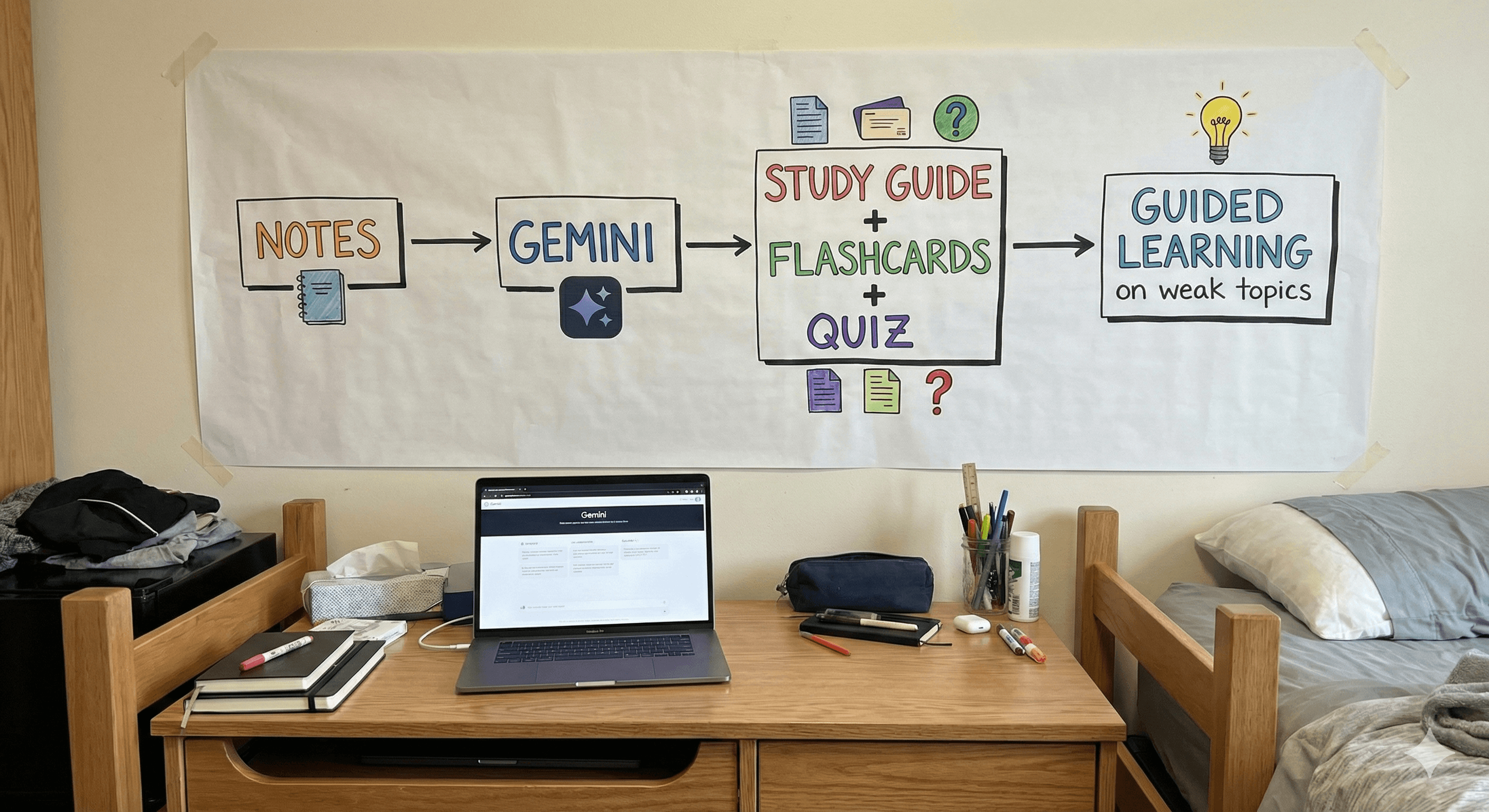
Use Guided Learning on weak topics: paste the parts you struggle with and ask for a step-by-step explanation, including check questions to confirm understanding.
Review mistakes intentionally: after a quiz, ask Gemini to explain why each wrong answer is wrong and what to revise next.
Best-practice guidance (so you don’t get caught out)
Check your institution’s AI policy before using AI for graded work.
Treat outputs as revision support: always verify facts, especially in technical subjects.
Ask for process, not just answers—Guided Learning is built for that.
Summary
Gemini’s study tools can reduce the admin that slows students down: converting notes into quizzes, flashcards and study guides, then using Guided Learning to build real understanding. Used well, it’s a strong revision companion—especially when you keep an eye on feature availability (for example, 18+ requirements for some tools) and follow your school or university guidelines.
Next steps: Generation Digital can help education teams and student-focused organisations position Gemini responsibly—clear feature claims, policy-friendly guidance, and messaging that supports learning outcomes.
FAQs
Q1: How does Gemini personalise learning?
Gemini can tailor quizzes, flashcards and study guides to the materials you provide, and Guided Learning adapts explanations step-by-step based on your questions and where you get stuck.
Q2: Can Gemini help with career preparation?
Gemini can support prep tasks such as drafting, refining explanations, or practising interview-style questions, but it’s best used alongside real feedback (tutors, careers services, peers).
Q3: What subjects can Gemini assist with?
Gemini can support a broad range of subjects because it works from your own materials. For technical or high-stakes topics, you should verify outputs against trusted sources.
Q4: Are Gemini’s study tools available to all students?
Availability depends on product and account type. Google notes that some study tools (quizzes, flashcards and study guides) have been limited to users 18+ at the time of rollout, and institutional settings can affect access.
“Student workflow diagram: notes → Gemini → study guide + flashcards + quiz → Guided Learning on weak topics.”
“Screenshot-style illustration of a practice quiz interface with ‘Show hint’ and ‘Next question’ CTA.”
“Concept graphic: ‘Answers’ vs ‘Understanding’ showing Guided Learning as step-by-step reasoning.”
Receive weekly AI news and advice straight to your inbox
By subscribing, you agree to allow Generation Digital to store and process your information according to our privacy policy. You can review the full policy at gend.co/privacy.



Generation
Digital

Canadian Office
33 Queen St,
Toronto
M5H 2N2
Canada
Canadian Office
1 University Ave,
Toronto,
ON M5J 1T1,
Canada
NAMER Office
77 Sands St,
Brooklyn,
NY 11201,
USA
Head Office
Charlemont St, Saint Kevin's, Dublin,
D02 VN88,
Ireland
Middle East Office
6994 Alsharq 3890,
An Narjis,
Riyadh 13343,
Saudi Arabia







Business Number: 256 9431 77 | Copyright 2026 | Terms and Conditions | Privacy Policy